VolumeHub
VolumeHub: Native macOS Per-App Volume Control and Equalizer with Audio Tap API Support
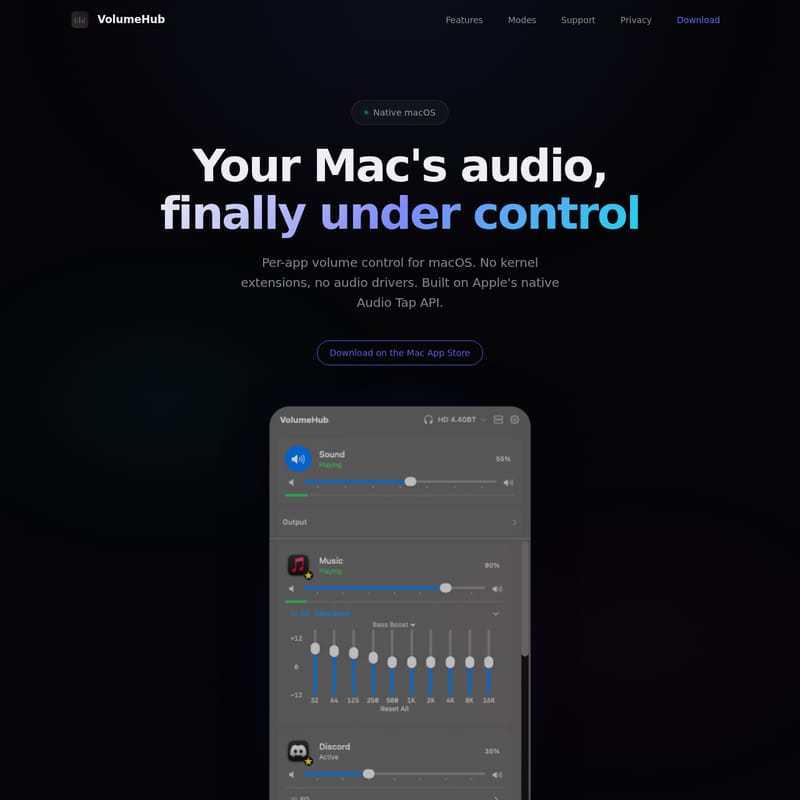
VolumeHub is a native macOS application designed for precise per-app volume control. Built using Apple's Audio Tap API and SwiftUI, it eliminates the need for kernel extensions or third-party audio drivers. Users can manage audio levels for individual apps, utilize a 10-band equalizer, and switch output devices directly from the menu bar. With zero data collection and three customizable view modes (Compact, Comfort, and Full), VolumeHub offers a secure, high-performance audio management experience for macOS Sonoma 14.2 and later on both Intel and Apple Silicon Macs.
2026-02-10
2.0K
VolumeHub Product Information
VolumeHub: Mastering Your Mac's Audio with Native Per-App Control
In the modern macOS ecosystem, managing sound across multiple applications can be a frustrating experience. Whether you are trying to balance background music during a Zoom call or lower the volume of a noisy web browser without affecting your system settings, the native macOS controls often fall short. Enter VolumeHub, the definitive solution for per-app volume control on macOS. Built with a focus on performance, privacy, and native integration, VolumeHub gives you the power to manage your audio environment with surgical precision.
What's VolumeHub?
VolumeHub is a native macOS application designed to bring comprehensive audio management to your fingertips. Unlike traditional audio routing software that requires complex setups, VolumeHub is built on Apple's native Audio Tap API. This means it provides robust per-app volume control without the need for kernel extensions or third-party audio drivers.
Developed by ShelTech, VolumeHub is a 100% Native SwiftUI application that lives in your menu bar. It allows users to adjust individual application volumes independently, ranging from 0% to 100%. If you have ever felt that your Mac's audio was out of your control, VolumeHub is the tool designed to fix that, offering a seamless experience for both casual listeners and professional power users.
Features of VolumeHub
VolumeHub is packed with features that prioritize utility without adding unnecessary bloat. Here is what makes VolumeHub the ultimate audio utility for Mac users:
Per-App Volume Control
The core of the VolumeHub experience is the ability to adjust each app's volume independently. You no longer have to settle for a single system-wide volume level. If your music is too loud during an important meeting, simply slide the specific app's volume down while keeping your communication app at full strength.
Native macOS Design and SwiftUI
VolumeHub feels like a natural extension of your operating system. Because it is built with Native SwiftUI, it features a sleek menu bar popover that matches the macOS aesthetic perfectly. It is optimized for both Apple Silicon and Intel processors, ensuring smooth performance regardless of your hardware.
Advanced Audio Tools
- Live Audio Meters: Real-time visualizations allow you to see exactly which apps are producing sound and at what decibel levels.
- Output Device Picker: Change your audio output (headphones, speakers, etc.) with a single click from the menu bar, removing the need to dig through System Settings.
- Per-App Equalizer: Shape your sound with a 10-band EQ. VolumeHub includes 17 built-in presets, and also allows you to create and save your own custom EQ profiles.
Focus Audio and Automation
Stay in the zone with Focus Audio. This feature can auto-duck other applications when a specific call or focus source becomes active. This automation ensures you never have to manually fiddle with sliders when an important notification or call comes through.
Simple & Pro Modes
VolumeHub caters to all users by offering two distinct interfaces:
- Simple Mode: For users who want quick and easy volume adjustments.
- Pro Mode: Unlocks the equalizer, audio meters, Focus Audio, and advanced device routing options.
Use Case Scenarios for VolumeHub
How does VolumeHub fit into your daily workflow? Here are several ways this powerful utility can enhance your Mac experience:
- The Remote Professional: During video conferences, use VolumeHub to lower the volume of background notifications or music apps while keeping your meeting audio crystal clear.
- The Content Creator: Monitor live audio meters to ensure your various applications are outputting sound at the correct levels without interfering with your recording software.
- The Music Enthusiast: Apply a custom 10-band EQ to your favorite music streaming app while leaving the system sounds and other apps at their default flat profile.
- The Minimalist: Use the Compact View Mode to keep your menu bar tidy while still having instant access to essential audio controls.
Three View Modes
VolumeHub recognizes that every user has a different workflow. To accommodate this, it offers three distinct density modes that you can switch between with a single click:
- Compact: Offers a minimal footprint for maximum efficiency in your menu bar.
- Comfort: Provides a balanced view that includes app names for easy identification.
- Full: Delivers maximum detail and control for those who want every slider and meter visible at once.
Privacy and Security
In an era of invasive tracking, VolumeHub stands out by prioritizing your privacy. The philosophy is simple: Your audio stays yours.
- 0 Data Collected: VolumeHub does not collect any user data.
- No Network Requests: The app does not connect to the internet, ensuring your information never leaves your Mac.
- No Tracking: There are no analytics, telemetry, or third-party SDKs included in the software.
- Zero Kernel Extensions: By using Apple's native APIs, VolumeHub maintains system stability and security without needing deep-level system access.
FAQ
Does VolumeHub require special drivers? No. VolumeHub is built on Apple's native Audio Tap API. It requires zero kernel extensions and no third-party audio drivers to function.
Which versions of macOS are supported? VolumeHub requires macOS 14.2 Sonoma or later. It is fully compatible with both Apple Silicon and Intel-based Macs.
Where can I download VolumeHub? You can download VolumeHub directly from the Mac App Store.
Can I save my own Equalizer settings? Yes. While VolumeHub comes with 17 built-in presets, you can also create and save your own custom profiles using the 10-band EQ in Pro Mode.
Does VolumeHub impact system performance? No. With Zero Overhead and no background processes, VolumeHub is designed to be lightweight and efficient, utilizing native Apple APIs for all audio processing.