iMideo AI
iMideo: The All-in-One AI Video Generator Powered by 8+ Leading Models
iMideo is a comprehensive AI video generation platform that empowers over 10,000 users to transform text, images, and existing footage into high-quality videos instantly. By integrating top-tier AI models like Sora 2, Kling, and Runway, iMideo offers a versatile suite of tools including Text to Video, Image to Video, and AI Face Swapping. Whether you are a content creator, marketer, or designer, iMideo simplifies the creative process with features like auto-subtitles, background removal, and video upscaling to 4K. Start creating cinematic content fast and easy with iMideo.
2026-02-28
61.0K
iMideo AI Product Information
iMideo: The Ultimate All-in-One AI Video Generator
In the rapidly evolving world of digital content, iMideo stands out as a powerful, all-in-one AI video generator designed to make video creation fast and easy. Trusted by over 10,000 users worldwide, iMideo leverages the power of 8+ leading AI models to turn your creative sparks into cinematic reality. Whether you are looking to convert text to video, animate a static image, or extend an existing clip, iMideo provides the professional tools needed to produce high-quality results without the need for complex editing skills.
What is iMideo?
iMideo is a cutting-edge AI video generation platform that serves as a centralized hub for creators, marketers, and designers. It simplifies the video production workflow by offering a suite of AI-driven tools that can generate motion from simple text descriptions or static photos. By integrating industry-leading models such as Sora 2, Kling, Runway, and Veo 3, iMideo allows users to compare results and choose the perfect output for their projects. From AI video generation to advanced image manipulation, iMideo is the go-to ecosystem for modern storytelling.
Key Features of iMideo
iMideo is packed with diverse features that cater to every aspect of the creative process. Below are the core capabilities that make it a leader in the AI tools space:
Core Video Generation Tools
- Text to Video: Transform words into cinematic videos in minutes. Simply describe your vision, and the AI brings it to life.
- Image to Video: One-tap animation for your images. Upload any photo and watch it gain natural movement, depth, and cinematic flow.
- Video to Video: Transform existing footage into fresh variations, changing moods, styles, or entire scenes instantly.
- Reference to Video: Blend multiple images into one cohesive video in just 2-3 minutes.
- Video Extend: Use AI-powered frame generation to extend the duration of your clips seamlessly.
Advanced AI Manipulation
- AI Video Face Swap & Head Swap: Replace faces in videos or photos with AI precision in seconds.
- AI Talking Avatar Generator: Create professional talking avatars from any photo with synchronized speech.
- AI Dance Generator: Make any character dance using motion transfer technology in 30 seconds.
- AI Clothes Remover: Utilize smart clothing removal with realistic AI enhancement and detail preservation.
Enhancement and Utility Tools
- AI Video & Image Upscaler: Enhance your content to crisp 4K resolution instantly.
- Auto Subtitle Generator: Generate accurate subtitles in over 100 languages with 95% AI accuracy.
- Background & Watermark Remover: Effortlessly remove or replace backgrounds and erase logos/watermarks while maintaining high quality.
- AI Sound Effects Generator: Add cinematic sound effects to any video instantly.
Powered by Leading AI Models
One of the unique strengths of iMideo is its ability to host multiple high-performance models under one roof. This allows for seamless switching and instant result comparison:
- Veo 3 & Nano Banana
- Sora 2 & Runway
- Kling (3.0, 2.1, 2.5 Turbo, 2.6)
- Wan (2.2, 2.5, 2.6)
- Seedance (1.0 Lite, 1.5 Pro)
- PixVerse & LTX-2
How to Use iMideo
Creating with iMideo is a straightforward process designed for speed and efficiency:
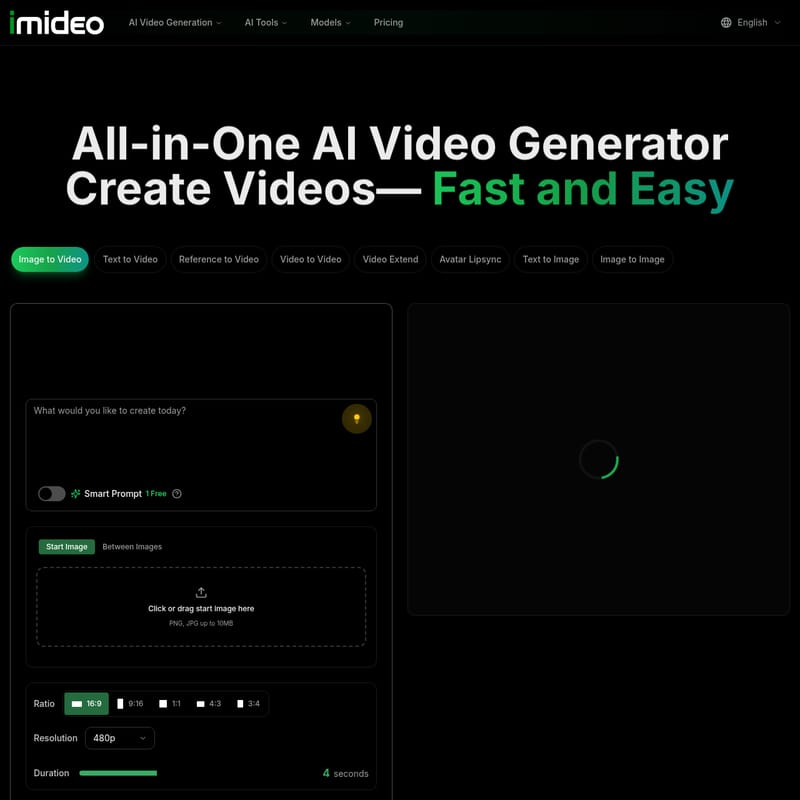
- Choose Your Tool: Select from Text to Video, Image to Video, or other AI tools in the dashboard.
- Upload or Input: Drag and drop your start images (PNG, JPG up to 10MB) or enter a descriptive prompt.
- Configure Settings: Select your desired aspect ratio (16:9, 9:16, 1:1, 4:3, 3:4), resolution (up to 480p for base generation), and duration.
- Select Model: Pick the AI model that best fits your creative style (e.g., Seedance 1.0 Lite).
- Generate: Click "Create Video." The system typically consumes credits (e.g., 4 credits per video) to process your request.
- Refine: Use tools like the Video Upscaler or Sound Effects Generator to polish your final product.
Use Cases
iMideo is a versatile platform suitable for various industries:
- Marketing & Social Media: Create product launch teasers, daily shorts, and engaging ads in minutes.
- Storytelling & Film: Develop visual concepts, pitch decks, and cinematic scenes without a full production crew.
- Gaming & Animation: Indie developers use iMideo to animate sketches and test visual concepts fast.
- Education: Students and educators can create talking avatars and subtitled instructional videos with zero budget.
- E-commerce: Use the Product Video Maker and AI Dress Changer to showcase merchandise dynamically.
FAQ
What is iMideo? iMideo is an all-in-one AI video generation platform that uses multiple leading models to help users create, edit, and enhance videos and images through AI.
Do I need video editing experience? No. iMideo is designed for simplicity. Its "One Tap" and "Smart Prompt" features allow anyone to create professional content without prior editing skills.
How much does it cost? You can start for free with 100 credits—no credit card required. Further usage follows a pricing structure based on your needs.
Which AI model should I choose? It depends on your goal. iMideo allows you to compare results from models like Sora 2, Kling, and Runway to find the perfect output for your specific project.
How long does generation take? Most tasks, such as face swapping or background removal, take between 10 to 60 seconds. Complex video blending (Reference to Video) typically takes 2-3 minutes.
Can I use videos commercially? For specific licensing details, please refer to the iMideo Terms of Service.
How do I get started? Simply sign in to the iMideo platform, choose a tool, and begin transforming your ideas into video today.