HappyHorse
HappyHorse AI Video Generator: Transform Text and Images into Cinematic AI Videos
HappyHorse AI Video Generator is a cutting-edge platform designed to create high-quality, cinematic videos from simple text descriptions and static images. Utilizing advanced deep learning and models like HappyHorse-1.0, it offers features such as text-to-video, image-to-video animation, and professional-grade camera controls. With support for multiple durations and high-resolution output, HappyHorse enables creators to generate immersive audio-visual content with precise lip-syncing and fluid motion, making it a top-tier choice for AI-powered video production.
2026-04-14
0.6K
HappyHorse Product Information
Create Stunning Videos with HappyHorse AI Video Generator
In the rapidly evolving landscape of digital content creation, the HappyHorse AI Video Generator stands out as a powerful tool for creators looking to transform ideas into cinematic reality. By leveraging cutting-edge deep learning technology, HappyHorse provides a seamless experience for generating high-quality videos through simple text prompts or existing images. Whether you are a professional filmmaker or a social media enthusiast, the HappyHorse AI Video Generator offers the creative control and output quality necessary to bring your vision to life.
What's HappyHorse?
HappyHorse is an advanced AI video generation platform that specializes in creating high-quality, cinematic videos from text descriptions and images. Built on a foundation of sophisticated deep learning models, including the highly-rated HappyHorse-1.0, the platform is designed to cater to various quality and speed requirements through its Lite and Pro model options.
HappyHorse has quickly gained recognition in the industry, frequently ranking at the top of performance arenas for both text-to-video and image-to-video categories. It is recognized for its ability to produce content that avoids common "AI-ish" vibrancy, instead delivering crisp textures, natural skin tones, and pleasant colors that mimic professional film production.
Key Features of HappyHorse
Text-to-Video Generation
The core of the HappyHorse AI Video Generator is its ability to interpret complex text descriptions and turn them into stunning visual sequences. Users can simply describe a scene, and the AI handles the rendering, lighting, and movement.
Image-to-Video Animation
Beyond text, HappyHorse allows users to breathe life into static images. By uploading a reference photo, the HappyHorse AI Video Generator uses AI-powered animation to create dynamic motion, making it perfect for animating portraits or concept art.
Cinematic Motion Quality
One of the standout attributes of HappyHorse is its fluid, natural motion. Unlike many AI tools that struggle with jittery movements, HappyHorse ensures realistic transitions and smooth frame-to-frame consistency.
Director-Level Camera Control
For creators who need specific shots, HappyHorse offers advanced camera controls. You can guide the generation using reference images and videos to specify camera angles, zooms, and pans, ensuring the output matches your creative intent.
Native Audio-Video Synchronization
HappyHorse excels in immersive audio-visual generation. In a single pass, it can produce action sounds, ambient noise, and dialogue with precise lip-syncing, eliminating the need for extensive post-production sync work.
Multi-Shot Storytelling
The platform supports multi-shot storytelling, maintaining consistent characters across different scenes and angles. This is crucial for narrative content where character continuity is essential.
Use Cases for HappyHorse AI Video Generator
"HappyHorse is an absolute nuke in the AI video space, providing broadcast-ready output with natural motion and cinematic lighting."
- Social Media Content: Create eye-catching clips for platforms like X, Instagram, or TikTok using simple text prompts.
- Professional Filmmaking: Use the HappyHorse AI Video Generator for storyboarding, pre-visualization, or creating high-quality b-roll with cinematic camera movements.
- Marketing and Advertising: Generate high-resolution promotional videos with natural textures and realistic human features.
- Animation and Character Design: Utilize image-to-video features to animate character designs while keeping visual consistency across multiple shots.
- Audio-Visual Projects: Benefit from the native audio-video synchronization to create scenes with ambient noise and dialogue produced simultaneously.
How to Use HappyHorse AI Video Generator
Starting your journey with the HappyHorse AI Video Generator is straightforward and designed for both beginners and experts:
- Log In: Access your account on the HappyHorse platform to start a new project.
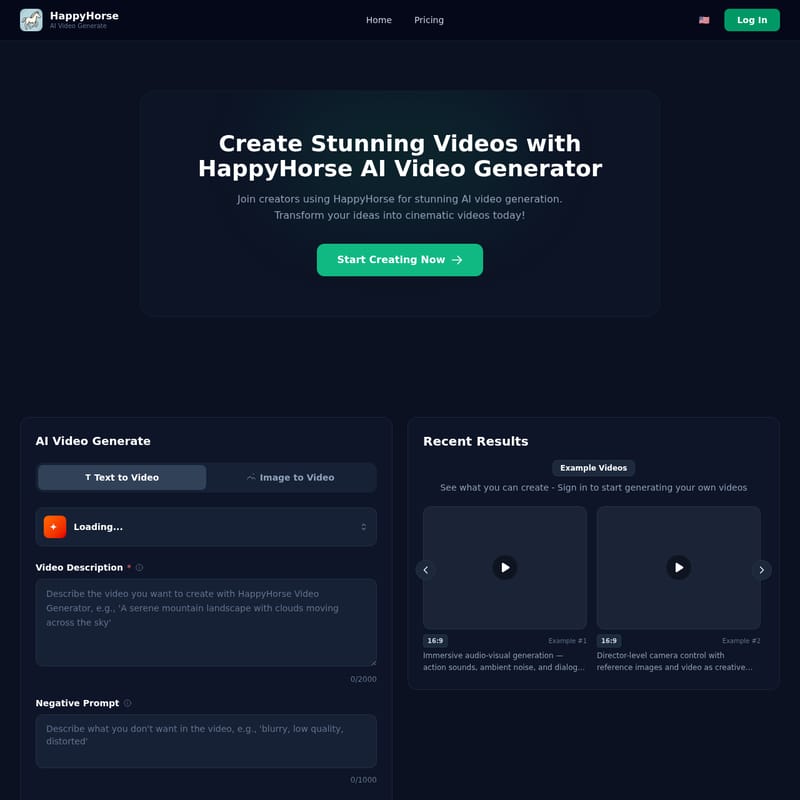
- Input Your Prompt: Enter a detailed Video Description (up to 2000 characters) in the text box. Be specific about the action, lighting, and style.
- Add Negative Prompts: Use the Negative Prompt field (up to 1000 characters) to specify what you don't want to see in the video, such as "blurry textures" or "unnatural motion."
- Use Reference Inputs: If you are using the Image-to-Video feature, upload your reference image or video to guide the AI's creative output.
- Generate Video: Click the "Generate Video" button. The AI will process your request, utilizing models like HappyHorse-1.0 or Lite versions based on your selection.
- Review and Export: Once the loading process is complete, review your cinematic video and export it in high resolution for professional use.
FAQ
What is HappyHorse?
HappyHorse is an advanced AI video generation platform that creates high-quality, cinematic videos from text descriptions and images. Built with cutting-edge deep learning technology, it offers both Lite and Pro models for different quality and speed requirements.
How does HappyHorse generate videos?
It uses advanced AI models to process text prompts or images, calculating motion, lighting, and textures to produce a coherent video file. It can even generate synchronized audio, including dialogue and ambient sounds, in a single pass.
What video formats and resolutions are supported?
HappyHorse supports high-resolution output, ensuring that videos are crisp, detailed, and ready for professional or broadcast use. Specific resolutions like 720p at 24fps are common for cinematic results.
How long are the generated videos?
HappyHorse offers multiple duration options to suit different needs. You can generate short 5-second clips (like those seen in Seedance 1.5 Pro integrations) or longer sequences up to 15 seconds or more, depending on the model used.
Can I try HappyHorse for free?
You can sign in to the platform to see what is possible and check the current pricing or trial options available for new creators.