FLUX 3
Sponsored product video
See FLUX 3 in motion
Flux 3: The Comprehensive AI Image & Video Studio for Advanced Content Creation
Flux 3 is an all-in-one AI image and video studio designed for creators, marketers, and teams. It allows users to generate polished images and cinematic clips using leading models like Flux 2, GPT Image, and Kling 3.0 in a unified workspace.
2026-07-26
--K
FLUX 3 Product Information
Flux 3: The Ultimate AI Image & Video Studio for Professional Creators
In the rapidly evolving landscape of digital content, Flux 3 emerges as a premier AI image & video studio designed to streamline the creative process. Whether you are looking to turn simple text into cinematic clips or transform reference photos into polished assets, Flux 3 provides a unified workspace that combines the power of multiple leading AI models. By integrating advanced tools for both static and dynamic media, Flux 3 empowers users to move from an initial idea to a final, publishable asset without switching between different platforms.
What is Flux 3?
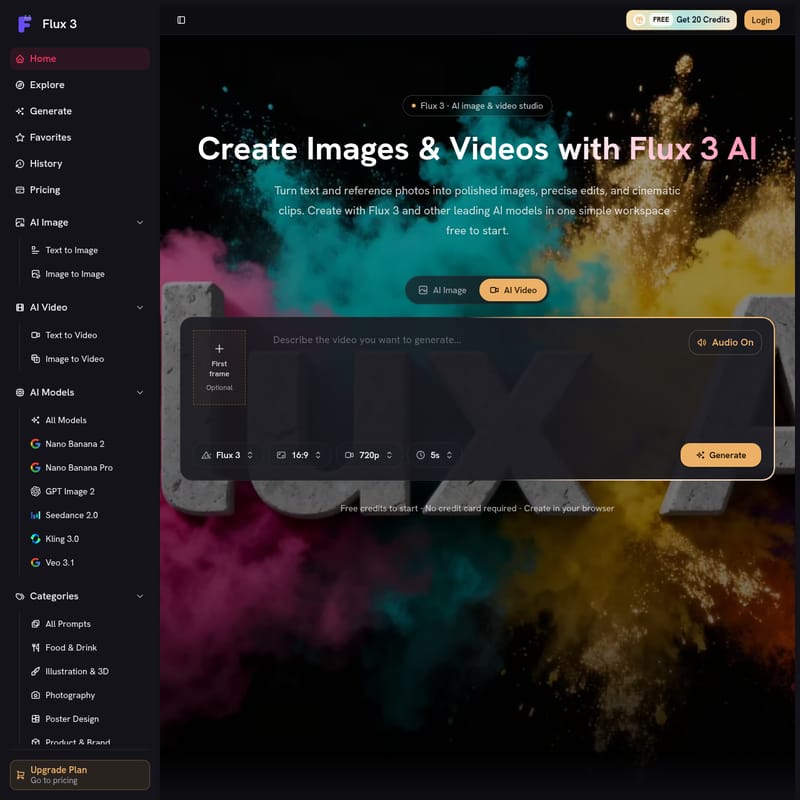
Flux 3 is a comprehensive creative platform that enables users to generate, edit, and organize AI-driven visual content. It serves as a central hub where text-to-image, image-to-image, and video generation technologies converge. Unlike standalone tools, Flux 3 allows you to access a variety of high-end models—including Flux 2, GPT Image, Nano Banana, Veo, Kling, and Seedance—all under one roof with a shared credit balance.
This studio is built for versatility, catering to individual creators, brand designers, and marketing agencies. With its browser-based interface, Flux 3 requires no complex installations, making it accessible to anyone with a vision and a prompt. From photorealistic scenes to 4K videos ready for publication, Flux 3 is the definitive solution for modern visual storytelling.
Key Features of Flux 3
Flux 3 is packed with professional-grade features designed to maximize creative control and efficiency. Below are the core functionalities that define the Flux 3 experience:
Comprehensive Text and Image Generation
- Text to Image: Transform descriptive prompts into finished images, including illustrations, product shots, logos, and posters. Users can precisely control lighting, composition, and mood.
- Image to Image: Use existing photos as a reference to create variations, apply new styles, or perform precise edits while maintaining the original structure.
Advanced AI Video Production
- Text & Image to Video: Flux 3 bridges the gap between static and moving images. You can generate cinematic clips directly from text or use a still image as the first frame for a video sequence.
- High-Quality Output: Support for 720p and 4K resolutions ensures that every video is ready for professional use and social media publishing.
Multi-Model Workspace
One of the standout features of Flux 3 is the ability to choose the specific AI model that fits your project's needs. The platform supports a wide array of industry-leading models:
- Nano Banana 2 & Pro for speed and specific stylistic needs.
- GPT Image 2 for high-quality hero shots and detailed prompt adherence.
- Flux 2 Pro & Flex for professional-grade imaging.
- Kling 3.0 & Veo 3.1 for cutting-edge AI video generation.
- Seedance 2.0 for fast and efficient creative workflows.
Commercial and Privacy Tools
- Commercial License: Eligible outputs from Flux 3 can be used in marketing, client projects, and commercial products based on your chosen plan.
- Privacy First: Your generation history, prompts, and uploads remain private and under your control within your account.
- Fast Generation: Compare different creative directions quickly and keep only the strongest results.
How to Use Flux 3
Getting started with Flux 3 is straightforward, designed to take you from a concept to a finished asset in just a few steps:
- Access the Workspace: Log in to the Flux 3 dashboard. No credit card is required to start with your initial free credits.
- Choose Your Input: Select whether you want to start with a text prompt or upload a reference photo. You can also explore the Flux 3 Gallery to find inspiration and reuse prompts from other successful creations.
- Select Your Model: Choose the AI model that best suits your goal. For instance, use Veo 3.1 for video or Flux 2 Pro for high-end images.
- Configure Settings: Adjust your parameters, such as aspect ratio (e.g., 16:9), resolution (720p), and duration (e.g., 5s for video clips).
- Generate and Refine: Click "Generate" to see your idea come to life. You can open any creation to change the style, framing, or model to further refine the output.
- Download: Once satisfied, download your asset. With the Basic, Pro, or Studio plans, your downloads will be free of watermarks.
Use Cases for Flux 3
Flux 3 is a versatile tool used across various industries to accelerate production and enhance creativity:
- Content Creators: Use the image-to-video features to turn static shots into engaging clips for social media platforms.
- Brand Designers: Quickly iterate on hero shots and product designs using models like GPT Image or Nano Banana to find the perfect visual identity.
- Performance Marketers: Reduce the turnaround time for ad creatives from days to hours by generating multiple variations in one sitting.
- Agencies: Provide clients with professional-looking results and maintain an organized workflow for multiple projects in a single studio environment.
- Indie Makers: Leverage free credits to test visual concepts before scaling up production for product launches.
Why Choose Flux 3?
"Flux 3 replaced three tools for me. I draft images, edit them, and turn them into video in one sitting." — Maya Rivera, Content Creator
Flux 3 is not just another AI generator; it is a complete creative ecosystem. By offering a shared credit balance across all models, users avoid the hassle of managing multiple subscriptions. The platform’s focus on speed, privacy, and commercial rights makes it the ideal choice for those who need high-quality AI assets that are both professional and legally compliant.
FAQ
What is Flux 3?
Flux 3 is an AI-powered image and video studio that allows users to create high-quality visual content from text or photos using various top-tier AI models.
Can I use Flux 3 for free?
Yes, Flux 3 is free to start. New users receive free credits upon signing up, with no credit card required to begin generating images.
Which AI models are available in Flux 3?
Flux 3 supports a wide range of models, including Flux 2, GPT Image 2, Nano Banana Pro, Kling 3.0, Veo 3.1, and Seedance 2.0.
Can I create both images and videos?
Absolutely. Flux 3 provides a unified workflow for Text to Image, Image to Image, Text to Video, and Image to Video generation.
How do credits work?
Each generation consumes a specific amount of credits (e.g., approximately 20 credits per image or 160 credits per fast video). You can add monthly credits through plans or purchase one-time packs.
Can I use Flux 3 creations commercially?
Yes, commercial usage rights are included in the paid plans (Basic, Pro, and Studio), allowing you to use your creations in marketing and client projects.
How is Flux 3 different from other AI generators?
Flux 3 stands out by offering multiple leading AI models in a single workspace with a shared credit system, allowing for a more focused and efficient creative workflow without switching tools.