Crreo
Crreo - AI Video Creation Platform
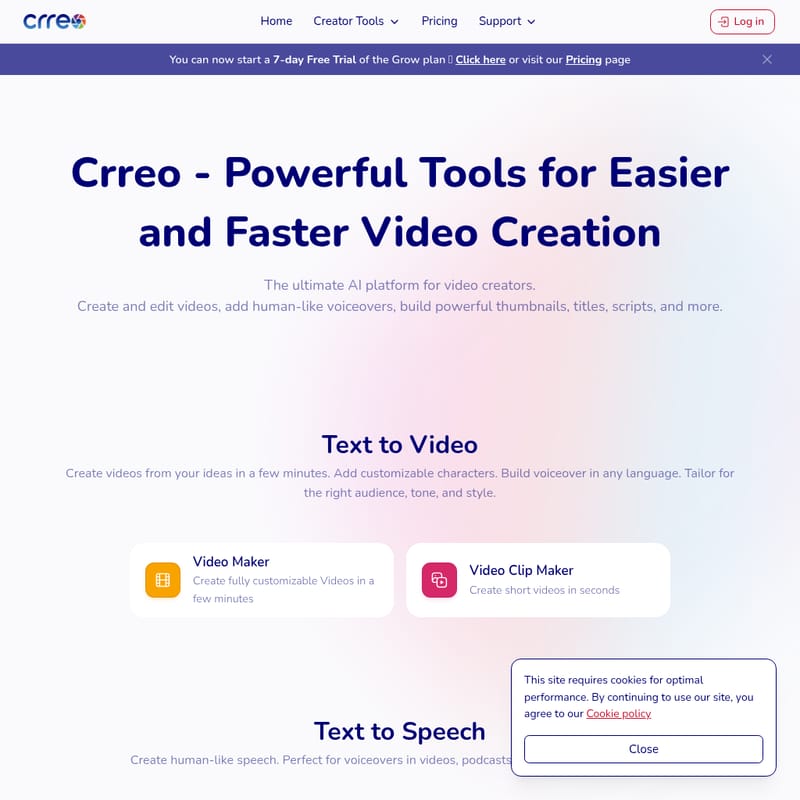
Crreo is a powerful AI platform that provides video creators with tools to easily create, edit, and enhance their videos. With features like Text to Video, Video Maker, Text to Speech, and more, Crreo helps creators produce professional-quality content quickly and efficiently. It offers customizable characters, voiceovers in any language, and tools for video scripts, thumbnails, and audio creation. Ideal for anyone looking to streamline their video production process.
2025-08-06
262.0K
Crreo Product Information
Crreo - AI Video Creation Platform
What's Crreo?
Crreo is an advanced AI-powered platform designed for video creators. It offers a wide range of tools to create, edit, and enhance videos in a fraction of the time. With features like Text to Video, Video Maker, and Text to Speech, Crreo empowers users to produce professional-quality videos, voiceovers, podcasts, and audio content effortlessly. Whether you're a YouTuber, podcaster, or content creator, Crreo streamlines your workflow and helps you create content that resonates with your audience.
Features
Text to Video
Create videos quickly by converting your ideas into engaging visuals. The Text to Video tool allows you to add customizable characters, voiceovers in multiple languages, and tailor the content to your desired audience, tone, and style.
Video Maker
Easily create fully customizable videos in just a few minutes. Whether you're producing long-form content or short clips, the Video Maker tool offers all the flexibility you need.
Video Clip Maker
Need a quick video? The Video Clip Maker helps you create short, impactful videos in seconds, perfect for social media.
Text to Speech
Generate human-like speech in various languages, making it ideal for voiceovers, podcasts, audiobooks, and ads.
Speech Generator
Produce AI-generated, human-like voiceovers for your videos or audio projects in no time.
Podcaster
Create a podcast with a natural-sounding, AI-generated voice in minutes.
Text to Audio
Convert text into powerful audio assets like soundtracks, music, or voiceovers.
Background Music Maker
Generate custom background music and sound effects in any style to enhance your videos and projects.
Text to Image
Design stunning visuals for YouTube thumbnails, TikTok covers, and more using Crreo's Text to Image tool.
Thumbnail Generator
Craft eye-catching thumbnails that grab attention and increase click-through rates on your videos.
Image Builder
Build custom images and photo assets to accompany your content.
Support Tools
Crreo offers a suite of support tools like the Content Writer, Topic Selector, and Title Generator to help you create compelling video scripts, articles, and titles that boost views and conversions.
Use Case
Crreo is an essential tool for anyone involved in content creation, especially those who want to streamline video production. Whether you're making videos for YouTube, creating a podcast, or producing audiobooks, Crreo provides you with the necessary tools to simplify your workflow. From video creation to audio narration and text-to-image generation, Crreo helps creators at every stage of their production process. The Text to Video and Video Maker tools are perfect for creating fully customizable videos, while the Text to Speech and Speech Generator provide lifelike voiceovers. For audio creators, the Text to Audio and Podcaster tools allow for fast production of podcasts and audiobooks.
FAQ
What is Crreo?
Crreo is an AI-powered platform that offers a range of tools for video creation, editing, and content enhancement. It helps users create professional-quality videos, audio, and images.
How does the Text to Video tool work?
The Text to Video tool allows you to turn your written ideas into engaging videos. You can add characters, voiceovers in different languages, and adjust the tone and style to suit your audience.
Can I use Crreo for podcasts?
Yes, Crreo provides the Podcaster tool, which lets you create podcasts narrated by a human-like AI voice in no time.
Does Crreo offer background music?
Yes, Crreo has a Background Music Maker that allows you to create custom music and sound effects for your videos.
How do I get started with Crreo?
You can start by signing up for a 7-day free trial of the Grow plan. Visit the Pricing page to learn more.
Is Crreo available in multiple languages?
Yes, Crreo's tools support multiple languages, including the Text to Speech feature, which allows you to generate voiceovers in any language.
Can I create custom thumbnails with Crreo?
Yes, Crreo's Thumbnail Generator helps you create attention-grabbing thumbnails to boost engagement with your videos.
How to Use Crreo
To get started with Crreo, follow these simple steps:
- Sign Up: Start by creating an account on Crreo.
- Choose Your Tool: Select the tool you want to use, whether it's Text to Video, Video Maker, or any other feature.
- Customize Your Content: Add characters, voiceovers, music, or images to tailor your video to your needs.
- Download or Share: Once your content is ready, download it or share it directly with your audience.
For more details on using each tool, visit the Help Center for step-by-step guides.