Adam CAD Copilot
Adam: The AI CAD Copilot for Hardware Teams and Mechanical Engineers
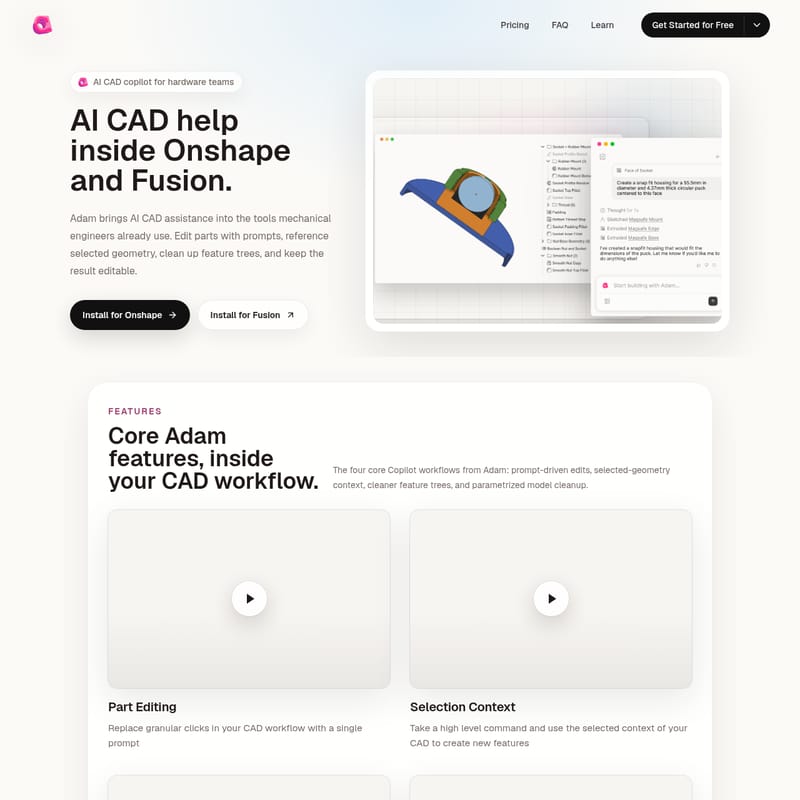
Adam is a specialized AI CAD copilot designed for mechanical engineers and hardware teams using Onshape and Autodesk Fusion. It facilitates prompt-driven part editing, selection-aware commands, feature tree optimization, and parametric model cleanup while maintaining fully editable CAD geometry.
2026-07-03
71.0K
Adam CAD Copilot Product Information
Adam: The Powerful AI CAD Copilot for Modern Hardware Teams
In the evolving landscape of mechanical design, the AI CAD copilot has emerged as a transformative tool for engineering efficiency. Adam is a dedicated AI CAD assistance platform specifically built for the tools that mechanical engineers use every day. By integrating directly into professional environments like Onshape and Autodesk Fusion, Adam allows hardware teams to streamline their design processes, moving from complex manual operations to intuitive, prompt-driven workflows.
Unlike generic AI tools, Adam is designed to understand the deep context of mechanical engineering. It sits directly within your CAD workflow, bridging the gap between the 3D model, the feature tree, and the prompts that describe your next design iteration. This ensures that every change made by the AI CAD copilot remains fully editable and integrated into your existing project structure.
What is Adam AI CAD Copilot?
Adam is an AI CAD copilot that helps with essential CAD actions such as part edits, feature inspection, selection-aware commands, and parametric cleanup. Developed by Adam AI Labs, Inc., this tool is specifically optimized for Onshape and Autodesk Fusion, providing a dedicated extension path for each platform.
The primary goal of Adam is to bring advanced AI assistance into the mechanical design environment without forcing engineers to leave their primary workspace. By using the Adam AI CAD copilot, users can reference selected geometry, clean up complex feature trees, and execute edits via text prompts, all while ensuring the final output is a robust, editable CAD model.
Core Features of Adam
The functionality of Adam is built around four core copilot workflows designed to simplify the lives of mechanical engineers.
1. Prompt-Driven Part Editing
One of the most powerful aspects of this AI CAD copilot is its ability to replace granular, repetitive clicks with simple text prompts. Instead of navigating through multiple menus to adjust a part's geometry, you can use Adam to interpret your intent and execute the change automatically. This feature allows for rapid iterations during the design phase, keeping the momentum of the project moving forward.
2. Selection Context Awareness
Adam is not just a text-to-CAD tool; it is a context-aware assistant. It can take a high-level command and use the specifically selected context of your CAD model to create new features. By understanding which faces, edges, or components you have highlighted, the AI CAD copilot ensures that the generated features are relevant and precisely placed according to your design intent.
3. Feature Tree Optimization
A messy feature tree can make a model difficult to manage and prone to errors. Adam includes tools for feature tree optimization. It can scan your design to find duplicate features and merge them. This process makes your feature tree more robust and easier for other members of the hardware team to navigate and edit in the future.
4. Advanced Parametrization
Transitioning from an ad-hoc prototype to a production-ready model often requires strict parametrization. Adam assists in this transition by setting distinct variables that cascade throughout your design. This conversion of ad-hoc models into parametric ones ensures that your design remains flexible and responsive to changes in project requirements.
Use Case: Who Should Use Adam?
The Adam AI CAD copilot is versatile enough to support various roles within the hardware development ecosystem.
- Mechanical Engineers: Professionals who need to speed up their workflow in Onshape or Fusion by automating repetitive tasks and optimizing their feature trees.
- Hardware Teams: Collaborative teams that benefit from cleaner, more robust models and faster iteration cycles during the product development process.
- Founders Building Prototypes: Entrepreneurs who need to move quickly from a conceptual prompt to a physical-ready CAD model without getting bogged down in every granular click.
- Creators: Anyone utilizing professional CAD tools who requires assistance that connects directly to real-world design environments rather than producing isolated concept images.
How to Use Adam
Getting started with the AI CAD copilot is straightforward, as it is designed to live where you already work.
- Installation: You can install Adam directly for your preferred platform. There are dedicated installation paths for both Onshape and Autodesk Fusion.
- Prompting: Once installed, you can begin editing parts using prompts. Simply describe the change you wish to see.
- Referencing Geometry: Select specific geometry in your model to provide context for the AI, allowing it to generate selection-aware features.
- Cleaning Up: Use the optimization tools to find duplicates in your feature tree and merge them for a more robust design.
- Parametrizing: Define variables that cascade through the model to convert conceptual designs into parametric CAD data.
FAQ
What is an AI CAD copilot? An AI CAD copilot helps with CAD actions such as part edits, feature inspection, selection-aware commands, and parametric cleanup. Adam is designed for mechanical design workflows in Onshape and Autodesk Fusion.
Does Adam work with Onshape and Autodesk Fusion? Yes. Adam has dedicated extension paths for Onshape and Autodesk Fusion, so teams can use prompt-driven CAD help without leaving their design environment.
How is this different from a generic AI 3D generator? Adam is built for CAD context. It can use selected geometry, feature-tree structure, and design intent to help with engineering changes instead of producing a disconnected concept image.
Who should use Adam Copilot? Adam is useful for hardware teams, mechanical engineers, founders building prototypes, and creators who need CAD assistance that connects to real design tools.
Can I keep my results editable? Yes. A key feature of Adam is that it brings AI assistance into the tools engineers already use while keeping the resulting models and feature trees fully editable.