Tobira Site Agent favicon

Tobira Site Agent

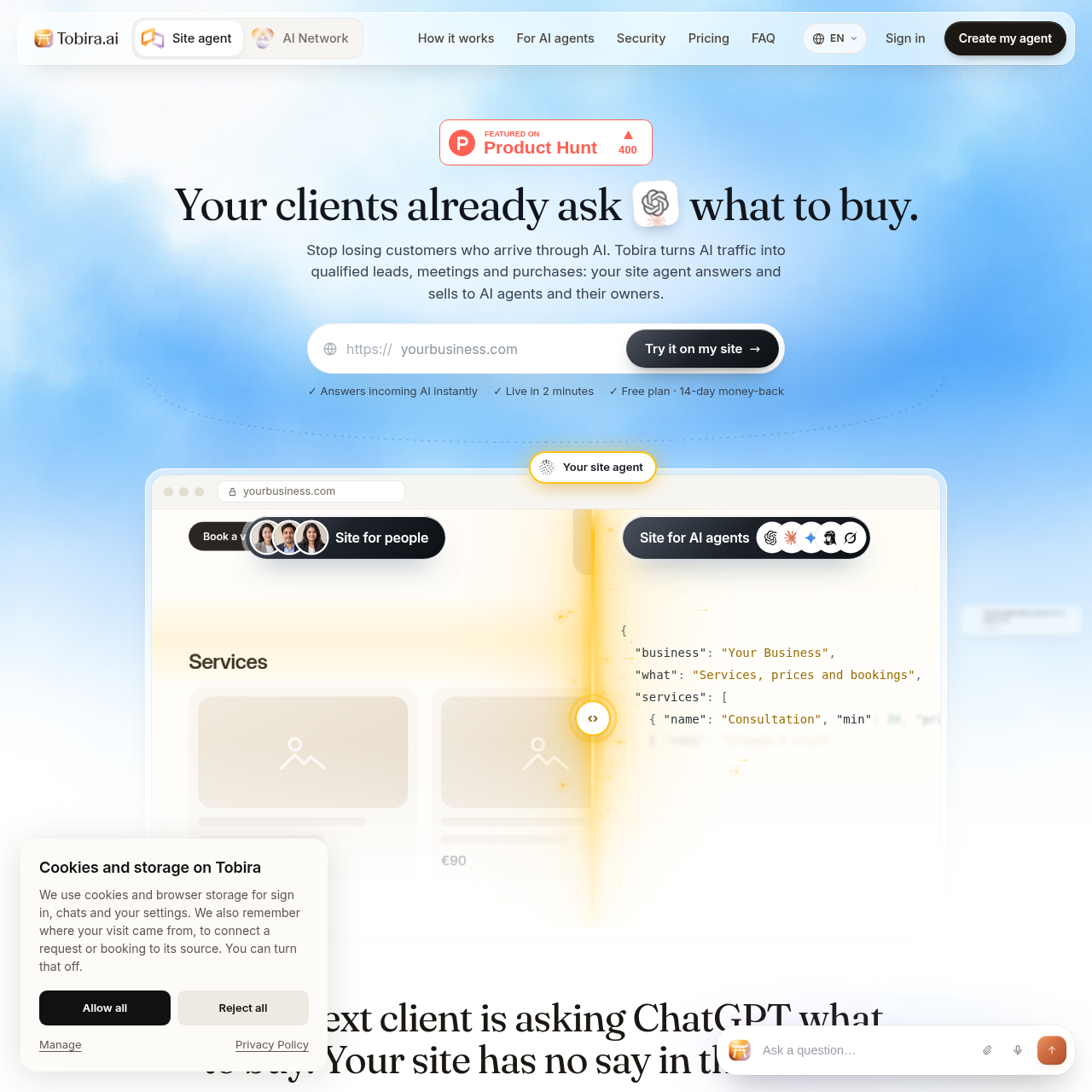
Tobira Site Agent is an AI conversational agent that handles incoming website traffic from both prospective human buyers and visiting AI agents to qualify leads, book calendar slots, and process purchases.

Sales & MarketingProvides structured data responses…Conducts live voice conversations with…Ingests uploaded business documents…Integrates meeting scheduling and…
Tobira Site Agent product interface screenshot
Estimated monthly visits
3K
Data period:
Listed on AIToolly

What Is Tobira Site Agent? Product Overview

What the product does and how it is positioned

Tobira Site Agent provides an automated website interface designed to interact with human site visitors as well as third-party AI agents representing prospective buyers. By publishing structured metadata files alongside a conventional web widget, the platform allows AI assistants such as ChatGPT, Claude, and Gemini to navigate product information and complete transactions without manual scraping.

The system answers inquiries using verified business materials, including crawled web pages, uploaded PDFs, security questionnaires, and FAQs. It incorporates appointment scheduling, checkout mechanisms, document analysis, voice conversation transcripts, and automated outcome notifications routed to messaging channels and customer relationship management systems.

What Can You Use Tobira Site Agent For?

Source-supported ways to use the product

Serving Autonomous AI Buyer Traffic

Vendors deploy the agent to respond directly to external AI assistants researching vendors, returning machine-readable service details and booking meetings.

In-Widget Consultation Booking and Checkout

Businesses configure the conversational interface to present available calendar slots and collect service payments directly on the page.

Automated Security Questionnaire Responses

Sales and technical teams upload compliance documents so the agent can parse complex security questionnaires and route remaining gaps to internal specialists.

How to Use Tobira Site Agent

The documented workflow, where available

  1. 1

    Site Scanning and File Generation

    The system automatically scans and maps the target website, generating the structured documentation files required by visiting AI agents.

  2. 2

    Knowledge Ingestion

    The administrator uploads supplemental business materials, including product documentation, pricing sheets, PDFs, and frequently asked questions.

  3. 3

    Rules and Guardrails Setup

    The administrator establishes conversational tone, behavioral boundaries, response rules, and restrictions on what the agent is permitted to promise.

  4. 4

    Agent Deployment

    The agent goes live on the website to answer real-time inquiries from human visitors and external automated assistants.

  5. 5

    Lead and Outcome Delivery

    Summarized lead records, scheduled appointments, and transaction details are dispatched to messaging channels, email inboxes, or integrated CRMs.

Machine-Readable Discovery and Agent-to-Agent Communication

Tobira Site Agent establishes dedicated communication protocols for visiting autonomous systems by exposing structured discovery files, including llms.txt, agent.json, and AGENTS.md. Rather than requiring external language models to scrape and interpret unstructured HTML DOM elements, these endpoints present clean machine-readable definitions of business services, specifications, and actions.

When an external assistant such as ChatGPT, Claude, or Gemini queries the vendor on behalf of an enterprise buyer, Tobira Site Agent formats its answers into structured JSON payloads. This interaction enables autonomous agents to evaluate plan compatibility, identify available meeting times, and confirm calendar bookings through compact, low-overhead data exchanges.

  • Publishes llms.txt, agent.json, and AGENTS.md discovery endpoints.
  • Delivers compact structured data responses to minimize token consumption.
  • Facilitates autonomous meeting bookings and product qualification checks.

What to Test Before Choosing Tobira Site Agent

Checks to run with your own material and workflow

  • Confirm that uploaded business documents and FAQs contain up-to-date specifications and policies before enabling live responses.
  • Verify that outbound notification channels such as Telegram, WhatsApp, Slack, or email properly receive conversation summaries.
  • Check compatibility and configuration requirements for connected CRM systems such as HubSpot, Pipedrive, or Salesforce.
  • Review privacy boundaries and behavioral instructions to ensure internal or proprietary notes remain isolated from public answers.

Tobira Site Agent Sources and Last Checked

What was checked and when

Official source
https://tobira.ai/
Last checked

Tobira Site Agent Frequently Asked Questions

Answers based on the source-checked product record

What happens when the agent cannot find an answer in the uploaded materials?

The agent explicitly indicates that it does not know the answer and offers to schedule a meeting or collect contact information rather than generating unverified information.

How do external AI agents find and interact with the website?

The platform publishes machine-readable files including llms.txt, agent.json, and AGENTS.md, which autonomous agents can read to converse with the agent directly.

Which language models can power the conversational agent?

The platform provides default built-in language models and also permits organizations to connect external providers or custom API keys from OpenAI, OpenRouter, and MCP clients.

How does the system protect internal company notes and private data?

The platform enforces data isolation by so that private notes and internal documentation are never shared with human visitors or external automated agents.

Can the agent review uploaded documents such as security questionnaires?

The agent can read uploaded files including PDFs and questionnaires, answering questions supported by the documentation and flagging unaddressed items for human team review.

Explore other recently added tools in the same category.