SpeakON
SpeakON: The Ultimate Physical AI Device for Instant Speech-to-Polished-Text and Workflow Optimization
SpeakON is a revolutionary hardware device designed to bridge the gap between thought and action by turning speech into finished, polished text instantly. Featuring a physical shortcut button that snaps onto your iPhone, SpeakON allows users to input text directly into any application without the friction of typing, switching apps, or manual pasting. With advanced features like Smart Polish, Attune tone adjustment, and real-time translation into 12 languages, SpeakON ensures your voice sounds professional and intentional. Built with enterprise-grade privacy including SOC 2 Type II and HIPAA certifications, it is the most secure and efficient way to capture ideas, create structured lists, and manage daily communication on the go.
2026-04-24
--K
SpeakON Product Information
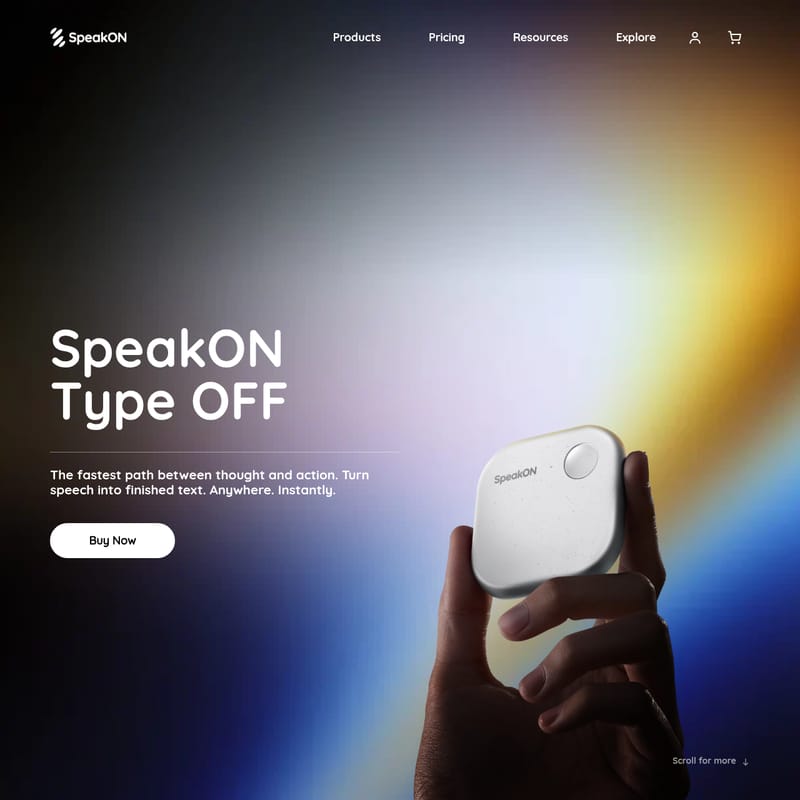
SpeakON: The Fastest Path Between Thought and Action
In a world where speed and efficiency are paramount, SpeakON emerges as the premier solution for professionals, creators, and thinkers. SpeakON is more than just a recording tool; it is a physical shortcut for your brain that turns speech into finished text instantly, anywhere you are. By removing the friction of traditional typing, the SpeakON Device allows you to express your most powerful thoughts with a single press, ensuring that nothing stands in the way of your productivity.
What's SpeakON?
SpeakON is an innovative hardware and software ecosystem designed to transform how we interact with our digital devices. At its core, the SpeakON Device is a physical button that snaps onto your iPhone, serving as an "invisible UI" that eliminates the need for keyboards. Whether you are using the standalone SpeakON Device or the SpeakON Device & Annual Pro Plan, the goal remains the same: to provide the fastest path between thought and action.
Unlike standard voice-to-text tools, SpeakON doesn't just transcribe; it polishes. It understands context, adjusts to the specific app you are using, and ensures that what comes out sounds exactly as you intended. It is a tool trusted by people whose words move things, providing a seamless way to capture ideas without the annoyance of typing.
Key Features of SpeakON
Press. Speak. Done.
With SpeakON, the workflow is simplified to three simple steps. You press one button, speak your mind, and your words arrive polished in whatever app you are currently writing into. There is no switching between screens and no manual copying or pasting required.
Smart Polish
We all use filler words like "um" or repeat ourselves when thinking out loud. SpeakON features Smart Polish technology that automatically removes every "um" and unnecessary repetition, leaving you with clean, professional prose.
Attune: Context-Aware Tone
SpeakON is intelligent enough to know where you are speaking. Through the Attune feature, the device detects which app you are writing into and adjusts the tone automatically. Whether it is a formal email or a casual message, you will always sound like yourself, not a generic template.
Smart List
Turning a brainstorm into an actionable plan has never been easier. Simply speak your thoughts, and SpeakON will organize them into a clean, structured Smart List. For example, mentioning a sequence of tasks—from reviewing a budget to closing a deal—will result in an organized list ready for use.
Real-Time Translation
Global communication is built directly into the device. SpeakON offers Translation services that turn your words into 12 different languages without ever leaving your app.
Privacy by Design
Security is a top priority for SpeakON. The platform is built with enterprise-grade privacy, boasting SOC 2 Type II and HIPAA certifications, ensuring your data and thoughts remain secure.
Voice Edits (Coming Soon)
Future updates will allow for total hands-free control. If you aren't happy with the output, you can simply use your voice to tell SpeakON to "make this more dramatic," "sound friendlier," or "make it longer."
How to Use SpeakON
Using the SpeakON Device is designed to be intuitive and friction-free:
- Snap it on: Attach the SpeakON Device to your iPhone for easy access.
- Select your App: Open the application where you want the text to appear (Email, Notes, Messaging, etc.).
- Press and Hold: Press the physical button on the SpeakON Device.
- Speak Naturally: Speak your thoughts, even if you stutter or use filler words.
- Release: Once you stop speaking, SpeakON processes the audio and inputs the polished, formatted text directly into your app.
"SpeakON captures ideas fast: press and speak for perfect text, bullets, and real-time translation. It even works offline and syncs later. No more typing." — Andrea Mosca
Use Cases for SpeakON
- Professional Communication: Use Attune to ensure your emails sound professional and your Slack messages sound collaborative without spending minutes editing.
- Project Management: Use the Smart List feature during a commute to dictate task lists that arrive pre-formatted in your project management tool.
- Content Creation: Capture raw ideas for blogs or scripts instantly. SpeakON removes the barrier between an idea appearing in your head and it appearing on the screen.
- International Business: Utilize the Translation feature to communicate with partners in 12 languages instantly while maintaining your original intent.
- On-the-Go Journaling: Since SpeakON works offline and syncs later, it is the perfect companion for capturing thoughts in areas with poor connectivity.
FAQ
Q: Does SpeakON work with any app? A: Yes, SpeakON inputs polished text directly into whatever app you are currently using on your phone.
Q: Is my data secure with SpeakON? A: Absolutely. SpeakON features enterprise-grade privacy and is both SOC 2 Type II and HIPAA certified.
Q: Do I need an internet connection to use it? A: The SpeakON Device can capture ideas offline and will sync them later when a connection is available.
Q: How does the Smart Polish feature work? A: Smart Polish uses AI to analyze your speech, removing filler words like "um" and fixing repetitions to ensure the final text is concise and clear.
Q: What is included in the Pro Plan? A: You can purchase the SpeakON Device & Annual Pro Plan together to unlock the full potential of the device's features, including advanced AI processing and tone adjustments.