Reframe
RetroMac Reframe: A Nostalgic macOS Browser with Classic 1999 Themes and Modern Chromium
Discover Reframe by RetroMac, an open-source desktop browser for macOS that recreates the iconic aesthetics of the late-90s and early-2000s. Featuring pixel-accurate themes for Netscape, Internet Explorer, Safari, and Firefox, Reframe utilizes a modern Chromium engine to ensure full compatibility with the contemporary web. Whether you are a retro enthusiast or a digital historian, Reframe offers a unique way to 'Surf like it's 1999' without sacrificing modern security or functionality.
2026-06-22
--K
Reframe Product Information
RetroMac Reframe: Experience the Golden Age of the Web with Modern Performance
In an era dominated by sleek, minimalist browser designs, RetroMac introduces a refreshing blast from the past with Reframe. If you have ever felt nostalgic for the tactile, textured, and often colorful user interfaces of the late 1990s and early 2000s, Reframe is the project you have been waiting for. This open-source desktop browser, specifically designed for macOS, allows users to "Surf like it's 1999" by wrapping a modern, powerful engine in the classic skins of the internet's most iconic pioneers.
What's Reframe by RetroMac?
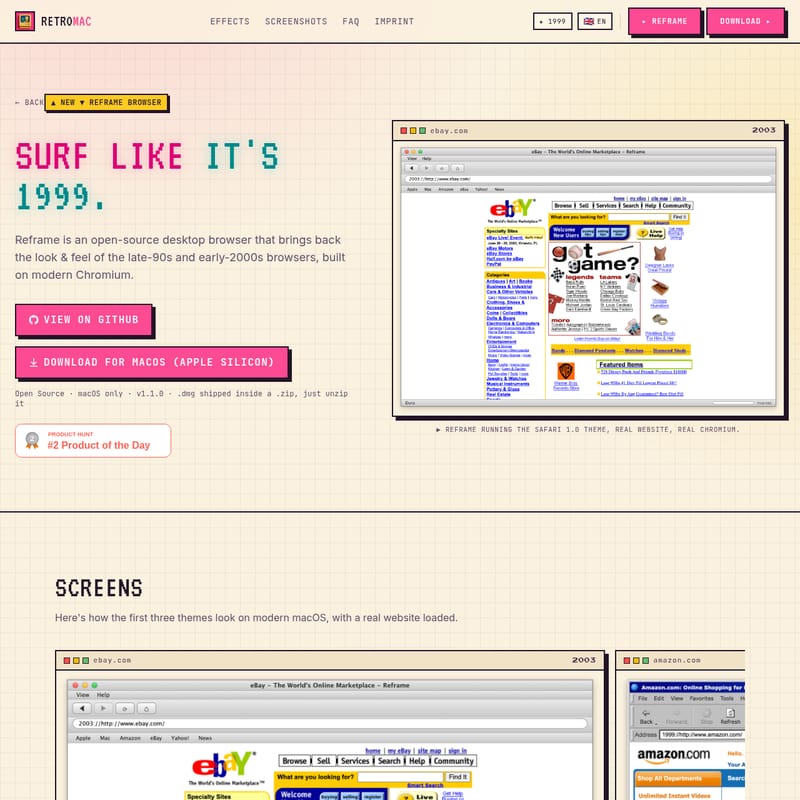
Reframe is a specialized desktop browser for macOS that meticulously reproduces the look and feel of legendary software like Netscape Navigator, Internet Explorer, early Firefox, and the original Safari. Developed under the RetroMac umbrella, Reframe is not just a static theme; it is a fully functional browser.
While the user interface might look like it belongs on a CRT monitor from 1999, the technology "under the hood" is entirely modern. Reframe is built on the Chromium engine via the Electron framework. This means that while you are clicking on brushed metal buttons or watching a classic "spinning throbber," you are actually using the same rendering power that drives Google Chrome and Microsoft Edge. It bridges the gap between vintage aesthetics and the technical requirements of the modern web, ensuring that JavaScript, CSS, and complex web apps work seamlessly.
Key Features of Reframe
Reframe stands out by offering more than just a superficial skin. The RetroMac team has focused on realism and functionality to provide an immersive experience.
Realistic Retro Design
The hallmark of Reframe is its commitment to accuracy. These are pixel-accurate reproductions of original browser chrome. Every detail, from the specific shade of Windows grey in the Internet Explorer theme to the iconic animated "throbber" in the top right corner, has been recreated to evoke the authentic feeling of early web exploration.
Full Browsing Capabilities
Despite its vintage appearance, Reframe offers a full browsing experience. Because it utilizes modern Chromium, users can visit any contemporary website—from YouTube and Amazon to complex web-based productivity tools. It supports modern JavaScript, video playback, and advanced web applications that would never have loaded on the original browsers being emulated.
Built-in Wayback Mode
One of the most exciting features for enthusiasts is the Wayback Mode. This integration allows users to visit websites as they appeared decades ago, providing a true time-capsule experience. When combined with the period-accurate UI of Reframe, the illusion of traveling back to the early days of the internet is complete.
Open Source and Community Driven
Reframe is a fully open-source project. The source code is available on GitHub, encouraging developers to contribute, report issues, or even fork the project to create new nostalgic themes. This transparency ensures that the RetroMac community can continue to improve and maintain the browser for years to come.
Classic Themes Included in Reframe
Reframe allows you to switch between four distinct eras of web history with just one click. Each theme is a tribute to a specific milestone in browser evolution:
- Internet Explorer 5.0 (1999): Experience the classic grey Windows chrome and the famous "Favorites" star. This theme represents the gateway to the web for millions during the turn of the millennium.
- Netscape 4.8 (2002): A tribute to the browser that started it all. This theme includes the famous "N" logo, the "What's Related" button, and the classic bookmarks interface that defined the early browser wars.
- Safari 1.0 (2003): Revisit Apple's "Aqua" era with brushed metal textures and vibrant blue buttons. This theme captures Apple at its most experimental and stylish.
- Firefox 1.0 (2004): Celebrate the underdog that changed everything. This theme restores the classic toolbar and layout of the original Firefox release, which paved the way for the open-web movement.
Use Case: Why Use RetroMac Reframe?
While Reframe is a powerful tool, it is designed with specific use cases in mind rather than replacing your primary daily browser.
- Retro Enthusiasts: For those who collect vintage hardware or enjoy the aesthetic of the 90s, Reframe provides the perfect software companion to complete the "retro" desktop vibe on a modern Mac.
- Digital Historians: Researchers and historians can use Reframe and its Wayback Mode to view archived web content in its original context, providing a more authentic perspective on digital evolution.
- Focused Browsing: The nostalgic interface can serve as a "zen" space for reading or research, away from the cluttered and often distracting designs of modern browsers.
- Web Development Testing: Developers may find it useful to see how their modern sites look and feel when framed within the constraints of historical UI layouts.
How to Use Reframe
Getting started with Reframe is simple, though it is currently exclusive to macOS users:
- Download: Obtain the latest version (v1.1.0) of Reframe for macOS. Note that specific builds are available for Apple Silicon.
- Installation: The download is typically provided as a
.dmgfile inside a.ziparchive. Simply unzip the file and move the application to your Applications folder. - Switching Themes: Once launched, you can switch between the four classic themes (Internet Explorer, Netscape, Firefox, Safari) at any time with a single click.
- Browsing: Enter any URL in the address bar to browse the modern web or use the Wayback Mode to explore the past.
FAQ
Q: Is Reframe available for Windows? A: Currently, Reframe is a macOS-only application.
Q: Can I use Reframe as my primary browser? A: While Reframe supports full modern browsing, the RetroMac team suggests it is best used as a nostalgic companion rather than a total replacement for your daily driver.
Q: Is Reframe safe to use for sensitive tasks? A: Reframe uses a modern Chromium engine, meaning it benefits from contemporary security standards. However, as an independent open-source project, users should always exercise standard caution as they would with any third-party browser.
Q: How do I update the browser? A: You can check for the latest releases on the official Reframe GitHub repository to ensure you have the most recent features and security patches.
Q: Are the original companies involved in this project? A: No. Reframe is an independent, non-commercial open-source project. It is not affiliated with Microsoft, Apple, Mozilla, or Netscape/Verizon. The themes are created as an aesthetic tribute to these iconic designs.