Upstream
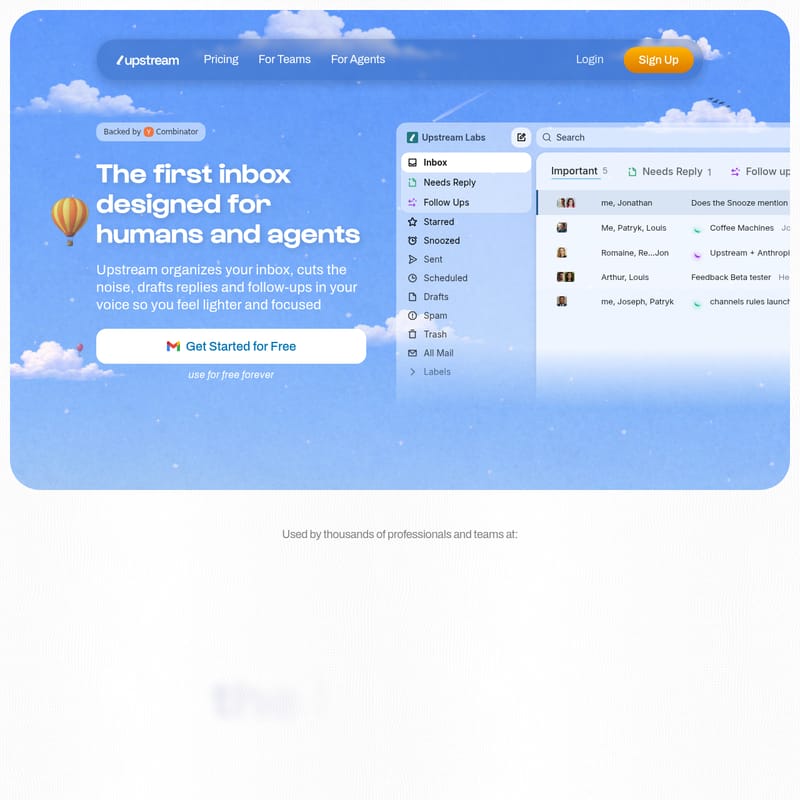
Upstream: The First AI-Powered Inbox Designed for Humans and Agents to Master Email Productivity.
Upstream is a Y Combinator-backed email platform that organizes your inbox, drafts replies in your voice, and manages follow-ups. It features custom split inboxes, team collaboration channels, and advanced AI agents to help professionals achieve inbox zero with ease.
2026-06-20
--K
Upstream Product Information
Upstream: The AI-Powered Inbox Designed for Humans and Agents
In the modern professional landscape, managing an overflowing email account can feel like a full-time job. Upstream is changing that narrative by introducing the first inbox specifically designed for both humans and agents. Backed by Y Combinator, Upstream is a revolutionary email management platform that organizes your inbox, cuts through the noise, and drafts replies in your unique voice, allowing you to feel lighter and more focused on your high-priority tasks.
Whether you are a founder, a product leader, or part of a growing team, Upstream provides the infrastructure needed to regain control over your digital communication. By leveraging agentic AI, Upstream transforms the traditional inbox into a proactive assistant that handles itself.
What is Upstream?
Upstream is more than just an email client; it is an intelligent layer that sits on top of your existing communication tools to streamline your workflow. The platform is designed to help users "Focus on what matters most" by splitting the inbox into categories that differentiate between what needs immediate attention, what can wait, and what can be ignored entirely.
Used by thousands of professionals at leading companies, Upstream ensures that important emails never get buried under a mountain of newsletters and cold outreach. By utilizing Upstream AI, the system learns your specific writing patterns and organizational preferences to provide a truly personalized email experience.
Key Features of Upstream
Intelligent Split Inboxes
Upstream organizes your inbox into "Splits" that fit your specific workflow. Instead of a single, overwhelming list of messages, Upstream separates your mail into categories such as:
- Needs Reply: Messages that require your direct action are pre-sorted and ready for you.
- VIP: Ensure your most important contacts always get the attention they deserve.
- Noise: AI automatically moves cold emails and newsletters out of your primary view.
- Custom Splits: Create views for specific projects, prospects, or tools like Linear and GitHub.
Personalized AI Drafts
One of the most powerful aspects of Upstream is its ability to generate drafts that actually sound like you. Unlike generic AI responses, Upstream identifies your unique writing patterns and saves them as a personalized prompt. When you open a message, an AI Draft is already waiting for you, taking into account the thread context and past messages with the recipient. You can simply tweak the text and hit send.
Automated AI Follow-ups
Upstream ensures that nothing slips through the cracks by bringing important conversations back to your inbox at the exact right time. The Upstream AI assesses the context of every message to determine when a follow-up is necessary and generates a draft for you, even considering other active threads with the same recipients.
Agentic Assistance
Upstream features agents that can handle a variety of requests. Whether you need to track down a receipt, book a meeting, or draft personal notes, these agents are integrated into your workflow. For example, the Upstream x Granola integration can automatically draft follow-up emails after meetings, summarizing key points and action items.
Collaborative Channels and Private Comments
Upstream turns your inbox into a collaborative space.
- Channels: Organize email into team-based or project-based spaces.
- Team Comments: Have private discussions with colleagues directly inside email threads using @mentions, without the recipient ever seeing the internal dialogue.
Blazing-Fast Navigation
For power users, Upstream offers a suite of speed-focused tools:
- Command K: A powerful interface to search, navigate, and take action instantly.
- Keyboard Shortcuts: Use lightning-fast shortcuts (like 'G+D' for drafts or 'E' for all messages) to fly through your inbox.
- Multiple Account Management: View and manage all your Gmail and Outlook accounts in one centralized location.
How to Use Upstream
Getting started with Upstream is designed to be a frictionless process that takes only a few seconds.
1. Connect Your Account
Quickly connect your Gmail account to the Upstream platform. There is no complex configuration needed to start seeing your emails in a more organized format.
2. Establish Your Voice and Tone
Once connected, the Upstream AI begins to find your voice. It learns your style, target audiences, and individual preferences from your past communications to ensure future drafts are accurate.
3. Manage Your Inbox with Confidence
Navigate to your new inbox to see your emails automatically organized into Splits with pre-drafted replies ready for your review. You can use Bulk Triage to clear months of emails in minutes using powerful batch actions.
Use Case Scenarios
For Founders and CEOs
Founders like Jo Widawski (Maze) and Antoine Sakho (Pennylane) use Upstream to save hours every day. By having half of their replies pre-drafted in their own voice, they can respond to stakeholders faster without sacrificing the personal touch required for leadership communication.
For Teams and Collaborative Projects
Teams use Upstream Channels and private comments to gain full visibility into communications. As noted by Mariem Ould Ismail (Stockline), being able to chat directly over an email and automate internal operations is a game-changer for information sharing.
For Sales and Recruitment
Professionals can use Custom Splits to track prospects and use AI Follow-ups to ensure that no lead is ever forgotten. The ability to insert Calendly links directly into AI-generated drafts makes scheduling 3–4x more efficient.
Security and Privacy
Upstream is built with enterprise-grade security to ensure your data remains private.
- CASA Tier 2 Compliance: Meets rigorous industry security standards.
- Full Encryption: Your emails are encrypted both in transit and at rest.
- Privacy First: Upstream never trains AI models on your personal data. Your information stays yours.
- Secure Infrastructure: Built on cloud infrastructure with 99.9% uptime.
FAQ
Does Upstream send emails automatically? No, Upstream prepares drafts for your review. You maintain full control and can tweak any message before hitting send.
Can I use Upstream with more than one email account? Yes, Upstream allows you to manage multiple accounts, including Gmail and Outlook, in one place.
How does Upstream learn my writing style? Upstream AI analyzes your past messages, style, and audience patterns to create a personalized prompt that mirrors your unique voice.
Is my email data secure? Absolutely. Upstream utilizes industry-leading encryption and is CASA Tier 2 compliant. Importantly, they do not train AI models on your data.
Does Upstream handle follow-ups? Yes, the AI assesses context to return important threads to your inbox at the right time, complete with a drafted follow-up message.