SciDraw AI
SciDraw AI: The Ultimate AI-Powered Scientific Illustration and Data Visualization Platform
SciDraw AI is a comprehensive AI scientific graphics platform designed for researchers, PhD students, and industrial R&D teams. It enables the creation of publication-ready figures, TOC graphics, and data charts in minutes using advanced AI drawing and visualization tools. Trusted by over 10,000 users worldwide, SciDraw AI offers features like text-to-image generation, sketch refinement, and smart data plotting from CSV/Excel files. With one-click presets for Nature, Science, and Cell, it ensures academic compliance while saving 90% of traditional drawing time. Supporting SVG vector exports and providing a flexible credit-based pricing model, SciDraw AI is the leading professional alternative for scientific illustration.
2026-04-25
11.1K
SciDraw AI Product Information
SciDraw AI: The Future of AI Scientific Illustration and Data Visualization
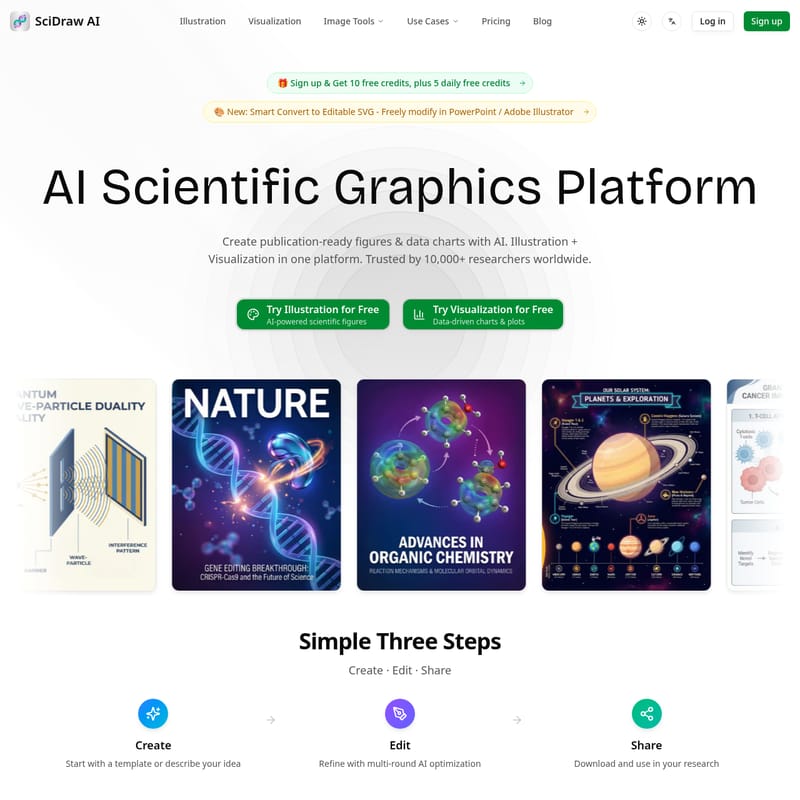
In the competitive world of academic publishing and industrial R&D, the quality of your visuals can be just as important as the quality of your data. SciDraw AI is a cutting-edge AI scientific graphics platform designed to help researchers, professors, and students create publication-ready figures and data charts with unprecedented ease. Trusted by over 10,000 researchers worldwide, SciDraw AI combines illustration and visualization into a single, intuitive interface.
What's SciDraw AI?
SciDraw AI is an AI-powered scientific illustration platform specifically engineered for the global research community. It serves as a comprehensive tool for generating high-quality scientific graphics, ranging from complex molecular biology pathways to intricate physics concepts. Whether you are working on a journal cover for Nature, a grant proposal diagram, or a research poster, SciDraw AI leverages artificial intelligence to transform text descriptions and rough sketches into professional, academic-grade visuals.
Unlike traditional design software that requires steep learning curves, SciDraw AI offers a conversational interface. It allows users to generate, edit, and export vector graphics (SVG) that meet the strict standards of top-tier SCI journals. By integrating AI Drawing and Scientific Visualization, SciDraw AI streamlines the entire creation process for scientific figures.
Core Features of SciDraw AI
SciDraw AI is packed with features designed to solve the unique challenges of scientific communication.
1. AI-Powered Illustration Tools
- Text to Image: Simply describe your scientific concept in words, and the AI generates professional illustrations instantly.
- Sketch / Image Edit: Upload your hand-drawn sketches or reference images, and let the AI transform them into polished, professional visuals.
- Multi-round AI Optimization: Use natural language dialog to refine and adjust your images through multiple rounds of optimization for precise results.
- SVG Vector Export: Download your creations as SVG files to freely modify them in external tools like Adobe Illustrator, PowerPoint, Inkscape, or Figma.
2. Advanced Data Visualization
- Smart Data Charts: Upload your CSV or Excel files, and SciDraw AI will generate journal-quality charts using Python matplotlib/seaborn code automatically.
- 10+ Chart Types: From box plots and violin plots to heatmaps and regression charts, the platform covers all essential research data formats.
- Colorblind-Friendly Palettes: Built-in access to Okabe-Ito and other accessible color schemes ensures your work is readable by all audiences.
3. Professional Standards and Customization
- Journal Style Presets: One-click adaptation for Nature, Science, Cell, PLOS, and ACS standards.
- Infinite Scaling: As a vector-based tool, graphics can be scaled to any size without losing clarity.
- Editable Elements: Users can click to select text, change colors, or adjust the position and size of individual components within an illustration.
How to Use SciDraw AI
Creating professional scientific figures with SciDraw AI is a simple three-step process:
- Create: Start by choosing from 7+ professional templates (such as TOC graphics or journal covers) or describe your idea directly to the AI.
- Edit: Refine your image using the multi-round AI optimization tool. You can modify elements, adjust layouts, or change styles (3D, flat, photorealistic, etc.) through simple conversation.
- Share: Download your finished figure in multiple formats including SVG, PNG, PDF, EPS, or TIFF for use in your research papers or presentations.
Use Cases for SciDraw AI
SciDraw AI is versatile enough to support a wide range of scientific disciplines and communication needs:
- Journal Publications: Create TOC graphical abstracts and cover art for prestigious journals like Nature and Science. Examples include DNA double helix structures with CRISPR-Cas9 or organic chemistry reaction mechanisms.
- Grant Proposals: Visualize complex mechanisms, such as CAR-T cell therapy or nanoparticle drug delivery systems, to improve funding success rates.
- Academic Presentations: Generate high-resolution crystal lattice structures or geological cross-sections for research posters and slide decks.
- Science Communication: Design infographics for textbooks or public outreach, such as solar system comparisons or plate tectonics visualizations.
- Industrial R&D: Document proprietary mechanisms and workflows with professional-grade schematic diagrams.
Why Researchers Choose SciDraw AI
The value proposition of SciDraw AI is centered on efficiency and quality:
- Save 90% Drawing Time: What used to take hours in traditional software now takes minutes with AI.
- Reduce 95% Costs: Avoid expensive design services; SciDraw AI offers professional results for less than $0.5 per image.
- Improve Acceptance Rates: Professional figures improve reviewer impressions and meet all SCI journal standards regarding color and layout.
- Zero Learning Curve: The intuitive interface allows anyone to start creating in under 5 minutes.
Pricing Plans
SciDraw AI uses a flexible, credit-based system to fit different needs:
- Free Plan ($0): 10 free credits on registration, plus 5 daily free credits. Access to 7+ templates and 6+ visual styles.
- Standard Plan ($10/mo): 300 credits/month (approx. 60 images), 3x faster generation, and permanent history retention.
- Premium Plan ($20/mo): 800 credits/month (approx. 160 images), all AI modes, and priority technical support.
- Enterprise Plan ($40/mo): 2,000 credits/month (approx. 400 images), 5x faster generation, and a dedicated account manager.
FAQ
Q: How long does it take to generate an image? A: Initial generation takes about 3 minutes. With multi-round optimization, a final polished figure can be completed in just 15 minutes.
Q: Who owns the copyright of generated images? A: SciDraw AI supports journal publication and commercial use for its users, ensuring you can use your creations in your professional work.
Q: What file formats are available for export? A: You can export your scientific graphics in SVG (for local editing), PNG, PDF, EPS, or TIFF formats.
Q: Can I edit the text inside the images? A: Yes, SciDraw AI features editable text and modifiable elements, allowing you to change color, position, and labels even after generation.