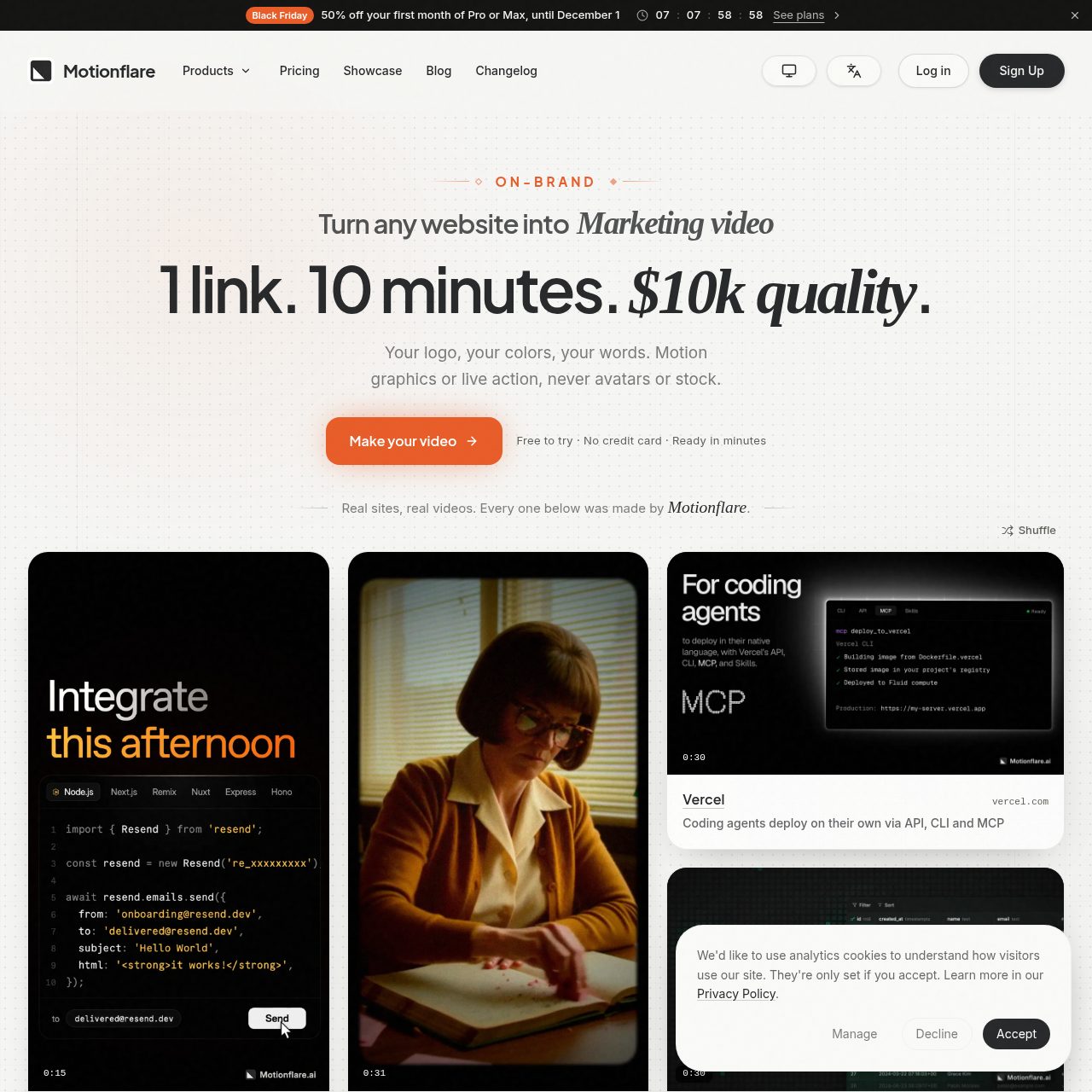
Motionflare is an AI video generator that transforms public websites or written descriptions into branded motion graphics, product demonstrations, and live-action-style commercials.
VideoAutomatically extracts logos, colors,…Captures real product interface…Automatically generates video scripts…Supports optional narration
Estimated monthly visits
5K
Data period:
Listed on AIToolly
What Is Motionflare? Product Overview
What the product does and how it is positioned
Motionflare is an AI-powered video creation tool designed for founders, brands, and marketing teams. It accepts a public website URL or a short written description and automatically generates video content for marketing, product demonstrations, and advertising.
For website-based motion graphics, Motionflare extracts brand assets, website copy, and product screenshots to assemble animated scenes. The platform automatically creates scripts and accompanying music, with optional narration available for product demonstrations.
Motionflare also includes Film mode for generating live-action-style commercials with AI-generated people, voiceover, sound effects, and music. Natural language revision instructions allow users to request changes to specific portions of generated videos.
What Can You Use Motionflare For?
Source-supported ways to use the product
Product Demonstration Videos
Create product demonstrations that incorporate screenshots of an actual interface captured from a public product website.
Product Launch Content
Generate branded launch videos using existing website copy, product imagery, logos, and brand colors.
Video Advertising
Produce motion graphics advertisements or live-action-style commercials for brand and product marketing.
Feature Announcements
Create videos introducing product features through animated visuals, product screenshots, and generated scripts.
Brand Marketing Videos
Develop marketing videos that incorporate an existing website's visual identity and written messaging.
How to Use Motionflare
The documented workflow, where available
1
Provide the Video Input
The user supplies a public website URL or a short written description of the intended video.
2
Process Website Content
For website-based motion graphics, Motionflare automatically extracts logos, colors, copy, and screenshots from the supplied page.
3
Generate the Video
Motionflare creates the video using motion graphics or Film mode, incorporating generated audio and visuals appropriate to the format.
4
Preview the Result
The generated video can be previewed in a web browser to assess its content and presentation.
5
Request Revisions
The user provides written feedback when changes are needed, and Motionflare revises the relevant portion of the video.
Website-Based Motion Graphics
Motionflare builds motion graphics videos from existing website assets, including logos, typography, colors, written content, and captured product screenshots. This approach incorporates actual product interface imagery into animated scenes.
The motion graphics generation process uses a code-based rendering approach with Remotion. Video frames are rendered from product imagery and typography, accompanied by automatically generated music.
Automatic extraction of website branding and copy.
Capture and composition of real product interface screenshots.
Frame-by-frame rendering through Remotion.
Automatically generated accompanying music.
Optional narration for product demonstrations.
Film Mode Generation
Film mode provides a separate approach to video creation through AI-generated live-action-style commercials. It produces videos featuring generated people, spoken narration, sound effects, and musical accompaniment.
The documented generation process uses video models such as Seedance 2.5 and HeyGen Video. Voiceover and sound effects are generated alongside the visuals, with music mixed into the resulting commercial.
Live-action-style commercial generation.
AI-generated human characters.
Integrated voiceover and sound effects.
Musical accompaniment.
Documented commercial duration of 5 to 45 seconds.
What to Test Before Choosing Motionflare
Checks to run with your own material and workflow
Verify whether the intended product website is publicly accessible for website-based generation.
Check whether captured interface screenshots adequately represent the product screens intended for the video.
Confirm whether the automatically extracted logos, colors, and copy reflect the intended brand identity.
Review the generated script and music for suitability with the intended marketing message.
Answers based on the source-checked product record
What inputs does Motionflare accept?+
Motionflare accepts a public website URL or a short written description of a product or intended video.
Does Motionflare use actual product interface screenshots?+
Yes. For website-based product demonstrations, Motionflare captures screenshots from the supplied live page and incorporates them into video scenes.
What types of videos can Motionflare generate?+
Motionflare supports branded motion graphics videos and live-action-style commercials, with documented use cases including product demonstrations, advertisements, product launches, and feature announcements.
Does Motionflare generate music and narration?+
Motionflare automatically generates accompanying music and supports optional narration for product demo videos. Film mode includes voiceover, sound effects, and music.
Can users revise a generated video?+
Yes. Users can provide natural language feedback describing requested changes, and Motionflare revises the relevant portion of the generated video.
More Video AI tools
Explore other recently added tools in the same category.