Macro
Macro: The All-in-One Open Source Workspace with Shared AI Memory and Unified Workflow
Macro is a powerful, open-source productivity platform that consolidates email, messages, documents, tasks, calls, and CRM into one super-fast app. Featuring shared AI memory and a keyboard-first interface, it optimizes team collaboration and intelligence.
2026-07-04
63.0K
Macro Product Information
Macro: The Unified Open Source Workspace for Modern Teams
In the modern digital landscape, professional workflows are often fragmented across dozens of different applications. From email and chat to task managers and CRM systems, the constant switching between tabs and tools creates friction and leads to lost context. Macro is designed to solve this problem by providing one app for all your work.
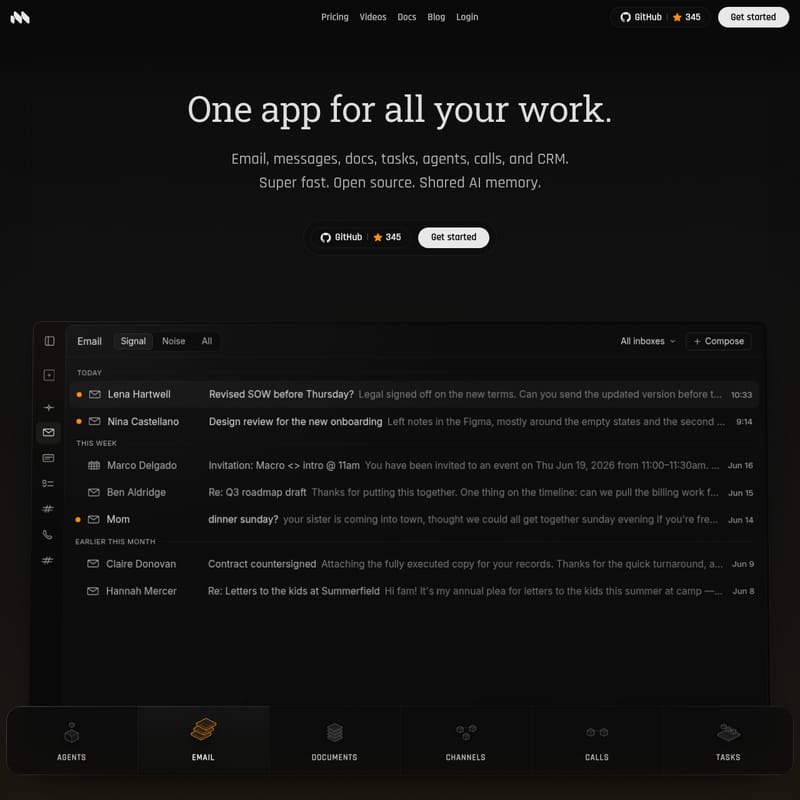
Macro is a super-fast, open-source productivity suite that integrates your entire stack—email, messages, docs, tasks, agents, calls, and CRM—into a single, cohesive environment. Built in the open and available on GitHub, Macro offers a level of transparency and extensibility that proprietary tools cannot match, while providing a shared AI memory that ensures you and your agents always have the full context of your business operations.
What's Macro?
Macro is more than just a productivity tool; it is a comprehensive workspace engine. It replaces the traditional, disconnected software stack with a unified platform where every piece of data is interconnected. Whether you are drafting a document, triaging an email, or managing a complex project, Macro keeps everything in one place.
At its core, Macro is built for speed and intelligence. It combines the best features of leading tools like Superhuman, Gmail, and Outlook with advanced AI capabilities. Because it is open source, teams can audit the code, extend its functionality, and run it anywhere, ensuring they truly own their data and their workflow.
Key Features of Macro
Macro is packed with features designed to eliminate busywork and enhance team collaboration through its shared memory architecture.
1. The Fastest and Smartest Email Client
Macro provides a keyboard-first inbox designed for maximum efficiency. It distinguishes between Signal and Noise, allowing you to focus on the communications that matter most.
- Unified View: Manage every email account in one unified inbox.
- Keyboard-First Navigation: Triage your mail using rapid keyboard shortcuts, eliminating the need for a mouse.
- Instant Search: Experience super-fast search, sending, and syncing across all your accounts.
2. Collaborative Docs Built for Agents
Documents in Macro are not just static files; they are agent-editable, collaborative, and markdown-native.
- @Linking: Every document can be @linked directly into your workspace, making it accessible within tasks or chat channels.
- Version Control: Built with versioning to ensure you can track changes over time.
- Mobile-Friendly: Access and edit your docs from any device without losing formatting or functionality.
3. Team Chat for Deep Work
Macro's messaging system is designed to facilitate focused work rather than constant distraction.
- Linked Channels: Chat channels are linked to your entire workspace. When you @mention a doc, task, or email, it is automatically shared with the channel members.
- Actionable Conversations: The transition from a chat message to a formal task is seamless, ensuring that ideas discussed in chat are actually executed.
4. Tasks Built Around Chat and Email
Macro ensures that no task is ever "stranded" in a separate app.
- One-Click Task Creation: Turn any chat message or email into a task with a single keystroke.
- Agent Delegation: Hand tasks over to AI agents that can report back directly within the task thread.
- PR Integration: Open a Pull Request (PR) and the task status will keep itself up to date automatically.
5. Unified Team-Level Agent Memory and CRM
One of the most revolutionary aspects of Macro is its Shared AI Memory. Every night, Macro builds a comprehensive memory from your team’s workspace activity.
- Full Context: Your AI agents have access to the same context you do, making them the most knowledgeable "people" in the company.
- Automated Recaps: Before a meeting, you can ask Macro for a recap. It will scan emails, call notes, and tasks to provide a detailed summary of the latest developments with a specific client or project.
How to Use Macro
Getting started with Macro is designed to be frictionless, taking only about 30 seconds to set up.
- Connect Your Inbox: Link your existing email accounts to Macro to bring your messages into the unified workspace.
- Organize with Channels: Create channels for specific projects (e.g., #go-to-market or #bug-reports) to keep discussions and files organized.
- Utilize Keyboard Shortcuts: Use the keyboard-first interface to triage your inbox and manage tasks without touching your mouse.
- @Mention Everything: Use @mentions in docs and messages to link tasks, files, and emails, ensuring everyone has the necessary context.
- Leverage the Agent: Use the Macro Agent to draft documents, edit content, or get instant summaries of long email threads and meeting notes.
Use Case: Managing Complex Projects
Imagine an engineering team managing a product launch. In a traditional stack, the launch plan might be in a doc, the bugs in a tracker, and the discussion in a chat app.
In Macro, the team uses a #go-to-market channel. When a developer mentions a flaky deploy pipeline in the chat, a manager can turn that message into a task with one keystroke. The task is then linked to the specific document containing the Q3 launch plan. Simultaneously, the Macro Agent scans previous call notes and emails from the legal team regarding the SOW (Statement of Work) to ensure the timeline remains compliant. Because everything is stored in the shared memory, the AI agent can provide an instant recap to the CEO before the 2 PM call, noting that 6 calls have occurred and 4 tasks are currently open.
FAQ
Is Macro secure for enterprise use? Yes. Macro offers enterprise-grade security, including Zero Data Retention (ZDR) with model providers, meaning your data is not used for training. It is also SOC 2 Type II certified and meets CASA Tier 2 standards.
Can I run Macro on my own servers? Because Macro is open source and built on GitHub, you can audit the code, extend it, and run it anywhere you choose. It is built for you to trust.
How long does it take to set up? It takes approximately 30 seconds to connect your inbox and start bringing your messages, docs, tasks, and calls into the shared memory system.
Does Macro support all my existing accounts? Macro is designed to bring all your accounts into one unified view, supporting integrated email, calls, and documents across your professional stack.