Vercel Drop
Drop to Deploy - The Instant No-Configuration Deployment Solution for Live Sites
Drop to Deploy is a seamless web deployment tool that allows users to launch live sites instantly by dragging and dropping files, folders, or .zip archives with zero configuration required.
2026-06-15
28700.0K
Vercel Drop Product Information
Drop to Deploy: The Ultimate Guide to Instant Site Deployment
What's Drop to Deploy?
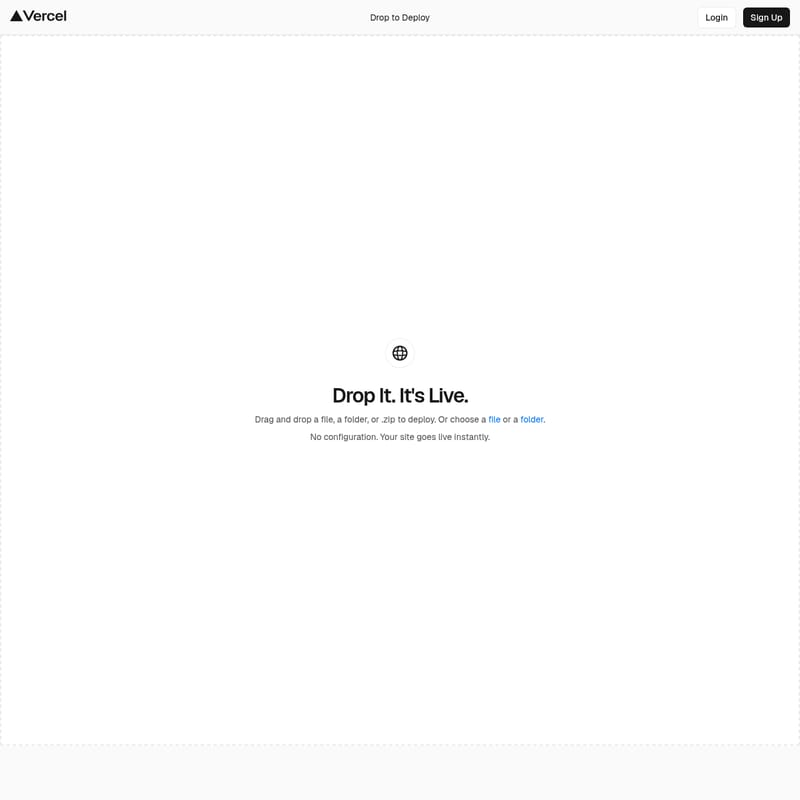
Drop to Deploy is a streamlined, user-friendly platform designed for the modern web, where the primary focus is on speed and efficiency. The service is built around a singular, powerful concept: "Drop It. It's Live." This means that the traditional complexities associated with getting a website onto the internet are completely removed.
At its core, Drop to Deploy is an instant deployment engine. It provides a simple interface where the act of moving a file from your local machine to the web is all it takes to launch a project. Whether you are a developer looking to showcase a quick project or a user who needs a folder accessible on a live URL immediately, Drop to Deploy serves as the bridge between your local files and a live, public presence. The platform is built to handle your data directly, ensuring that when you Drop to Deploy, your site goes live instantly without the need for middle-man processes or technical overhead.
Features of Drop to Deploy
Drag and Drop Deployment Interface
The standout feature of Drop to Deploy is its intuitive drag-and-drop interface. Users do not need to navigate complex command-line tools or intricate dashboards. Instead, you can simply drag and drop a file, a folder, or .zip to deploy. This interaction model is designed to be as natural as moving files between folders on your own computer. The Drop to Deploy system recognizes the content immediately, triggering the process to make the site live.
Versatile File Support
Drop to Deploy is highly flexible regarding the types of data it can process. The platform allows you to choose the method that best suits your workflow:
- Drag and drop a file: Perfect for single-page sites or specific assets.
- Drag and drop a folder: Ideal for complex projects with multiple assets and sub-directories.
- Drag and drop a .zip archive: A convenient way to upload compressed projects for instant expansion and deployment.
No Configuration Required
One of the most significant advantages of using Drop to Deploy is that there is no configuration. In a traditional hosting environment, you might spend hours setting up servers, defining paths, or managing environment variables. With Drop to Deploy, all of those steps are bypassed. The system is designed to understand your files as they are, ensuring that your site goes live instantly without any manual setup or technical adjustments.
Instant Live Status
When the platform says, "It's Live," it means it literally. The transition from a local file to a live site happens in the blink of an eye. Drop to Deploy optimizes the ingestion process so that as soon as you drag and drop a file, a folder, or .zip to deploy, the deployment is initiated and completed. This instant feedback loop is what makes Drop to Deploy a leader in the instant deployment space.
Choice of Selection Methods
While the "drag and drop" feature is a primary highlight, Drop to Deploy also respects different user preferences. If you prefer not to drag files, you can simply choose a file or a folder through a standard file selection dialog. This ensures that Drop to Deploy is accessible regardless of how you prefer to interact with your operating system's file manager.
Use Case for Drop to Deploy
Drop to Deploy is specifically tailored for scenarios where time and simplicity are of the essence.
- Instant Project Launching: If you have a completed web project in a folder, you can use Drop to Deploy to make it accessible to the world in seconds. Because there is no configuration, you can move from local development to a live site faster than any other method.
- Rapid Prototyping: Designers and developers can use Drop to Deploy to share live versions of their work-in-progress. By dropping a .zip or a folder, the prototype is hosted and ready for review instantly.
- Simple Static Hosting: For sites that consist of basic files, Drop to Deploy provides the fastest route to the web. The "Drop It. It's Live" workflow is perfect for landing pages, portfolios, or documentation folders.
- Zero-Hassle Deployment: Users who do not want to deal with the technicalities of web hosting find Drop to Deploy to be the perfect solution. Since there is no configuration, anyone who can drag a file can deploy a website.
How to Use Drop to Deploy
Getting your site live with Drop to Deploy is a straightforward process that involves only a few steps:
- Access the Platform: Start by visiting the Drop to Deploy interface. You can Login to your existing account or Sign Up to create a new one.
- Prepare Your Content: Ensure your website content is organized into a file, a folder, or a .zip archive.
- Deploy Your Site:
- Option A: Simply drag and drop a file, a folder, or .zip to deploy directly into the browser window.
- Option B: Use the interface to choose a file or a folder from your local storage.
- Go Live: Once the drop is complete, no configuration is needed. Your site goes live instantly.
FAQ
Q: What can I upload to Drop to Deploy? A: You can drag and drop a file, a folder, or .zip to deploy. The platform is designed to handle these formats to ensure your site goes live instantly.
Q: Is there any configuration needed to make my site work? A: No. Drop to Deploy features no configuration. The system handles everything so that your site is live the moment you drop your files.
Q: How fast is the deployment process? A: The process is designed to be instant. As the slogan says: "Drop It. It's Live."
Q: Do I need an account to use Drop to Deploy? A: The platform provides Login and Sign Up options to manage your deployments.
Q: Can I select files manually instead of dragging them? A: Yes, you can choose a file or a folder using the standard selection tool if you prefer not to use the drag-and-drop method.
Summary: Drop to Deploy is the premier choice for anyone seeking a "no configuration" path to a live website. By allowing users to drag and drop a file, a folder, or .zip to deploy, it fulfills the promise: Drop It. It's Live.