Typeahead 2.0
Typeahead: Private Local AI Autocomplete for Every Mac Application
Typeahead is a native macOS application providing AI-powered autocomplete across all your apps. Running locally for total privacy, it learns your voice and speeds up typing without subscriptions.
2026-07-08
5.0K
Typeahead 2.0 Product Information
Typeahead: The AI Autocomplete That Works Everywhere You Type
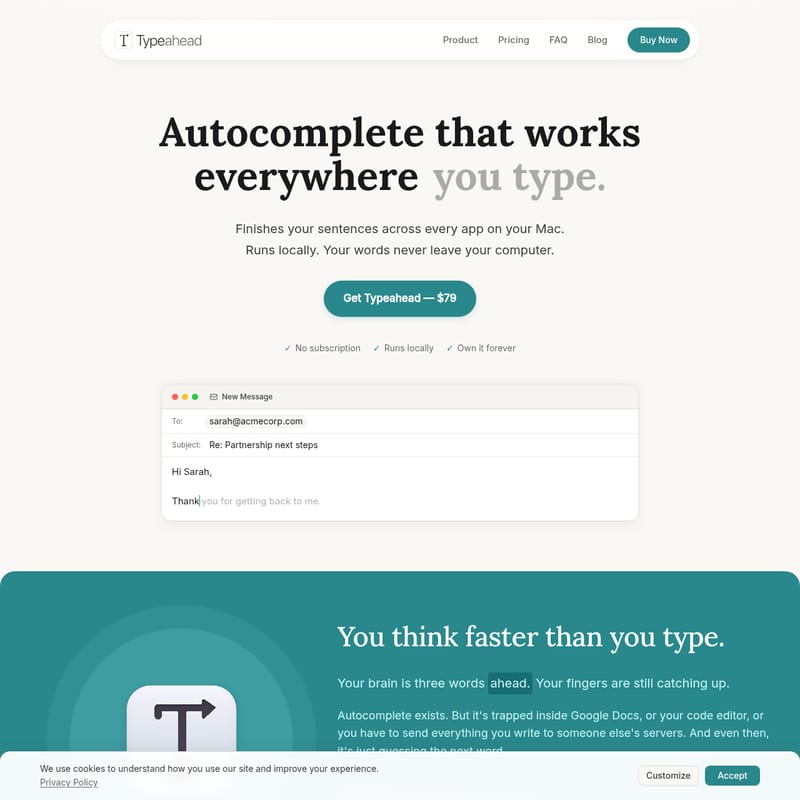
In a world where your brain often moves faster than your fingers, finding a way to bridge the gap between thought and text is essential. Your brain is frequently three words ahead, and your fingers are constantly playing catch-up. While autocomplete technology exists, it is often restricted to specific environments like Google Docs or code editors, or it requires you to sacrifice your privacy by sending your data to external servers.
Typeahead changes this dynamic by offering a powerful, native Mac application that finishes your sentences across every single app on your macOS device. Whether you are drafting an email, writing code, or messaging a colleague, Typeahead ensures that the words appear exactly when you need them, all while keeping your data 100% private and local.
What's Typeahead?
Typeahead is a revolutionary AI autocomplete tool built specifically for macOS. Unlike traditional writing assistants that rely on cloud processing, Typeahead runs entirely on your local machine. This means your words never leave your computer—there is no cloud, no account requirement, and no telemetry monitoring your every move.
Typeahead is designed to be a seamless part of your workflow. It isn't just guessing the next word; it's providing intelligent completions that adapt to your unique writing style. Optimized for Apple Silicon, Typeahead is fast, lightweight, and feels like a native part of the macOS ecosystem. It is a one-time purchase solution that removes the need for monthly subscriptions, allowing you to own the software forever.
Features
Typeahead is packed with features designed to maximize productivity and ensure the highest level of security for your data.
- Native Mac App: Built specifically for macOS and optimized for Apple Silicon. It provides a smooth, integrated experience that feels natural to the platform.
- Lightning Fast Performance: Utilizing GPU acceleration, Typeahead provides zero-lag suggestions. The AI keeps up with your typing speed in real-time.
- 100% Privacy by Design: Your writing is never "encrypted in transit" because it never goes into transit. There are no servers, no accounts, and no data collection. Everything stays on your Mac.
- Universal Compatibility: Typeahead works in every Mac app. From Slack and Notion to Apple Mail, Gmail, Outlook, and Google Docs, if you can type in it, Typeahead can finish your sentences.
- Adaptive Learning: After just a few days of use, Typeahead learns your voice. It adapts to how you write so that suggestions sound like you, not a generic robot.
- Works Offline: Because all AI processing happens locally, Typeahead works perfectly on a plane, in a remote cabin, or anywhere without an internet connection.
- One-Time Purchase: Say goodbye to recurring fees. Pay once and own Typeahead for life, including free updates.
- Efficiency: Users can save between 5 to 8 hours every week by reducing repetitive typing and finishing thoughts faster.
How to Use
Typeahead is designed to be incredibly easy to use, requiring no complex setup or configuration.
- Type Normally: Simply start typing in any application on your Mac.
- View Suggestions: As you type, intelligent suggestions will appear inline with your text.
- Accept with Tab: To accept a suggestion, just press the Tab key. Typeahead will instantly complete the sentence or phrase for you.
- Refine Over Time: Continue using the app normally. Within a few days, you will notice the suggestions becoming increasingly tailored to your specific vocabulary and tone.
Use Case
Typeahead is built for anyone who finds themselves typing more than they would like to. Here are some of the primary ways professionals are using Typeahead to reclaim their time:
The Email Power User
Professionals like Sarah M., who send over 50 emails a day, often find themselves typing the same phrases repeatedly. Whether it is "Thanks for reaching out" or "Just following up on," Typeahead recognizes these patterns and completes them before the second word is even finished. This allows heavy email users to get hours back in their week.
The Developer
While tools like GitHub Copilot are great for code, developers like Alex K. spend half their day in Slack, writing PR descriptions, or filling out issue write-ups. Typeahead fills the gap where coding assistants stop, providing autocomplete for all the human language parts of a developer's day.
The Creative Writer
For writers like Jamie L., the fear of losing their unique voice to AI is real. Typeahead addresses this by learning the user's specific writing style. After a few days of training, the suggestions sound authentic to the writer's voice, enabling faster drafting without losing personal flair.
The Non-Native Speaker
Users like Priya S. use Typeahead to bridge the gap between thought and fluency. It helps in suggesting the right phrasing in real-time, reducing the time spent second-guessing sentence structure and helping users communicate more fluently and confidently.
Business and Productivity Apps
Typeahead is the perfect companion for various applications:
- Messaging: Slack, Microsoft Teams.
- Documentation: Notion, Google Docs.
- Email: Apple Mail, Outlook, Gmail.
- Project Management: Recaps, handoffs, and status updates.
Typeahead vs. The Competition
| Feature | Typeahead | Grammarly | Copilot | Notion AI | | :--- | :---: | :---: | :---: | :---: | | Runs Locally | Yes | No | No | No | | No Account Required | Yes | No | No | No | | No Cloud Processing | Yes | No | No | No | | Works Everywhere on Mac | Yes | No | No | No | | One-time Payment | Yes | No | No | No | | Zero Telemetry | Yes | No | No | No |
FAQ
How do I get Typeahead? You can purchase Typeahead for the early access price of $79 and download it immediately. It is a one-time payment, and the software is yours to keep forever.
How is this different from Grammarly or Copilot? Grammarly is primarily a browser-based tool for fixing grammar, and Copilot is designed for code editors. Typeahead is a universal tool that completes everything you type in every application on your Mac, and it does so entirely locally.
Does it work offline? Yes. All AI processing is handled by your Mac's hardware. While the app checks your license upon startup, it remains fully functional without an internet connection.
What about my privacy? Privacy is a core pillar of Typeahead. Your writing never leaves your Mac. There is no cloud processing and no telemetry. The only network activity involved is for license activation and optional update checks.
What Mac do I need? You will need macOS 14 or later. Typeahead supports both Apple Silicon and Intel processors. It requires a minimum of 8 GB of RAM and approximately 3 GB of free disk space for the AI model.
Is it a subscription? No. Typeahead is a one-time purchase of $79. There are no renewal fees or recurring monthly costs. We believe one-time purchases incentivize building a better product rather than focusing on retention tricks.
What is included in the Launch Day Special? The $79 special offer (discounted from $149) includes smart autocomplete in every Mac app, unlimited usage with no caps or quotas, all language models, free updates for life, and a 30-day money-back guarantee.