Terminal Mode by Even Realities
Even G2 Smart Glasses with Terminal Mode: The Ultimate Wearable for Developers and AI Agents
Experience the future of development with the Even G2 by Even Realities. Featuring the revolutionary Terminal Mode, these smart glasses allow you to stay connected to your coding agents in real-time. Whether you are on a coffee run or at the gym, the Even G2 keeps your workflow visible in your line of sight. Monitor multiple sessions, approve actions with a tap, and provide voice guidance without needing your laptop. Learn more about the Even G2, the Father’s Day offers, and how to optimize your 'Code In The Wild' experience.
2026-06-13
1100.0K
Terminal Mode by Even Realities Product Information
Even G2 Smart Glasses: Master Your Workflow with Terminal Mode
In the rapidly evolving landscape of artificial intelligence and software development, staying tethered to a laptop screen can be a significant limitation. Even Realities has introduced a solution that bridges the gap between high-intensity coding and the freedom of movement: the Even G2 with Terminal Mode. This cutting-edge wearable technology is designed specifically for builders who rely on coding agents to keep their projects moving 24/7.
Currently, Even Realities is celebrating the community with a special Father’s Day Offer. When you buy the Even G2, you can get 10% off the Even R1 and accessories. This limited-time promotion ends on June 24, making it the perfect time to upgrade your development toolkit.
What is Even G2 Terminal Mode?
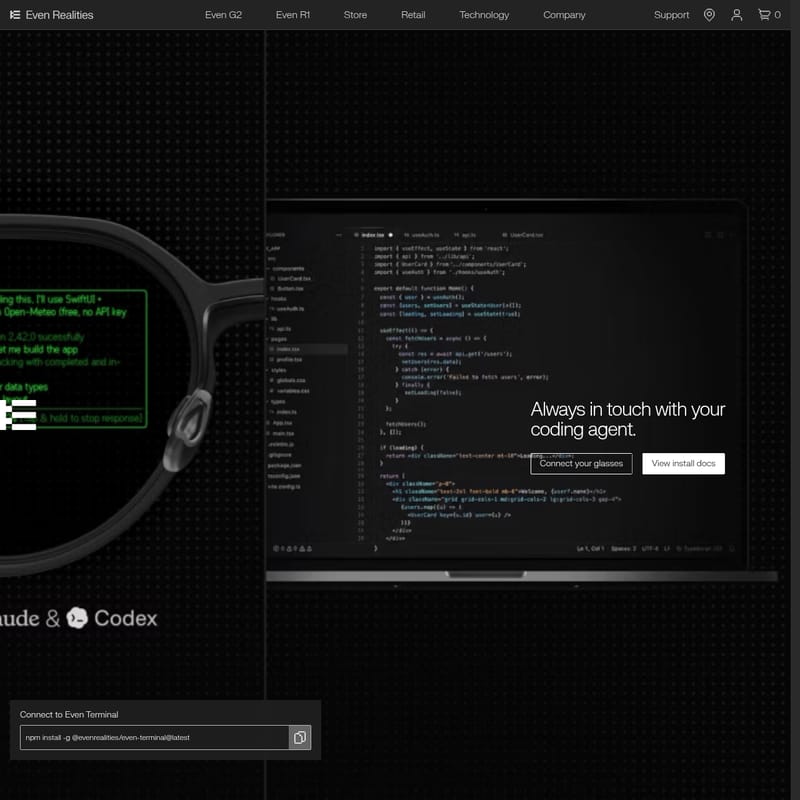
Terminal Mode is a specialized feature for the Even G2 smart glasses that turns your wearable device into a live interface for agentic work. Rather than just being a passive notification window, Terminal Mode allows you to stay in constant contact with your coding agents.
While your agents continue to run on your laptop, their real-time status is streamed directly to your Even G2 glasses. This means you can step away for a walk, a workout, or a coffee run while maintaining a clear view of your progress. It is more than just a terminal; it is a way to ensure that "agents work, while humans live."
Key Features of Even G2 Terminal Mode
1. Line-of-Sight Status Monitoring
With the Even G2, your coding agent's status appears directly in your field of vision. You no longer need to constantly check your phone or laptop to see if a process has finished or if an agent is stuck.
2. Multi-Session Management
The Even G2 interface allows you to monitor multiple sessions simultaneously. You can see what is currently running, what is blocked, and which sessions are waiting for user input, all without jumping between different screens or tabs.
3. Interactive Command and Control
The Even G2 isn't just for viewing; it's for interacting.
- Tap to Approve: Approve simple agent actions with a quick tap on the frame.
- Voice Guidance: Need to provide more complex instructions? Simply tap and hold to record a quick voice instruction when your agent requires more guidance.
4. Seamless Connectivity with TriSync
Utilizing Even Realities' proprietary TriSync connectivity, the Even G2 ensures a stable and fast connection between your host machine, your smartphone, and your glasses. This stability has been praised by early adopters as a "game changer" for mobile productivity.
5. Even HAO™ Technology
The Even G2 features Even HAO™ technology and a digitally designed frame that supports prescription lenses, ensuring that the high-tech heads-up display (HUD) is accessible to everyone regardless of their vision needs.
How to Use Terminal Mode on Even G2
Setting up Terminal Mode on your Even G2 is a streamlined process designed for developers. There is no traditional installer required; everything is handled via a simple CLI command.
Step 1: CLI Installation
On your host machine (where your coding agents are running), perform a global npm installation:
npm install -g @evenrealities/even-terminal@latest
Once installed, you can start the process by picking your agent provider with the --provider flag. The server will print key information and a QR code—ensure you leave this process running.
Step 2: Mobile App Pairing
Open the Even Realities app on your smartphone. Navigate to the Settings menu and enable Terminal Mode. Use your phone's camera to scan the QR code printed by the CLI on your laptop. This pairs your host machine with the app and begins streaming the session to your Even G2 glasses.
Step 3: View and Respond
Once paired, the session will appear on your Even G2 lenses. You can now move away from your desk. Use a ring tap to approve simple actions, or tap and hold to provide voice instructions to the agent in real-time.
Use Case: #CodeInTheWild
Even Realities encourages the community to participate in the #CodeInTheWild challenge. This movement highlights the flexibility provided by the Even G2.
- Coffee Runs: Monitor your agent's terminal while waiting for your latte.
- Workouts: Keep an eye on long-running deployments during your gym session.
- Walking: Stay productive and ensure you are "tokenmaxxing" even when you aren't at your desk.
Developers like memo_amc have noted that the Even G2 replaces the need to constantly check phone apps like Claude or Dispatch, as the terminal is always present in their line of sight. Others, like bhattman, have noted that Terminal Mode prevents the feeling of being "doomed" by not being connected to their agents constantly.
FAQ about Even G2 and Terminal Mode
Which devices support Terminal Mode?
Terminal Mode is specifically designed for the Even G2 smart glasses. It integrates with the Even Realities app and requires a host machine for the CLI.
How do I install the terminal software?
You can install it using the command npm install -g @evenrealities/even-terminal@latest. It runs as a process on your host machine and does not require a bulky installer.
Can I use Terminal Mode if I'm not on my local network?
Yes. While basic setup works on a LAN, there is an advanced setup available for users who need to reach their host machine from outside their local area network.
Is there a Father's Day promotion?
Yes! Buy an Even G2 and receive 10% off the Even R1 and various accessories. This offer is valid until June 24, 2026.
How does the voice recognition work?
The Even G2 uses a "hold-to-talk" feature. Users have reported that this voice recognition feels intuitive and is highly effective for guiding agents when work requires human intervention.
Can I get prescription lenses for the Even G2?
Yes, the Even G2 supports prescription lenses and features a digitally designed frame for maximum comfort and utility.
What other features do Even Realities glasses offer?
Beyond Terminal Mode, the Even Realities ecosystem includes features like Teleprompt, Translate, Even AI, HUD, Transcribe, and Conversate, all powered by technologies like Even HAO™.