Tabstack Dev Tools
Tabstack: The Ultimate API for Structured Web Extraction, Autonomous Research, and Browser Automation
Tabstack is a specialized API platform designed for developers to perform structured web extraction, autonomous research, and browser automation without managing complex infrastructure. By turning any URL into structured JSON or clean markdown in a single call, Tabstack enables the creation of sophisticated AI agents and data-driven applications. It features robust SDKs for Python and TypeScript, an MCP server for coding assistants, and multi-source research capabilities with citations.
2026-06-20
6.0K
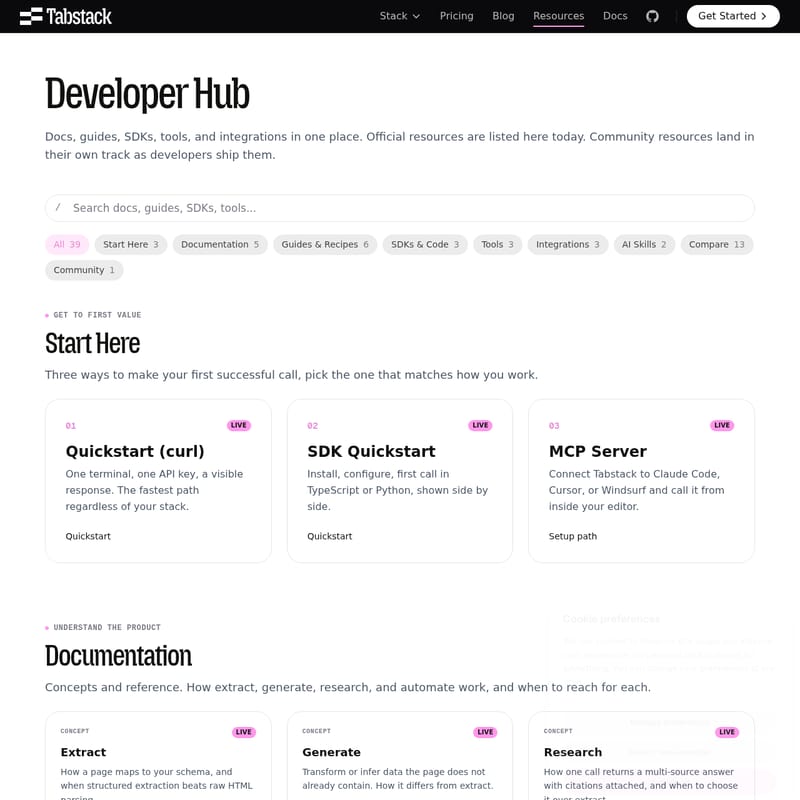
Tabstack Dev Tools Product Information
Tabstack: The Ultimate API for Structured Web Extraction and Research
In the evolving landscape of web data acquisition, developers often face the challenge of managing complex browser infrastructure and fragile parsers. Tabstack emerges as a comprehensive solution, providing a single, powerful API to get a structured response from any URL in one call. By eliminating the need to run browsers or maintain manual parsers, Tabstack streamlines the process of structured extraction, autonomous research, and browser automation.
What's Tabstack?
Tabstack is a developer-centric platform that provides the tools, SDKs, and integrations necessary to transform the web into a programmable database. At its core, Tabstack is designed to handle the "web intelligence" layer of modern applications, particularly those powered by AI agents.
Whether you need to pull specific data points into a JSON schema, conduct deep research across multiple sources, or automate interactive browser sessions, Tabstack provides a managed environment that handles the heavy lifting. It is built for developers who need reliable, structured data without the overhead of managing headless browsers like Playwright or complex scraping frameworks.
Features of Tabstack
Tabstack offers a suite of "AI Skills" and core concepts that allow developers to choose the right tool for their specific data needs. These features are categorized into four main pillars:
1. Structured Extraction
With Tabstack's extraction capabilities, a web page maps directly to your predefined schema. This method is significantly more efficient than raw HTML parsing because it understands the context of the data. Developers can pull structured JSON from any URL, ensuring that the output is ready for immediate use in databases or applications.
2. Generate and Infer Data
Unlike simple extraction, the Generate feature allows Tabstack to transform or infer data that the page does not already contain. This is particularly useful for creating new fields based on existing content, such as sentiment analysis, categorization, or data transformation into a typed schema.
3. Autonomous Research
Tabstack Research is designed for depth. Instead of just scraping a single page, a single call to the research endpoint returns a multi-source answer with citations attached. This is ideal for applications that require factual accuracy and sourced information, providing a significant advantage over simple extraction tools.
4. Browser Automation
For tasks that require interaction, Tabstack provides a browser agent and orchestrator model. This allows for multi-turn interactive sessions, enabling the agent to navigate sites, click buttons, and perform actions as a human would, all managed through the Tabstack API.
How to Use Tabstack
Tabstack is built to fit into any developer's workflow, offering three primary paths to get started and achieve your first successful API call.
01. Live Quickstart (curl)
For those who want the fastest path regardless of their technology stack, the curl command is the best option. With just one terminal and one API key, you can see a visible response instantly. This is the quickest way to test the power of Tabstack extraction.
02. SDK Quickstart
Tabstack provides typed SDKs for both TypeScript (available via npm) and Python (available via PyPI). These SDKs allow for easy installation and configuration, enabling developers to make their first call in just a few lines of code.
- TypeScript SDK: A typed client for Node and the edge.
- Python SDK: A typed client specifically designed for scripts and AI agents.
03. MCP Server Setup
You can connect Tabstack to modern coding assistants like Claude Code, Cursor, or Windsurf. By setting up the Tabstack MCP Server, you can call extraction and research tools directly from inside your code editor.
Use Cases
Tabstack is versatile enough to power a wide range of real-world tasks. Some of the most popular recipes and guides include:
- Price Monitoring: Check competitor pages on a schedule and write changes directly to a store. This is essential for e-commerce intelligence.
- Job Listings Aggregation: Extract structured job listings from multiple company career pages into a single, unified schema.
- Markdown Extraction: Turn any web page into clean markdown. This is a critical step for developers building LLM prompts and RAG (Retrieval-Augmented Generation) pipelines.
- Competitive Intelligence: Tools like the community-built app Rival use the Tabstack API to create open-source dashboards for tracking competitors.
- AI Agent Skills: Use the Tabstack Agent Skill to teach your coding agents how and when to call the API for web-based information gathering.
Integrations and Tools
Tabstack integrates seamlessly with the frameworks that agent builders already use:
- LangChain: Use Tabstack as a loader and tool within the LangChain ecosystem. A dedicated Python package is coming soon to PyPI.
- Vercel AI SDK: An upcoming adapter will expose Tabstack features as callable tools within the Vercel AI SDK.
- Tabstack CLI: Call extract, research, and automate functions directly from your terminal using Homebrew or npm.
- Raycast Extension: Run quick research or extraction tasks directly from your Mac's Raycast launcher.
Tabstack vs. Other Tools
Developers often compare Tabstack to other tools in the market. Here is how it stands out:
- vs. Firecrawl: While both handle markdown, Tabstack excels in structured extraction and autonomous research.
- vs. Playwright: Playwright requires you to run your own browser; Tabstack is a managed API that removes that infrastructure burden.
- vs. Perplexity: Perplexity is a consumer-facing engine, whereas Tabstack is the API you use to build your own version of such products.
- vs. Exa: Exa is for finding pages; Tabstack is for extracting data and performing research on those pages.
FAQ
Q: Do I need to manage my own proxy or browser?
A: No. Tabstack handles all browser infrastructure and proxy management. You simply provide a URL and receive structured data.
Q: What is the difference between Extract and Generate?
A: Extract pulls data that is explicitly on the page according to your schema. Generate can infer or transform data that isn't explicitly present, such as summarizing a text or categorizing a product.
Q: Can I use Tabstack with my local coding agent?
A: Yes. Through the MCP Server, you can expose Tabstack as a tool to coding assistants like Cursor, Windsurf, and Claude Code.
Q: Is there a free tier to start?
A: Yes, Tabstack is free to start. You can get your API key and begin building immediately.