SUN-to-Spotify
Sun to Spotify: Convert Any Topic into a Professional Dialogue Podcast and Listen on Spotify
Sun to Spotify is a comprehensive AI tool and CLI that transforms prompts, questions, or feeds into high-quality dialogue podcasts, managing research, scriptwriting, and publishing directly to your Spotify library.
2026-05-19
615200.0K
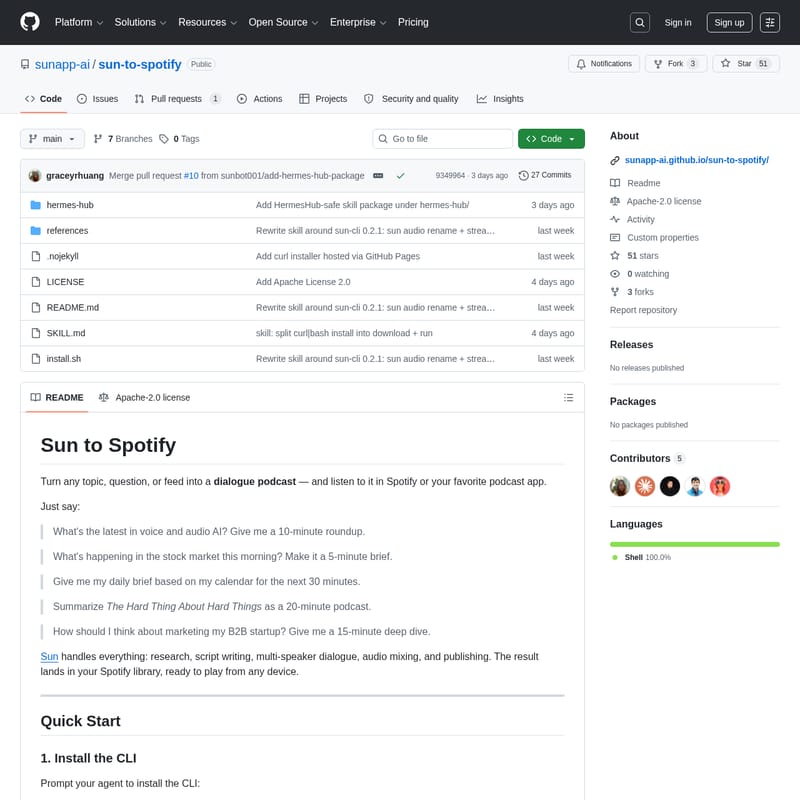
SUN-to-Spotify Product Information
Sun to Spotify: The Ultimate AI-Powered Podcast Generation Tool
In the era of information overload, consuming content efficiently is more important than ever. Sun to Spotify is a revolutionary tool designed to turn any topic, question, or feed into a professional dialogue podcast. Whether you are looking for a quick market update or a deep dive into a complex subject, Sun to Spotify handles the heavy lifting of content creation, allowing you to listen to customized audio content directly in Spotify or your favorite podcast application.
What's Sun to Spotify?
Sun to Spotify is an automated audio production platform that leverages advanced AI to transform text-based prompts into immersive audio experiences. It is not just a text-to-speech engine; Sun handles the entire production pipeline, including research, script writing, multi-speaker dialogue creation, audio mixing, and publishing.
The result of this process is a polished podcast that lands directly in your Spotify library, ready to be played from any device. By using the sun-cli, users can interact with the Sun engine to generate bespoke audio content tailored to their specific needs and duration preferences.
Key Features of Sun to Spotify
Sun to Spotify offers a robust suite of features designed for power users, developers, and casual listeners alike:
- End-to-End Production: Automates research, script writing, and multi-speaker dialogue mixing.
- Flexible Durations: Generate content ranging from a quick 5-minute brief to a comprehensive 120-minute deep dive.
- CLI Integration: The sun-cli provides a powerful command-line interface for managing podcast generation, token authentication, and job status tracking.
- Claude Code Compatibility: Includes a dedicated skill that allows Claude Code to drive the CLI automatically.
- Spotify Integration: Seamlessly publish generated audio to your Spotify library for easy access across all your devices.
- Advanced Customization: Support for voice overrides, prompt files, and callback URLs for automated workflows.
- Developer Friendly: Full JSON mode support for all commands and a comprehensive API for headless or CI/CD environments.
Use Cases for Sun to Spotify
Sun to Spotify is versatile enough to handle a wide range of content needs. Here are several ways you can utilize this technology:
- Daily News & Market Briefs: "What's happening in the stock market this morning? Make it a 5-minute brief."
- Educational Deep Dives: "How should I think about marketing my B2B startup? Give me a 15-minute deep dive."
- AI & Tech Roundups: "What's the latest in voice and audio AI? Give me a 10-minute roundup."
- Personal Productivity: "Give me my daily brief based on my calendar for the next 30 minutes."
- Book Summaries: "Summarize 'The Hard Thing About Hard Things' as a 20-minute podcast."
How to Use Sun to Spotify
Getting started with Sun to Spotify involves a few simple steps, from installation to your first generated podcast.
1. Install the CLI
You can install the Sun CLI using your preferred Python package manager. Python 3.10+ is required. The recommended method is using uv, but pipx or standard pip also work:
curl -fsSL https://sunapp-ai.github.io/sun-to-spotify/install.sh | bash
Alternatively, install manually:
- uv:
uv tool install 'sun-cli>=0.2.1' - pipx:
pipx install 'sun-cli>=0.2.1' - pip:
pip install 'sun-cli>=0.2.1'
2. Install the Skill for Claude Code
If you use Claude Code, you can teach it how to drive the CLI by cloning the skill into your directory:
- User-scoped:
git clone https://github.com/sunapp-ai/sun-to-spotify ~/.claude/skills/sun-to-spotify
3. Authentication
To begin, you must authenticate your session. Run the following command to sign in via your browser:
sun login
You can verify your identity with sun whoami or log out using sun logout. For headless environments, you can use Personal API tokens created via sun tokens create <name>.
4. Generating Content
Use the sun audio create command to start a podcast generation job. You can provide a prompt directly or via a file:
sun audio create --prompt "Your topic here" --duration-minutes 10 --wait
5. Saving to Spotify
Once the generation is complete, you can use the save-to-spotify skill or CLI to upload the audio to your Spotify account. This ensures your custom podcast is available in your podcast library with proper packaging.
CLI Reference
| Command | Description |
| :--- | :--- |
| sun login | Sign in via browser |
| sun audio create | Start a podcast generation job |
| sun audio status <id> | Check job status (PENDING, SUCCESS, etc.) |
| sun audio get <id> | Download finished audio or manifest |
| sun tokens create | Mint a personal API token |
Important Audio Create Flags
--prompt TEXT: The content generation instruction (1-4000 chars).--duration-minutes N: Desired length (5-120 minutes).--wait: Blocks the terminal until the job is finished.--partial: Used withsun audio getto download segments while they are still being generated.
FAQ
How do I fix a 401 Unauthorized error?
This usually means your token is missing, invalid, or revoked. Ensure you have run sun login or that your SUN_TOKEN environment variable is set correctly.
Can I generate audio longer than 30 minutes?
Yes. While 30 minutes is the default, you can specify a duration between 5 and 120 minutes using the --duration-minutes flag.
What happened to the 'sun courses' command?
sun courses is now a hidden alias for backwards compatibility and is deprecated. You should use the sun audio command for all new scripts.
How do I handle 429 Rate Limit errors?
If you receive a 429 error, it means you have exceeded the rate limit. You should respect the Retry-After header and wait before attempting another request.
Where can I find my API tokens?
You can manage your tokens using sun tokens list and sun tokens revoke <name>. Note that the secret for a new token is only printed once during creation.