LumiMusic
Sponsored product video
See LumiMusic in motion
LumiMusic: The All-in-One AI Music Generation and Creation Platform
LumiMusic is a comprehensive AI music creation platform that transforms text prompts and lyrics into high-quality songs. Featuring advanced V5 and V5.5 models, it provides integrated tools for remixing, stem splitting, and MIDI editing within a single, unified workspace.
2026-07-27
--K

LumiMusic Product Information
LumiMusic: The Ultimate All-in-One AI Music Creation Platform
In the evolving landscape of digital creativity, LumiMusic stands out as a comprehensive AI music creation platform designed to empower both novices and professionals. By integrating advanced artificial intelligence with a suite of professional-grade editing tools, LumiMusic allows users to move from an initial concept to a polished, finished track within a single, connected workspace. Whether you are looking to generate a full song from a simple text prompt or fine-tune an existing arrangement, LumiMusic provides the technology and flexibility required to bring your musical vision to life.
What is LumiMusic?
LumiMusic is an all-in-one platform for high-quality AI music generation. It is built to handle the entire lifecycle of music production, from the first spark of an idea to the final distribution-ready file. Unlike basic generators, LumiMusic utilizes advanced AI models (including V5 and V5.5) to produce rich, expressive sounds that include both vocals and instrumentals.
The platform is designed as a unified workspace where users can generate full songs, create structured lyrics, and then refine those tracks using a variety of connected AI tools. LumiMusic is more than just a generator; it is a creative suite that offers royalty-free music with clear usage rights, making it an essential tool for content creators, songwriters, and producers who need original audio without the complexities of traditional licensing.
Key Features of LumiMusic
LumiMusic offers a diverse array of features categorized into creation, editing, and specialized audio tools. These features ensure that every aspect of your music production is covered.
AI Music Generation and Lyric Creation
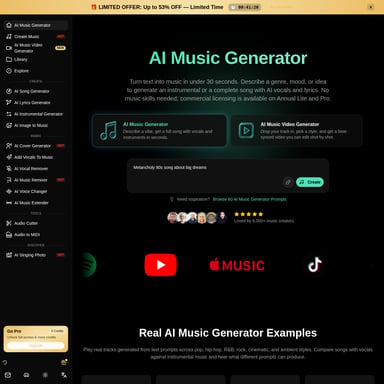
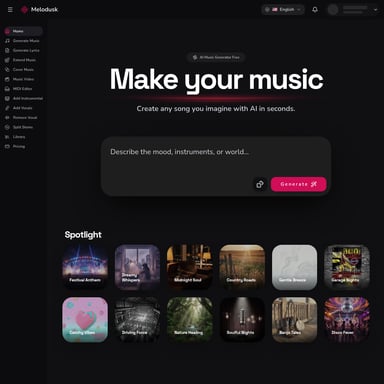
- AI Music Generator: The flagship tool of the platform, the LumiMusic AI Music Generator, allows you to create complete songs from a text prompt. It can produce full vocal and instrumental tracks that sound polished and professional.
- AI Lyrics Generator: If you have a theme or a specific idea but lack the words, the LumiMusic AI Lyrics Generator can transform your concepts into structured song lyrics, providing a solid foundation for your track.
Advanced Editing and Refinement Tools
- AI Music Remixer: This tool allows you to rework a song's style and arrangement, giving you the power to change the vibe of a track after it has been created.
- AI Music Extender: If your track is too short or needs a longer outro, the LumiMusic AI Music Extender can continue the music beyond its original ending seamlessly.
- Add Vocals & Instrumentals: These specialized tools allow you to build upon existing tracks. You can add professional-sounding vocals to an instrumental piece or build a full arrangement around a standalone vocal track.
Specialized Audio Tools
- AI Stem Splitter: A powerful utility for producers, the LumiMusic AI Stem Splitter separates a full track into individual stems (such as drums, bass, and vocals) for more granular mixing.
- AI Vocal Remover: This allows for the clean separation of vocals from the instrumental backing, ideal for creating karaoke tracks or remixes.
- AI Audio to MIDI: Transform audio recordings into editable MIDI notes, which can then be manipulated in the MIDI Editor, a browser-based piano roll for precise musical adjustments.
- AI Music Analyzer: Gain deep insights into your creations. This tool reveals the tempo (BPM), key, musical structure, and overall style of any track.
How to Use LumiMusic
LumiMusic is designed with a streamlined workflow that takes you from an initial idea to a finished, shareable track in three simple steps.
01. Create a Song
The process begins in the creation phase. You can input a descriptive text prompt or your own custom lyrics into the LumiMusic AI Music Generator. The platform will then process this information to produce a complete vocal or instrumental track. For example, you might request a "dreamy synth-pop R&B track with whisper vocals" or "early 2000s UK garage with soulful R&B vocals."
02. Shape the Sound
Once the initial track is generated, you can refine the music using the connected suite of tools. This is where you can use the AI Music Remixer to change the style, the AI Stem Splitter to isolate specific instruments, or the MIDI Editor to tweak the melody. This integrated workflow ensures you never have to leave the LumiMusic environment to polish your sound.
03. Finish and Share
After refining your music, you can organize your tracks within your personal Library. LumiMusic provides a polished player for high-quality playback. From here, you can download your files or share a dedicated listening page with others. Depending on your plan, you can also enjoy commercial usage rights for your finished tracks.
Use Cases and Musical Styles
LumiMusic is versatile enough to handle a vast range of musical genres and creative needs. Here are some examples of what can be created on the platform:
- Synth-Pop & R&B: Create tracks like "My Vision", featuring bedroom-pop textures and ethereal atmospheres.
- UK Garage & 2-Step: Produce energetic tracks like "Secret Fantasy" with shuffled drums and soulful vocals.
- Indie Rock & Dance Punk: Generate restless, witty tracks like "I Can't Stop Now" that capture the energy of 2000s indie rock.
- Electronic Pop & Nu-Disco: Craft tracks like "Pocket Weather" with elastic R&B grooves, warm analog pads, and close-miked female vocals.
- Cinematic & Dark Trap: Design atmospheric hip-hop like "After Midnight" with deep 808s and late-night city energy.
- Liquid Lounge & Jazz: Compose smooth tracks like "Not The Same" featuring Rhodes chords, muted trumpets, and ASMR-style vocals.
LumiMusic Pricing and Plans
LumiMusic offers several tiers to accommodate different levels of usage, from casual hobbyists to professional creators. All paid annual plans include a 40% discount.
- Free Plan: Includes 15 sign-up credits (approx. 2 songs), the Basic AI Music Generator, AI Lyrics Generator, and 7-day cloud storage. (No commercial use).
- Starter Plan ($8.3/month billed annually): Provides 6,000 credits per year (approx. 1,200 songs), access to V5 & V5.5 models, 1,000 downloads, and the AI Stem Splitter. (No commercial use).
- Pro Plan ($25/month billed annually): Includes 24,000 credits per year (approx. 4,800 songs), Commercial License, unlimited downloads, and priority email support.
- Unlimited Plan ($59/month billed annually): Offers unlimited credits and songs, commercial licensing, and full access to all AI music editing tools.
FAQ
What is LumiMusic? LumiMusic is a complete AI music creation platform that allows you to generate, edit, and share music in one connected workspace.
What can I create with LumiMusic? You can create full songs with vocals and instruments across various genres, including pop, rock, electronic, jazz, and trap, using text prompts or your own lyrics.
Is LumiMusic more than an AI music generator? Yes. While it features a powerful generator, it also includes a suite of editing tools like a stem splitter, remixer, MIDI editor, and music analyzer to refine your tracks.
Can I upload and edit my own audio? Yes, LumiMusic provides tools like the AI Vocal Remover, AI Stem Splitter, and AI Music Analyzer to work with and refine audio content.
Do I need music production experience? No. LumiMusic is designed to be intuitive, allowing anyone to create music from prompts, though it offers advanced tools like the MIDI editor for those who want more control.
Where are my songs and results saved? Your songs and musical projects are saved in your personal LumiMusic Library, where you can organize, play, and share them.