Nada
Nada: Compose Music With Voice - The Ultimate Voice-to-MIDI Creator for iOS and Mac
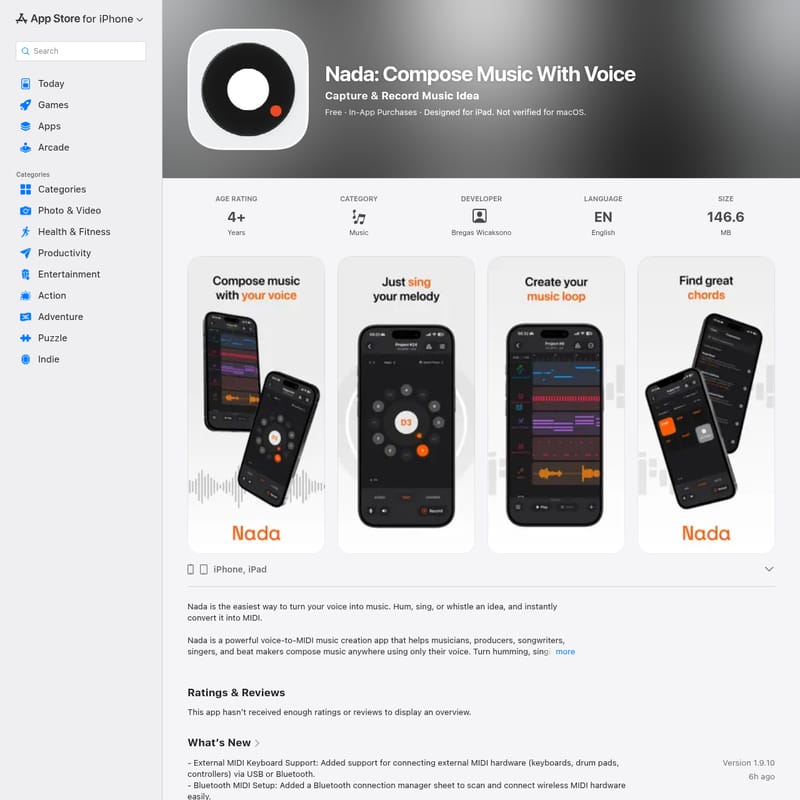
Nada is a professional music creation app that converts humming, singing, or whistling into real-time MIDI data. Designed for producers and songwriters, it features multi-track arranging, beat making, and advanced mixing tools.
2026-06-29
597600.0K
Nada Product Information
Nada: Compose Music With Voice – Transform Your Voice into Professional Music
In the world of modern music production, the gap between a fleeting melody in your head and a fully realized track can often feel insurmountable. Nada: Compose Music With Voice is designed to bridge that gap instantly. Developed by Bregas Wicaksono, Nada is a powerful voice-to-MIDI music creation app that empowers musicians, producers, songwriters, and beat makers to capture inspiration using nothing but their vocal cords. Whether you hum, sing, or whistle, Nada converts your audio input into high-quality MIDI data, allowing you to control a vast array of virtual instruments in real-time.
What is Nada?
Nada is an innovative music composition tool that functions as a sophisticated voice-to-MIDI converter. It is specifically designed for the iPhone, iPad, and Mac, providing a portable and intuitive music production workflow. The core philosophy of Nada is "Don't just sing it. Create it." It takes the natural human ability to vocalize a melody and translates it into a digital performance that can be edited, layered, and refined.
Unlike traditional MIDI controllers that require keyboard or finger-drumming skills, Nada uses your voice as the primary interface. This makes it an essential tool for music creators who want to build complex arrangements, develop harmonies, or sketch out song ideas quickly without being tethered to a desk or a physical MIDI keyboard. From electronic music and hip hop to cinematic scores and indie tracks, Nada is the ultimate companion for capturing musical ideas before they disappear.
Key Features of Nada
Nada is packed with professional-grade features that turn your mobile device into a complete recording studio. Below are the standout capabilities of the app:
Advanced Voice-to-MIDI Conversion
At the heart of the app is a high-performance voice-to-MIDI engine. Utilizing advanced real-time pitch detection, Nada transforms your microphone into a versatile MIDI maker.
- Real-Time Performance: Hear instruments respond instantly as you sing or hum.
- Instrument Versatility: Use your voice to play Piano, Synthesizer, Bass, Guitar, Strings, Pads, and Lead instruments.
- Custom MIDI Control: Control your favorite virtual instruments with natural vocal expressions.
Multi-Track Song Maker
Nada is more than just a converter; it is a multi-track song maker. Users can layer multiple tracks to build complete musical arrangements.
- Arrangement Tools: Build song demos, instrumental tracks, and vocal compositions by combining melodies and harmonies.
- Clip-Based Timeline: A redesigned engine allows for clip splitting, copy-and-paste functionality, and easy track management.
- Track Automation: Draw volume or panning curves over time using the dedicated automation lanes to add movement to your tracks.
Beat Making and Rhythm Tools
For beat makers, Nada offers a dedicated Beat Rack Grid Sequencer.
- 16-Step Drum Grid: Manually tap out and program beats or use the Beat Rack in the MIDI Editor to edit clips step-by-step.
- Trigger Cards: Build rhythm patterns and grooves instantly whenever inspiration strikes.
- Beat Templates: Load pre-made rhythm patterns to jumpstart your production.
Key, Scale, and Chord Lock
To ensure your compositions always sound professional, Nada includes a Key & Scale Lock system.
- Stay in Tune: Lock your performance to specific keys and scales to avoid wrong notes.
- Chord Pads: Utilize chord pad auditions and keyboard feedback. The app even features Guitar Voicings (Open & Barre modes) for realistic chord mapping.
- Automatic Scale Detection: The app can automatically detect the scale of your recordings to streamline the workflow.
Professional Mixing and Effects
- Master Channel Effects: Includes a dedicated Master Channel strip with limiting and compression controls.
- Visual Master EQ: A multi-band equalizer with a live interactive frequency curve and real-time spectrum analyzer.
- C++ DSP: Built with C++ digital signal processing for faster performance and better stability.
- Metal GPU Rendering: High-performance rendering ensures that timeline notes and waveforms scroll smoothly at up to 120Hz.
MIDI Export and Connectivity
Nada is built to fit into your existing professional workflow.
- DAW Export: Export MIDI files, audio recordings, and song drafts directly to your favorite Digital Audio Workstation (DAW).
- External Hardware Support: Connect external MIDI keyboards, drum pads, and controllers via USB or Bluetooth.
- Standalone MIDI Controller: With a Nada Pro subscription, use the app as a standalone MIDI controller for your desktop DAW.
Use Cases
Nada is a versatile tool suitable for various musical scenarios:
- Songwriters: Capture a melody idea while walking or traveling by humming into the app.
- Music Producers: Quickly sketch out basslines or lead synth lines without needing a MIDI keyboard.
- Beat Makers: Develop drum patterns and rhythm foundations on the go.
- Beginners: Learn music creation by interacting with instruments using a familiar tool—the voice.
- Content Creators: Generate unique musical backgrounds and loops for videos and social media.
How to Use Nada
Getting started with Nada is straightforward, even for those new to music production:
- Select an Instrument: Choose from the built-in library of sounds, including pianos, synths, or guitars.
- Set Your Key: Use the Key & Scale lock to ensure your vocal input stays harmonically consistent with your project.
- Vocalize Your Idea: Hum, sing, or whistle into the microphone. Nada will convert your pitch and rhythm into MIDI notes in real-time.
- Edit in the MIDI Editor: Refine your performance using the MIDI Editor. You can quantize notes, adjust velocity, and use the Super Zoom (up to 300%) for fine-tuning.
- Build Your Arrangement: Add more tracks for beats, harmonies, and secondary instruments. Use the clip-based timeline to arrange your song.
- Mix and Master: Apply automation curves for volume and panning, and use the Master EQ to polish your sound.
- Export and Share: Once satisfied, export your MIDI or audio files to share with collaborators or finish the track in a desktop DAW.
FAQ
Q: Does Nada require a MIDI keyboard?
A: No, Nada is designed specifically so you can compose music anywhere using only your voice. However, it does support external MIDI hardware if you choose to use it.
Q: Can I use Nada on my Mac?
A: Yes, Nada is compatible with macOS 15.0 or later, provided you have a Mac with an Apple M1 chip or later.
Q: Is there a way to keep my humming in tune?
A: Absolutely. The Key & Scale Lock feature allows you to restrict your performance to specific musical scales, preventing any "wrong" notes from being recorded.
Q: Can I export my creations to other software?
A: Yes, Nada supports exporting MIDI files and audio recordings directly to your favorite DAW or for sharing with friends.
Q: Does the app support Bluetooth MIDI?
A: Yes, the latest updates include a Bluetooth MIDI setup manager to easily connect wireless hardware.
Q: Is Nada free to use?
A: Nada is free to download and offers basic features, with In-App Purchases available for Monthly ($9.99) or Annual ($99.99) subscriptions to unlock the full professional suite.