stagecaptions.io
Stage Captions: Real-Time Closed Captioning Software for Live Events and Broadcasts
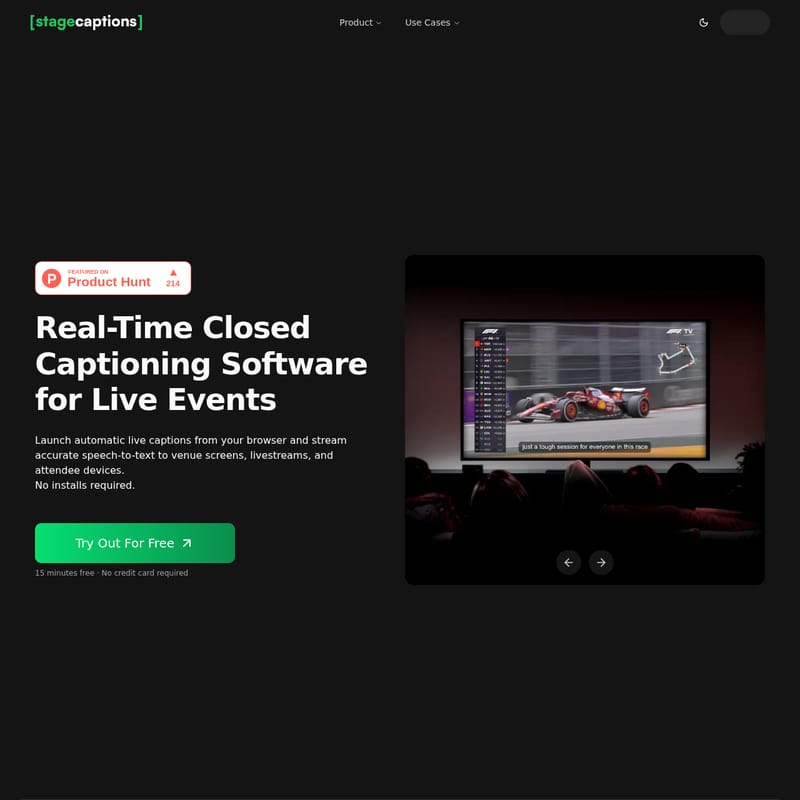
Stage Captions is a powerful, browser-based real-time closed captioning software designed to transform live speech into accurate text instantly. Ideal for conferences, sports, and broadcasts, it offers low-latency performance, custom dictionaries for technical terminology, and seamless integration with production tools like OBS Studio and Resolume Arena. With no software installation required, users can launch captions from a browser and share them via QR codes or direct URLs, ensuring universal accessibility across all attendee devices and venue screens.
2026-02-09
--K
stagecaptions.io Product Information
Real-Time Closed Captioning Software: Enhance Live Events with Stage Captions
In the modern landscape of live production, accessibility and engagement are paramount. Stage Captions provides a professional-grade real-time closed captioning software solution designed to convert live speech into accurate text instantly. This browser-based platform allows event organizers, broadcasters, and educators to stream high-quality captions to venue screens, livestreams, and personal devices without the need for complex software installations.
What's Stage Captions?
Stage Captions is a comprehensive, browser-based platform engineered to turn live speech into captions for venues, hybrid events, and broadcasts. As a leading real-time closed captioning software, it eliminates the technical barriers typically associated with live transcription. Users can launch the application directly from their web browser and deliver speech-to-text data to stadium scoreboards, livestream overlays, or attendee smartphones in real time.
Whether you are managing a small presentation or a massive international broadcast, this real-time closed captioning software scales to meet your needs, ensuring that your message is accessible to everyone, including the hearing impaired and non-native speakers.
Features of Stage Captions
Low-Latency Performance
The core of any real-time closed captioning software is its speed. The advanced captioning engine within Stage Captions processes audio instantly. This ensures that the transcription matches the spoken word with industry-leading latency, making it the perfect choice for high-stakes environments where timing is critical.
Protect Technical Terminology with Custom Dictionaries
Accuracy is vital when dealing with specialized industries. Stage Captions allows users to maintain custom dictionaries to protect technical jargon, brand names, and proper nouns. By adding these terms to your profile, the real-time closed captioning software recognizes and transcribes them correctly every time.
Complete Control via Presenter Dashboard
The intuitive Presenter Dashboard gives producers and presenters full control over their caption sessions. From one interface, you can:
- Create and manage caption rooms.
- Configure various audio inputs.
- Customize caption styles to match your branding.
- Monitor performance in real time.
Universal Access with QR-Powered Viewer
Accessibility is made effortless through the QR-powered viewer. Attendees can scan a simple QR code to access live captions on their own smartphones, tablets, or laptops. This feature ensures that no one is left out, and no app downloads are required for the audience.
Professional Production Integration
Stage Captions is built for professionals. The browser-based output provides a clean URL that integrates flawlessly with production software and hardware, including:
- OBS Studio for livestreams.
- Resolume Arena for visual performances.
- Professional stage display systems and venue screens.
How to Use Stage Captions
Setting up your real-time closed captioning software is a straightforward three-step process designed for efficiency.
- Create a Room: Open your browser, select your preferred audio input, set the target language, and choose a design preset that fits your event's aesthetic.
- Share the Viewer Link or QR Code: Provide your audience with the link or QR code so they can follow the live transcription instantly from any device.
- Display Captions: Use the browser output to project captions onto venue screens or integrate them into your livestream overlays for a professional finish.
Use Cases for Real-Time Closed Captioning Software
Stage Captions is a versatile tool built for every stage. Its adaptability makes it suitable for a wide range of industries:
- Conferences: Improve accessibility for international attendees and provide a text-based reference for keynote speeches.
- Live Events: Ensure that every attendee, regardless of their position in the venue, can follow the audio.
- Broadcast & Streaming: Add professional-grade overlays to your digital broadcasts using easy browser integration.
- Education: Support students in lecture halls by providing real-time text versions of educational content.
- Presentations: Help corporate presenters deliver their message clearly in any environment.
- Sports Events: Use stadium scoreboards to display live commentary via real-time closed captioning software for fans.
FAQ
What is Stage Captions? It is a browser-based platform that turns live speech into captions for venues, hybrid events, and broadcasts.
Do presenters or attendees need any software? No installs are required. The software works entirely through the browser for both the producer and the viewer.
How accurate and fast is it? The platform uses an advanced engine to deliver high-accuracy transcriptions with minimal delay (low latency).
Which languages are supported? Stage Captions supports multiple languages, allowing for real-time multilingual captioning to reach a global audience.
How many viewers can join a caption feed at once? The system is designed to scale, allowing large numbers of attendees to join via the QR-powered viewer simultaneously.
Can we run a rehearsal or test session? Yes, users can start a free trial or use their account to test audio inputs and display settings before the live event starts.
Can we export transcripts? The platform provides the ability to export transcripts after the session is complete for record-keeping or post-event distribution.