Spotlight by Backplanes
Spotlight by Backplanes: AI Agent Session Reports for Claude Code and Codex
Spotlight by Backplanes is a specialized CLI tool designed to provide deep visibility into AI agent behavior. By reading Claude Code and Codex sessions, it generates comprehensive session reports that highlight reasoning, best practices, and potential security risks. With local redaction for privacy and a free tier for individuals and teams, it helps developers optimize their AI workflows.
2026-06-12
7.0K
Spotlight by Backplanes Product Information
Spotlight by Backplanes: The Ultimate Visibility Tool for Claude Code and Codex
In the rapidly evolving world of AI-assisted development, have you ever stopped to wonder what your codex is actually doing? As AI agents become more integrated into our daily workflows, much of their activity remains invisible, hidden behind terminal prompts and automated scripts. Spotlight by Backplanes is designed to change that. By reading your Claude Code and Codex sessions, Spotlight provides detailed session reports that help you and your team get recursively better at leveraging AI agents.
Built by a team of industry leaders and practitioners from renowned companies like Valimail and Algolia, and backed by HF0, Spotlight by Backplanes is the premier solution for developers who want to move fast without losing sight of the details.
What’s Spotlight by Backplanes?
Spotlight by Backplanes is a developer-centric tool that "shines a light" on every AI agent session. It is specifically built to analyze the interactions between developers and agents like Claude Code and Codex. Instead of letting your agent run in a vacuum, Spotlight watches every move and provides quick, actionable feedback through high-quality session reports.
These reports identify what is worth keeping, what needs to be fixed, and where you can save time in future runs. Whether your agent ran for 40 minutes while you were in a meeting or executed a complex migration while you were focused on other tasks, Spotlight ensures that you are never out of the loop. It is currently free for individuals and teams, making it an essential addition to any modern development stack.
Key Features of Spotlight by Backplanes
Spotlight by Backplanes is packed with features designed to enhance visibility, security, and efficiency in AI-driven development.
Comprehensive Session Reports
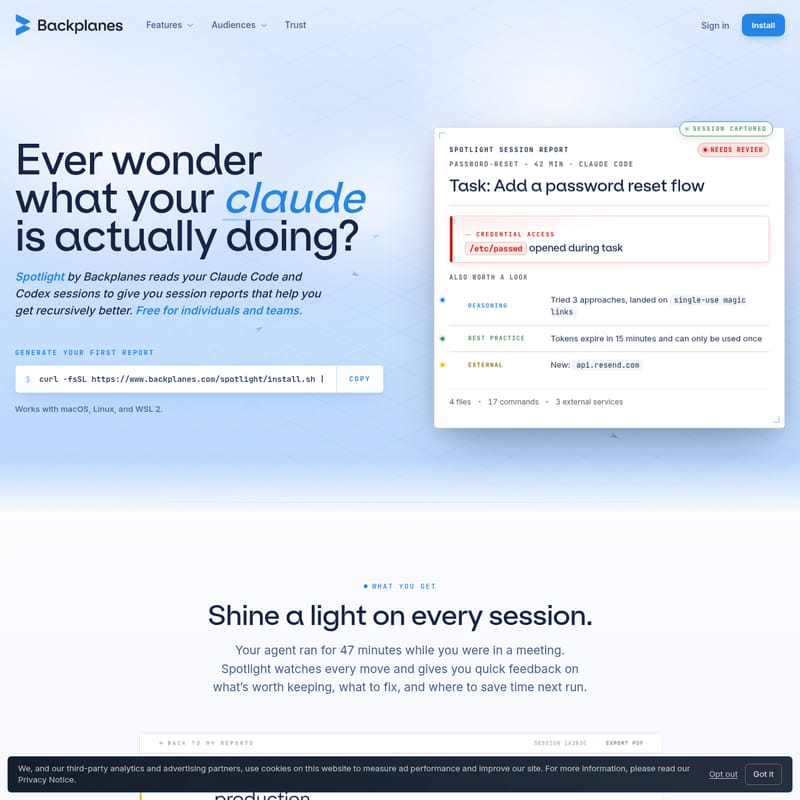
At the core of the product are the Spotlight Session Reports. These reports categorize your agent's work into segments like "Needs Review" or "Business as Usual." Each report provides a deep dive into the task performed, such as:
- Reasoning: Understand the logic behind the agent's decisions (e.g., trying multiple approaches before landing on a solution).
- Best Practices: See if the agent followed security protocols, such as ensuring tokens expire or using single-use links.
- External Services: Tracking which APIs (like api.resend.com) were accessed during the session.
- Statistics: A quick summary of files changed, commands run, and external services utilized.
Automated Session Capture
You don't have to manually trigger a recording. Spotlight captures sessions automatically as they end. This allows you to stay in your flow while the tool works in the background to process the data and prepare your reports.
Privacy-First Local Redaction
Security is a top priority for Backplanes. Spotlight includes local redaction capabilities that strip out Personally Identifiable Information (PII) and sensitive credentials from your logs before any data leaves your local machine. This ensures that your secrets stay on your laptop.
No Complex Integrations
Unlike other tools that require intrusive permissions, Spotlight requires no OAuth into Anthropic or OpenAI. The CLI simply reads the session data after the session has concluded, maintaining a clean boundary between your AI provider and your reporting tools.
Multi-Platform Support
Spotlight by Backplanes is built for the modern developer environment. It works seamlessly with:
- macOS
- Linux
- WSL 2 (Windows Subsystem for Linux)
Use Cases for Spotlight by Backplanes
1. Security Auditing and Credential Monitoring
AI agents often have broad permissions to explore directories. A critical use case for Spotlight by Backplanes is identifying when an agent accesses sensitive files outside of its task scope. For example, if an agent is tasked with a "password-reset" flow but opens /etc/passwd, Spotlight will flag this as "Needs Review," allowing you to catch potential security regressions immediately.
2. Improving Agent Prompting and Reasoning
By reviewing the "Reasoning" section of a session report, developers can see how the agent interpreted a prompt. If an agent tried three different approaches before succeeding, you can use that insight to refine your instructions for the next run, saving time and compute resources.
3. Team Visibility and Attribution
For teams, Spotlight provides a unified view of what every agent is doing across the organization. It helps lead developers track migrations, schema changes, and UI tweaks without having to manually review every line of code generated by the AI.
How to Use Spotlight by Backplanes
Getting started with Spotlight by Backplanes is a straightforward process designed to get you up and running in minutes.
Step 01: Install the CLI
Open your terminal and run the following command to install the Spotlight CLI:
curl -fsSL https://www.backplanes.com/spotlight/install.sh | sh
This script handles the installation for macOS, Linux, and WSL 2. Once installed, the CLI will authenticate in your browser, allow you to create your team account, and begin capturing sessions automatically.
Step 02: Continue Your Workflow
You don't need to change how you work. Simply continue using Claude Code or Codex as you normally would. Spotlight stays active in the background, watching for finished sessions. When a session ends—whether it was a password-reset, an auth-refresh, or a migrate-pg-v14 task—Spotlight captures it instantly.
Step 03: Review Your Reports
Once your next session is completed, your first report will appear. You can access a dashboard that shows which reports are "Business as Usual" and which ones require your attention. This allows you to quickly scroll past clean runs and focus your energy on the sessions that had issues or performed unexpected actions.
FAQ
Is Spotlight by Backplanes really free? Yes! Spotlight is free for individual developers and the teams they work on. There are no seat counts or trial clocks. For large-scale organizational rollouts requiring specific administrative controls, Backplanes offers custom setups.
Which AI agents are supported? Currently, Spotlight works with Claude Code and Codex. However, the roadmap includes potential support for Cursor AI, Google OpenCode, and others based on user feedback.
Does my data leave my computer? Spotlight uses local redaction to ensure that PII and credentials are removed before anything is sent to the Backplanes servers. Your privacy and security are maintained throughout the reporting process.
How do I get my first report? Simply install the CLI and complete one session with your agent. Your first report will be generated automatically after that session ends.
Move fast and see everything. Start capturing your AI agent sessions today with Spotlight by Backplanes.