Skills Janitor
Skills Janitor: Audit, track usage, and manage your Claude Code skills efficiently.
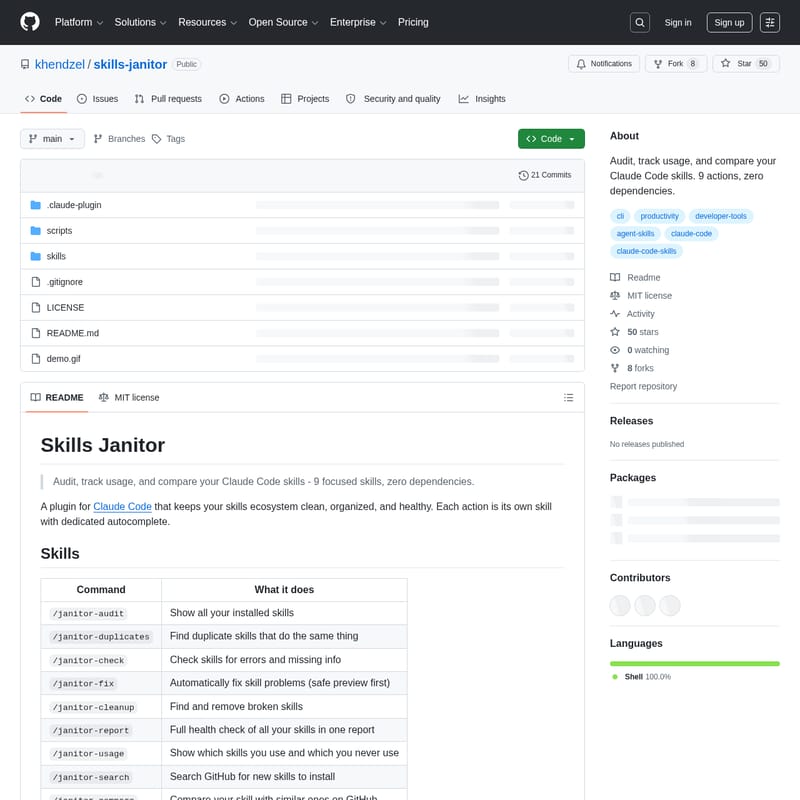
Skills Janitor is a powerful plugin for Claude Code designed to audit, track usage, and compare your AI skills ecosystem. It features 9 focused skills with zero external dependencies, allowing developers to maintain a clean and organized workspace. Users can identify duplicate skills, check for errors, and generate comprehensive health reports. With built-in GitHub search and market comparison tools, Skills Janitor ensures you are using the best available tools while identifying unused or broken skills to optimize your developer workflow.
2026-04-15
615200.0K
Skills Janitor Product Information
Skills Janitor: The Essential Plugin for Claude Code Skill Management
Maintaining a clean and efficient development environment is crucial for productivity. Skills Janitor is a specialized plugin designed specifically for Claude Code that allows users to audit, track usage, and compare their skills ecosystem. With a focus on organization and health, Skills Janitor provides 9 dedicated actions to ensure your Claude Code skills remain high-performing and clutter-free.
Built with zero dependencies, Skills Janitor operates using Bash and Python 3, making it a lightweight yet powerful addition to your developer toolkit. Whether you are looking to find duplicate skills, fix errors, or discover new tools on GitHub, Skills Janitor offers a comprehensive suite of commands to manage your AI-driven workflow.
What's Skills Janitor?
Skills Janitor is an audit and management plugin for Claude Code. It serves as a "janitor" for your digital workspace, keeping your skills organized by providing deep insights into how they are used. The tool helps developers identify which skills are active, which are broken, and which are redundant.
By parsing conversation history, Skills Janitor can generate usage reports that highlight your most-used skills and recommend the removal of unused ones. It also facilitates skill discovery by allowing you to search and compare your current local skills against those available in the wider GitHub ecosystem.
Features
Skills Janitor is packed with features designed to optimize your Claude Code experience:
- Comprehensive Auditing: View a full inventory of all installed skills.
- Duplicate Detection: Easily identify redundant skills that perform identical tasks.
- Health Checks & Auto-Fixing: Scan for errors or missing information and automatically resolve issues with a safe preview mode.
- Usage Tracking: Analyze your conversation history to see which skills you actually invoke and which have been dormant.
- Skill Discovery: Search GitHub for new skills to install and compare them against your current set.
- Zero Dependencies: Requires no
pipinstalls ornode_modules, relying strictly on Bash, Python 3, andcurl. - Safety First: Destructive operations are dry-run by default and never delete content without explicit confirmation.
How to Use Skills Janitor
Skills Janitor integrates seamlessly into your workflow using slash commands with dedicated autocomplete or natural language triggers.
Installation
To install Skills Janitor, you can use the recommended plugin marketplace command:
/plugin marketplace add khendzel/skills-janitor
/plugin install skills-janitor
Alternatively, you can clone the repository directly into your Claude directory:
git clone https://github.com/khendzel/skills-janitor ~/.claude/skills/skills-janitor
Command Reference
Once installed, you can use the following commands to manage your Claude Code skills:
/janitor-audit: Displays a full inventory of all your skills./janitor-usage: Shows a detailed report of which skills you invoke versus which remain unused./janitor-search: Searches GitHub for new Claude Code skills based on keywords./janitor-compare: Performs market analysis by comparing your skill against alternatives on GitHub./janitor-check: Scans your skills for errors and missing information./janitor-fix: Automatically fixes detected skill problems (previews changes first)./janitor-report: Generates a full health report of your entire skill ecosystem./janitor-cleanup: Identifies and removes broken skills./janitor-duplicates: Finds duplicate skills that perform overlapping functions.
Usage Tracking Examples
Skills Janitor provides actionable insights. For instance, a usage report might look like this:
=== Skills Janitor - Usage Report === Period: 4 weeks Active skills: 4 / 36 (11%) Unused skills: 32 (89%) Recommendation: Remove 32 unused skills
Use Case
Developer Workflow Optimization
Developers using Claude Code often accumulate many skills over time. Skills Janitor is ideal for those who want to prune their environment to ensure only the most efficient and error-free tools are active.
Skill Maintenance
If you are a skill creator, you can use /janitor-check and /janitor-fix to ensure your metadata is correct, and /janitor-compare to see how your skill stacks up against others in the GitHub community.
Resource Discovery
Users looking to expand their capabilities can use /janitor-search to find high-quality skills on GitHub. By setting a GITHUB_TOKEN, users can enjoy higher rate limits and more accurate search results.
FAQ
Q: Does Skills Janitor delete my files automatically? A: No. Skills Janitor never deletes anything without explicit confirmation and uses dry-runs by default for all potentially destructive operations.
Q: Can it modify marketplace plugins? A: No, the tool is designed to respect your ecosystem and will not modify plugin or marketplace-managed skills.
Q: What are the system requirements?
A: You only need Bash, Python 3, and curl. There is no need for external package managers like pip or npm.
Q: How does the usage tracking work? A: It parses your local conversation history to identify which skill commands have been invoked over a specific period.