SAM TTS
Microsoft SAM Text to Speech Online
Create Microsoft SAM text to speech online with SAM TTS. Enter text, adjust pitch and speed, preview the classic Windows voice, and download WAV audio for free.
2026-03-06
98.0K
SAM TTS Product Information
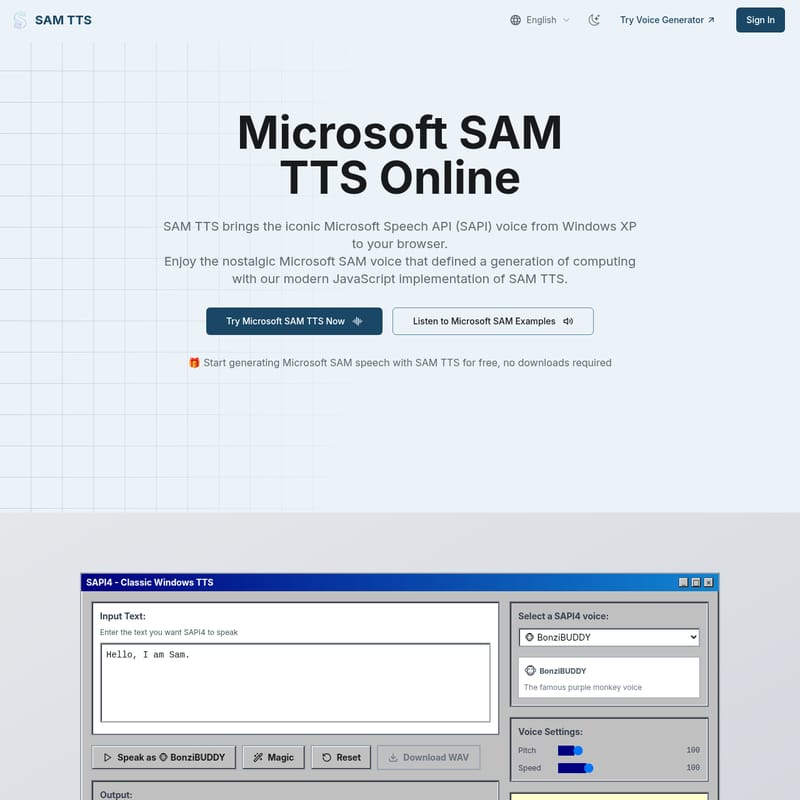
SAM TTS is a browser-based Microsoft SAM text-to-speech generator for people who want a deliberately robotic, Windows XP-style voice. The current interface lets you enter text, preview the result, adjust pitch and speed, choose from the listed voice options, and download WAV audio. It is a better fit for retro narration and character experiments than for natural, human-like voiceover.
What does SAM TTS do?
The official SAM TTS website presents the tool as a modern browser implementation inspired by classic Microsoft SAM and SAPI-era speech. It is not Microsoft's current cloud speech service. Instead, it focuses on the recognizable synthetic sound associated with older Windows text-to-speech.
At a glance, the workflow includes:
- Text input for speech generation
- A voice or preset selector
- Pitch and speed controls
- In-browser audio preview
- Reset and random-text options shown in the current interface
- WAV download for the generated result
The main attraction is the voice character. SAM TTS is intentionally mechanical, so it can work well when a polished neural voice would sound too modern.
How to use Microsoft SAM text to speech online
- Enter the text. Start with a short English sentence so you can hear how the generator handles pronunciation and pacing. The product's guidance says common English words and phrases usually work best.
- Choose an available voice option. Use the selector to compare the presets currently offered. The available list may change, so treat the live interface as the source of truth.
- Adjust pitch and speed. Higher pitch creates a smaller or more exaggerated character, while lower pitch produces a heavier sound. Speed changes the delivery without making the voice natural.
- Preview and revise. Listen before downloading. If a name or unusual term sounds wrong, try a phonetic spelling, add punctuation, or split a long sentence into shorter lines.
- Download the WAV file. Save the result only after the wording and timing sound right. Keep the original text alongside the audio if you expect to revise it later.
Testing one short sentence first makes the process faster and helps you find useful settings before generating a longer passage.
When is a Microsoft SAM voice generator useful?
SAM TTS is most useful when the robotic quality is part of the creative direction.
- Retro videos and memes: Create narration that suggests early desktop computing or internet culture.
- Game and character prototypes: Give a robot, terminal, announcer, or non-player character a temporary synthetic voice.
- Alerts and short audio cues: Generate compact lines that can be exported as WAV audio.
- Voice experiments: Compare how pitch, speed, spelling, and punctuation change rule-based speech.
It is less suitable for audiobooks, customer support, accessibility narration, or other work that needs consistently natural pronunciation and long-form listening comfort. For those cases, a modern neural text-to-speech service is usually a better match.
Important limitations to check
The generator's strengths also create its main limitations:
- The voice is intentionally synthetic. It should not be evaluated by the same standard as a realistic AI voice generator.
- English text is the safest starting point. Proper names, technical terms, abbreviations, and other languages may need manual spelling adjustments.
- Long passages require more review. Break long scripts into sections so pronunciation or pacing problems are easier to correct.
- A WAV download does not define usage rights. Review the site's current terms before using generated audio commercially or in a client project.
- A browser-based workflow is not automatically suitable for confidential text. Check the current privacy policy before entering sensitive or private material.
The official site mentions additional developer-oriented capabilities, but public availability and documentation can change. Verify the live product before planning an integration around them.
SAM TTS compared with modern AI voices
Choose SAM TTS when you specifically want a retro computer voice, simple controls, and a downloadable audio file. Its value comes from a narrow and recognizable style.
Choose a modern AI voice platform when you need natural expression, multilingual pronunciation, speaker cloning, long-form narration, or production controls. Those tools solve a different problem, so replacing the SAM sound with a more realistic voice may remove the effect you wanted.
The practical decision is straightforward: use SAM TTS for character and nostalgia; use neural text to speech for realism and broader language coverage.
Frequently asked questions
Is SAM TTS free to use?
The current official interface presents the generator as free and does not require a software download. Check the live site for any future changes to access or usage terms.
Can I download Microsoft SAM speech as audio?
The current generator includes a WAV download option. Preview the result first, because pronunciation and pacing can change after you edit the text or voice settings.
Is SAM TTS an official Microsoft product?
The site presents SAM TTS as a modern browser-based recreation of the classic voice style, not as Microsoft's current speech platform. Do not confuse it with Microsoft's current speech products.
What text works best?
Start with standard English words and short or medium-length sentences. Punctuation can help create pauses, while phonetic spelling may improve unusual names or technical terms.
Can I use the generated audio commercially?
Do not assume that a download button automatically grants commercial rights. Review the current SAM TTS terms and consider any relevant brand, character, or project requirements before publishing.
Should you use SAM TTS?
Use SAM TTS if you want Microsoft SAM text to speech online for a deliberately robotic, retro result. It offers a direct path from text to preview, pitch and speed adjustment, and WAV download. If your priority is natural delivery, multilingual narration, or polished long-form audio, choose a modern text-to-speech service instead.