Open Vibe
Open Vibe: A Free Open-Source AI Tutor for Building Production-Ready SaaS Apps
Open Vibe is a 100% free, MIT-licensed open-source tool that transforms AI agents like Claude Code into a professional SaaS-building assistant. It helps users master web development systems while shipping real applications using the Open SaaS template.
2026-05-14
1.0K
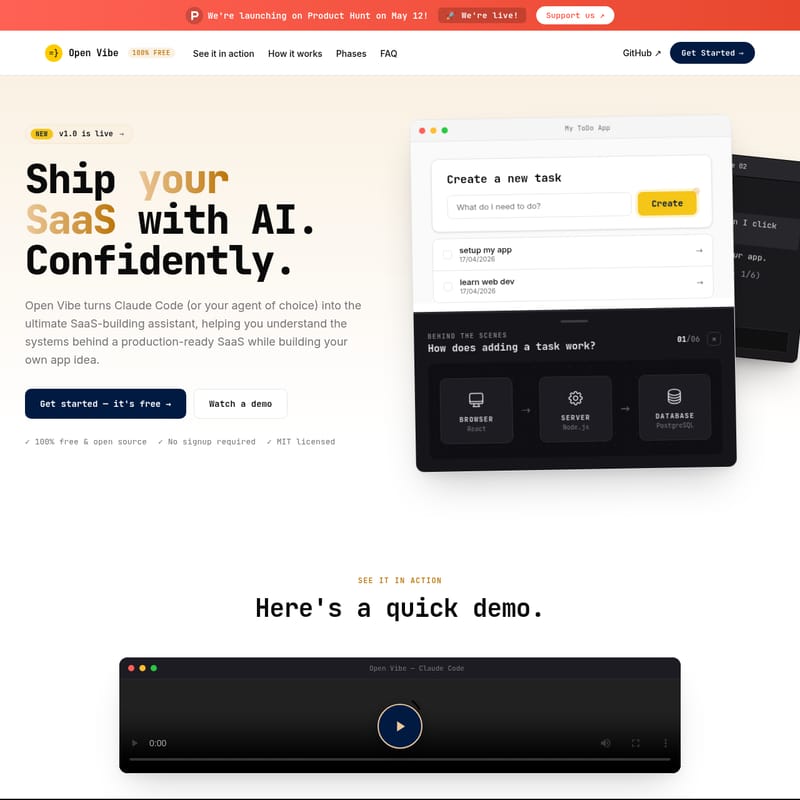
Open Vibe Product Information
Open Vibe: Ship Your SaaS with an AI Agent That Actually Teaches You
In the rapidly evolving world of software development, a new trend called "vibe coding" has emerged. While it allows for quick prototyping, many developers find themselves stuck in a cycle of endless prompting without truly understanding the systems they are building. Open Vibe is here to break that loop. Launched on Product Hunt on May 12, Open Vibe is a 100% free and open-source tool designed to turn AI agents into professional tutors and SaaS-building assistants.
Whether you are using Claude Code, Cursor, or another capable AI agent, Open Vibe ensures that you don't just ship an app—you actually understand it. By moving beyond throwaway tutorials and fragile "vibe-coded" prototypes, Open Vibe helps you grok the systems behind production-ready software.
What's Open Vibe?
Open Vibe is a comprehensive educational and development framework that integrates directly into your AI agent's environment. It is specifically designed to help aspiring founders and developers build their own SaaS ideas using a production-ready stack. Instead of watching a video or reading a static PDF, Open Vibe provides a set of skills, instructions, and interactive components that run in your terminal.
Built by the team at Wasp, Open Vibe turns your AI agent into a mentor that guides you through the complexities of full-stack development. It utilizes the Open SaaS template—a powerful, MIT-licensed starter pack—to ensure your application is built on a professional foundation from day one. With Open Vibe, you are always in control, learning the patterns and decisions that professional coders use to build modern applications.
Key Features of Open Vibe
Open Vibe is packed with features that make it the ultimate assistant for building and learning simultaneously. Here is what sets Open Vibe apart:
1. 100% Free and Open Source
Static bootcamps and tutorials can cost hundreds of dollars and become outdated almost immediately. Open Vibe is completely free and MIT-licensed. You can fork it, remix it, or even run your own classes with it. It stays free forever, ensuring that high-quality web development education is accessible to everyone.
2. Lessons Live Directly in Your Agent
There is no need to switch between a browser and your IDE. Open Vibe runs inside your terminal. As you build your SaaS, the agent provides context-aware tutoring. When something breaks, your Open Vibe assistant helps you understand why it broke, rather than just giving you a snippet to paste.
3. Local Execution and Privacy
With Open Vibe, everything runs on your machine. There is no platform lock-in and no surprises regarding token limits. Your code stays local until you are ready to deploy. When that time comes, your Open Vibe assistant helps you launch your app to the web in about five minutes.
4. Interactive Diagrams and "Behind the Scenes" Visibility
Open Vibe provides a "Behind the Scenes" look at how your application functions. Through interactive diagrams and overlays, you can see exactly how a request moves from the React browser interface to the Node.js server and finally to the PostgreSQL database. You can click any node in the live diagram, and the Open Vibe agent will explain its function in detail.
5. Powered by Open SaaS
By using Open Vibe, you get access to the Open SaaS stack, which includes built-in features such as:
- Auth: Complete authentication systems.
- Payments: Integration to start making revenue right away.
- Admin Dashboard: Manage your users and data.
- Email & Blog: Essential communication and marketing tools.
- AI-Ready: Templates optimized for AI integration.
How to Use Open Vibe
Getting started with Open Vibe requires no signup and can be initiated with a single command. Follow these steps to begin your journey:
Step 01: Paste the Install Prompt
Copy and paste the following prompt into your preferred AI agent (like Claude Code or Cursor):
I want to ship my app with Open Vibe. Run
curl -fsSL https://openvibe.sh/llms.txtand follow the file's instructions.
This command drops the guided instructions and curriculum directly into your assistant.
Step 02: Build Alongside Your Assistant
The Open Vibe agent will guide you step-by-step. It facilitates your understanding of the core concepts while you work on your actual SaaS project. You can ask questions like "what happens behind the scenes when I click 'add task'?" to trigger a deep dive into the system architecture.
Step 03: Learn Interactively
Whenever you feel confused, you can go deep into the logic. Use the live diagrams provided by Open Vibe to visualize data flow and system interactions. The assistant remains patient, allowing you to go at your own pace.
Use Case: For Aspiring Founders
Open Vibe is the perfect tool for founders who want to build a real business while gaining technical literacy. Instead of building "throwaway" apps, you use Open Vibe to develop a functional product like SearchCraft.io, Scribeist.com, or PromptPanda.io. By building on the Open SaaS stack, you ensure that your project is ready for users and revenue from the moment you finish the curriculum.
Phases of the Open Vibe Curriculum
Open Vibe is organized into modules that cater to different skill levels:
Phase 1: Learn the Basics (Available Now)
This phase is for those new to web apps. It covers:
- Setup: Configuring your environment and tools.
- Module 0: Building your first web app.
- Module 1-4: Data, Databases, UI design, and system connections (some modules coming soon).
Phase 2: Build a SaaS with Open SaaS (Available Now)
For those who have the basics down, this phase focuses on production features:
- Module 1: Exploring the contents of the Open SaaS template.
- Module 2: Mastering the Auth → Payment → Access loop.
- Module 3-4: Wiring up real payments and beyond.
FAQ
Is Open Vibe really free? Yes. Open Vibe is 100% free and open source under the MIT license. This includes the agent instructions, skills, and diagrams.
Do I need to know how to code? No. Open Vibe is designed for everyone from beginners to pros. If you can type and follow instructions, you can use Open Vibe.
What agents does it work with? It is tested in Claude Code, but since the course pack is plain Markdown, it works with any agent that can read files and execute tools, such as Cursor, Codex, or OpenCode.
Will I learn to code? Open Vibe focuses on teaching the systems, patterns, and architectural decisions a pro coder uses. While you aren't just memorizing syntax, you can always ask the agent to explain the specific code to you.
Why choose Open Vibe over just asking an AI agent? Agents don't always know what you don't know. Without a curriculum like Open Vibe, you might only ask surface-level questions. Open Vibe provides a structured plan and live diagrams to ensure you learn the systems beneath the code.
Do I need an API key? You bring your own agent and its respective subscription or API key. Open Vibe itself provides the free curriculum and tools to run on top of those platforms.
How long does it take? The course is designed for approximately ten weeks at 6 hours per week, but you can move as fast or as slow as you like.
Why the name 'Open Vibe'? Because while "vibe coding" is how many build today, Open Vibe assists you in understanding the underlying concepts so you don't build fragile, misunderstood applications.