Novu Connect
Novu Connect: Integrate Claude Managed Agents into Slack, Teams, and WhatsApp
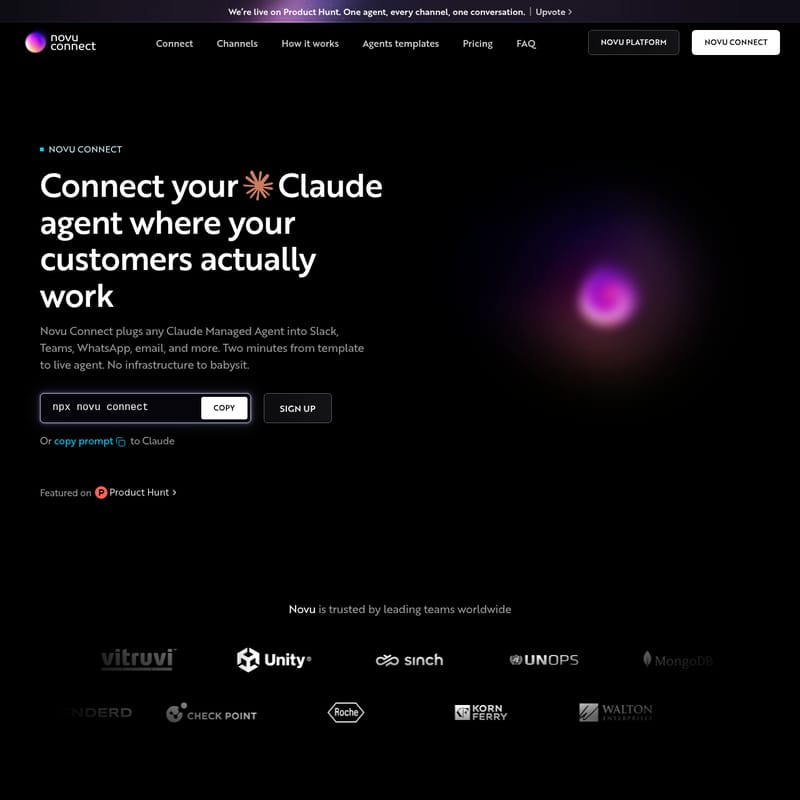
Novu Connect is an open-source platform that enables developers to seamlessly plug Claude Managed Agents into communication channels like Slack, Teams, and WhatsApp in just two minutes. With pre-built templates for onboarding and support, it offers a secure, SOC2 and HIPAA-compliant way to deploy AI agents where teams and customers already work.
2026-06-17
121.0K
Novu Connect Product Information
Novu Connect: Deploy Your Claude Managed Agent Across Every Communication Channel
In the rapidly evolving landscape of artificial intelligence, the ability to deploy intelligent agents where your team and customers actually work is a game-changer. Novu Connect is a powerful platform designed to bridge the gap between your Claude Managed Agent and the tools your organization uses every day. Whether it is Slack, Microsoft Teams, WhatsApp, or Email, Novu Connect allows you to turn a standard AI agent into a functional teammate that lives within your existing workflows.
By leveraging Novu Connect, you can move away from isolated AI browser tabs and bring the power of Claude directly into your production environment. With a promise of moving from a template to a live agent in just two minutes, Novu Connect eliminates the need for developers to "babysit" complex infrastructure, allowing for a seamless, multi-channel conversation experience.
What is Novu Connect?
Novu Connect is an integration layer specifically built for Claude agents. It serves as a unified connector that plugs any Claude Managed Agent into popular communication platforms including Slack, Teams, WhatsApp, Email, and Telegram. The platform is designed with a "one agent, every channel, one conversation" philosophy, ensuring that your AI assistant maintains context and visibility regardless of where the interaction takes place.
Novu Connect is built in the open, meaning it is an open-source solution that allows developers to inspect the code, contribute new integrations, and adapt the system to fit specific team workflows. It is trusted by leading teams worldwide and provides a robust framework for those looking to deploy AI SDK Agents without the overhead of building custom notification and messaging pipelines from scratch.
Key Features of Novu Connect
Novu Connect is packed with features that make it the premier choice for deploying AI agents in a professional setting:
1. Multi-Channel Deployment
With Novu Connect, your agent shows up everywhere at once. You can pick a single channel or deploy across all of them simultaneously. Supported and upcoming channels include:
- Slack: Send team alerts and connect agents directly to workspaces.
- WhatsApp: Reach users quickly on their preferred mobile messaging app.
- Email: Deliver clean, automated digests and updates.
- Telegram: Push instant updates to users and groups.
- Microsoft Teams: Notify and interact within team channels.
- Coming Soon: Integration with Google Chat, iMessage, Linear, Zoom, Discord, Messenger, and GitHub is currently on the roadmap.
2. Pre-Built Agent Templates
You don't have to start from a blank prompt. Novu Connect offers a variety of ready-to-use templates with prompts, tools, and skills already wired up. These templates are designed for specific business functions like onboarding, support, and billing.
3. Tool and Skill Integration
Novu Connect allows you to keep the tools your agent relies on. By connecting to MCP (Model Context Protocol) connectors, your agent can access real-time context from sources such as:
- Notion and Confluence for documentation.
- Mixpanel and Amplitude for product data.
- Stripe for billing information.
- Zendesk, Freshdesk, and Intercom for customer support tickets.
4. Enterprise-Grade Security
Security is a top priority for Novu Connect. The platform is built to connect to your work environment without compromising privacy, adhering to the following standards:
- SOC2 Type II
- HIPAA compliance
- ISO 27001:2013
- GDPR
Use Cases for Novu Connect
Novu Connect is versatile enough to handle a wide range of automated tasks. Here are some of the primary use cases supported by specialized templates:
Onboarding and Activation
- Activation Coach (Ace): This agent nudges users toward their first "win" in your product and celebrates their milestones, turning signups into active accounts via Slack and Email.
- Trial Conversion (Scout): Helps trial users find value before their trial expires by connecting to Mixpanel, Stripe, and Intercom data.
- Welcome Guide (Wren): Walks new signups through the setup process step-by-step to prevent onboarding stalls.
Self-Service Support
- Knowledge Base (Sage): An agent that answers product questions using your official documentation (Notion/Confluence) in plain English, attaching sources to deflect support tickets.
- Ticket Tracker (Track): Allows customers to check their support ticket status on Slack or WhatsApp without waiting for a manual reply.
- Troubleshooter (Dex): Diagnoses technical issues step-by-step instead of providing generic help articles. It resolves fixable problems and escalates complex ones to your human team.
How to Use Novu Connect
Getting started with Novu Connect is designed to be a developer-friendly experience that takes place largely within your terminal. Follow these steps to go live:
- Initialize the Connection: Open your terminal and run the following command to start the setup process:
npx novu connect - Sign In: Follow the prompt to sign in or create a new account to manage your agents.
- Choose a Path: You can either start from a pre-built template (like the Pull Request review agent) or point Novu Connect at a Claude Managed Agent you have already built.
- Connect Your Tools: Wire up your agent to your existing data sources using MCP connectors like Notion, GitHub, or Zendesk.
- Select Your Channels: Choose where you want your agent to live (e.g., Slack or WhatsApp) and configure the delivery settings.
- Deploy: Once configured, your agent is ready to work as a teammate, answering questions and moving work forward in real-time.
Pricing Plans
Novu Connect offers flexible pricing to suit projects of all sizes:
- Free ($0/month): Includes 100 active conversations, 2 agents, and 2 channels. This plan is powered by Novu branding.
- Pro ($30/month): Includes 1,000 active conversations, 5 agents, and 5 channels. Extra conversations are billed at $0.02 each, and Novu branding is removed.
- Team ($250/month): Includes 5,000 active conversations, 10 agents, 10 channels, and a custom email domain. Extra conversations cost $0.015 each.
- Enterprise: Custom volume for complex workflows. Includes unlimited agents and channels, HIPAA BAA, SSO/SCIM, audit logs, and dedicated support.
FAQ
What happens when I exceed my conversation limit? Depending on your plan, you may be charged for extra conversations (Pro and Team plans) or need to upgrade to ensure uninterrupted service.
What happens when I hit my agent or channel limit? You will be notified to either manage your current agents/channels or upgrade to a higher tier like the Pro or Team plan to increase your capacity.
Are some agent providers or channels gated to higher plans? While many features are available on the Free tier, advanced customization and higher volume limits are reserved for the Pro, Team, and Enterprise tiers.
Can I move between plans without losing data? Yes, Novu Connect allows for transitions between plans while maintaining your existing configurations and data.
Is Novu Connect HIPAA compliant? Yes, Novu Connect offers HIPAA compliance, which is especially critical for enterprise and healthcare-related workflows available in the Enterprise tier.