ImageVids AI
ImageVids AI: Professional AI Image to Video Generator for Creating High-Quality Cinematic Motion Clips
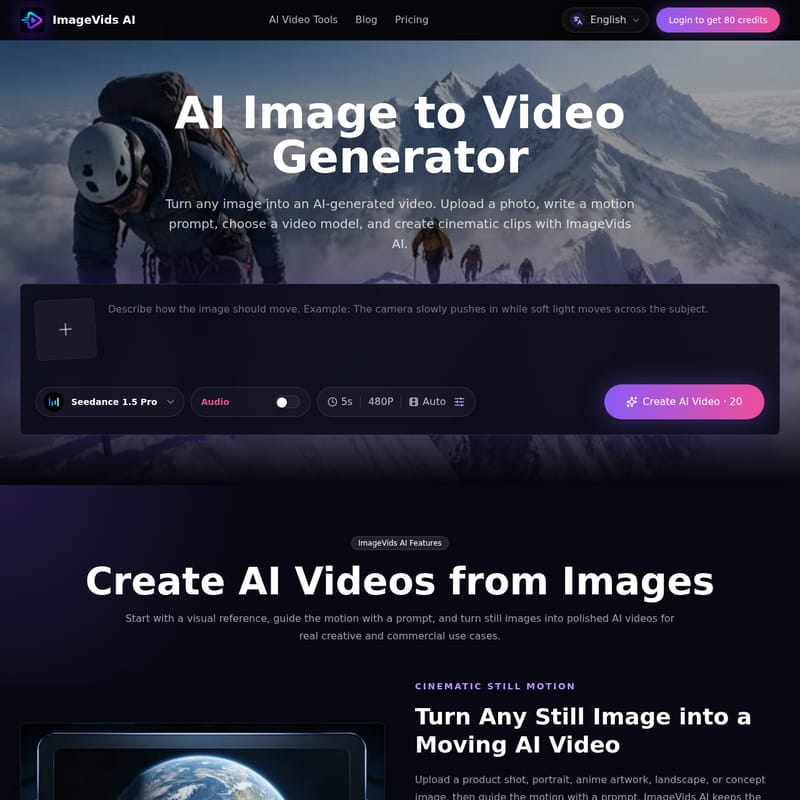
ImageVids AI is a powerful AI image to video generator that transforms still photos, products, and artwork into cinematic videos using advanced motion prompts and multiple AI video models. Perfect for marketers and creators, it offers HD exports and commercial use.
2026-07-17
--K
ImageVids AI Product Information
Transform Still Images into Cinematic Motion with ImageVids AI
In the modern digital landscape, static images often struggle to capture the full attention of a fast-paced audience. ImageVids AI bridges this gap by offering a sophisticated AI image to video generator that breathes life into your still photos. Whether you are a marketer looking for compelling product ads or a creative artist wanting to animate anime illustrations, ImageVids AI provides the professional AI video tools necessary to create high-quality, AI-generated video content with ease.
What's ImageVids AI?
ImageVids AI is a specialized platform designed to turn any image into a moving video. Unlike general-purpose video editors, this tool is built specifically around the image to video workflow. By leveraging advanced AI video models, users can upload a photo, write a detailed motion prompt, and generate polished, professional clips. The platform is designed for both creative and commercial use, maintaining the integrity of the original visual while adding dynamic camera movements, subject motion, and atmospheric effects. With ImageVids AI, you can transform a single visual reference into a cinematic masterpiece in just a few clicks.
Features of ImageVids AI
ImageVids AI is packed with features designed for flexibility and high-quality output. Here are the core features that make it a leading AI image to video generator:
- AI Image to Video Generation: Start with any visual reference—a product shot, a portrait, or a landscape—and turn it into a moving AI video.
- Prompt-Based Motion Control: You have total control over the animation. Guide the camera movement, subject action, lighting, and mood through simple text prompts.
- Multiple AI Video Models: Choose from a wide variety of models to find the right motion style, whether you need a fast draft or a highly polished cinematic export.
- Cinematic Still Motion: ImageVids AI keeps your original visual anchor while adding realistic movement and atmosphere to your images.
- HD and Watermark-Free Exports: Paid plans unlock the ability to export high-definition videos without watermarks, perfect for professional presentations.
- Flexible Aspect Ratios: Whether you need vertical videos for TikTok or widescreen clips for YouTube, the tool supports square, vertical, widescreen, and portrait formats.
- Free Trial Credits: New users can start with free trial credits to test prompts and models before committing to a paid plan.
Use Case Scenarios for ImageVids AI
There are countless ways to utilize the power of an AI image to video generator. Here are some of the most popular use cases for ImageVids AI:
1. Product Advertisements
Transform static product photos into engaging short ads. By adding studio lighting transitions and gentle camera rotations, you can create a professional commercial feel that showcases your product from every angle.
2. Portrait Animation
Bring portraits to life with natural expressions. Use ImageVids AI to add subtle head movements, blinking, and soft lighting changes to create a realistic, atmospheric portrait video.
3. Anime and Artwork
Anime creators can use the tool to add motion to their illustrations. From blowing hair and drifting particles to glowing backgrounds, ImageVids AI makes it easy to animate characters and scenes without complex manual animation.
4. Social Media Content (TikTok, Reels, and Shorts)
Quickly generate vertical AI videos for social media platforms. Turn your best photography into dynamic clips that stand out in a scrolling feed.
5. Real Estate and Travel
Enhance property photos by adding cinematic pans and zooms. This creates a more immersive experience for potential buyers or travel enthusiasts viewing interior and landscape shots.
How to Use ImageVids AI
Creating an AI-generated video from a still image is a straightforward process. Follow these three simple steps to get started:
- Upload an Image: Choose a clear photo, portrait, or landscape. High-quality images with a strong subject typically yield the best results.
- Describe Motion and Choose a Model: Write a motion prompt describing what you want to see (e.g., "camera pushes in slowly"). Then, select the AI video model that best fits your visual style.
- Generate and Refine: Click to create your video. Once the first result is generated, review the motion and adjust your prompt or settings until the output is perfect.
Choosing the Right AI Video Model
One of the strongest advantages of ImageVids AI is the variety of models available. Different images require different motion styles, and having access to multiple models allows for maximum creative freedom. Available models include:
- Seedance Series: Seedance 1.5 Pro, Seedance 2.0 Fast, and Seedance 2.0.
- Wan Series: Wan 2.2, Wan 2.5, Wan 2.6, and Wan 2.7.
- Kling Series: Kling 3.0, Kling 2.6, and Kling 2.5 Turbo.
- Veo Series: Veo 3.1 Fast and Veo 3.1.
- Specialty Models: Grok Imagine, Happy Horse 1.0, and ImageVids 1.0.
Pricing and Plans
ImageVids AI offers simple pricing tiers to match your specific workflow requirements:
- Starter: Ideal for exploring AI image to video creation with private generations.
- Creator: Perfect for regular publishers, offering more credits and a 5% bonus on credit packs.
- Pro: Designed for professional projects and client work, featuring higher capacity and a 10% bonus on credit packs.
- Studio: Maximum capacity for high-volume production, including a 15% bonus on credit packs.
FAQ: AI Image to Video Generator
What is an AI image to video generator? It is a tool that transforms a still image into a moving video by using AI to interpret motion prompts and generate realistic frames.
Can I use ImageVids AI for free? Yes, new users receive free trial credits to test the platform's capabilities before upgrading to a paid plan.
What should I write in the motion prompt? You should focus on movement. For example: "The camera slowly pushes in toward the subject," or "The subject turns their head and smiles naturally."
Can I use generated videos commercially? Commercial use is available on eligible paid plans. Always check the specific terms of your plan before publishing commercial work.
Does it support vertical videos? Yes, you can generate videos in multiple aspect ratios, including vertical for TikTok and Reels.
Are there any content restrictions? Yes. ImageVids AI does not support the generation of NSFW, adult, or sexually explicit content. All generations must follow the platform's safety rules.