Image 2 - Free GPT Image 2 Generator
Sponsored product video
See Image 2 - Free GPT Image 2 Generator in motion
GPT Image 2: High-Fidelity AI Image Generation, Multilingual Text, and 4K Professional Editing
GPT Image 2 is a state-of-the-art AI generation and editing platform that delivers 4K high-fidelity visuals. It excels in multilingual text rendering, character consistency across frames, and seamless image-to-video workflows. From architectural photography to data infographics, GPT Image 2 empowers creators with precision tools like AI inpainting, background changing, and reference-aware blending for professional-grade results.
2026-07-16
243.0K
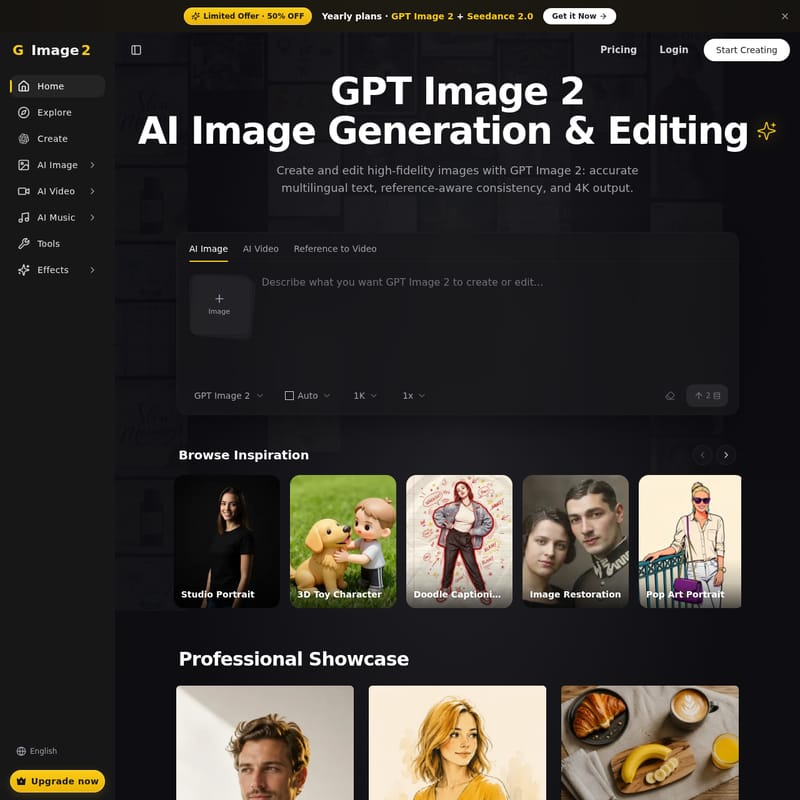
Image 2 - Free GPT Image 2 Generator Product Information
GPT Image 2: The Future of High-Fidelity AI Image Generation and Professional Editing
In the rapidly evolving landscape of artificial intelligence, GPT Image 2 emerges as a premier solution for creators, marketers, and designers seeking professional-grade visual content. By combining advanced AI image generation with a comprehensive suite of editing tools, GPT Image 2 allows users to create and edit high-fidelity images with unprecedented accuracy. Whether you need precise multilingual text, 4K resolution, or reference-aware consistency, GPT Image 2 provides a seamless workflow to turn your ideas into stunning reality.
Currently, new users can take advantage of a Limited Offer featuring 50% OFF Yearly plans, which include both GPT Image 2 and Seedance 2.0. This is the perfect opportunity to upgrade your creative toolkit and start building with the most advanced models available.
What is GPT Image 2?
GPT Image 2 is an independent AI image and video creation platform powered by frontier models. Unlike generic AI generators, GPT Image 2 focuses on precision and reliability, offering a single workflow that integrates perfect text rendering, consistent characters, and cinematic video. It is a standalone product designed for speed and quality, enabling users to generate 4K images and then transition those visuals into motion clips without leaving the platform.
At its core, GPT Image 2 is built to handle complex prompts that require more than just artistic flair; it understands context, follows strict brand aesthetics, and manages technical requirements like specific aspect ratios and high-resolution output.
Key Features of GPT Image 2
GPT Image 2 stands out due to its unique combination of power and control. Below are the primary features that define this advanced AI platform:
1. Perfect Multilingual Text in Images
One of the biggest challenges in AI generation has been text legibility. GPT Image 2 solves this by delivering crisp typography across multiple languages, including English, Chinese, Japanese, Arabic, and more. Whether it is a poster headline or a sub-caption, the text remains sharp and accurate up to 4K resolution.
2. High-Fidelity 4K Output
Quality is non-negotiable for professional workflows. GPT Image 2 supports multiple resolutions, ranging from 1K and 2K up to 4K output. This ensures that every detail—from skin texture to fabric weaves—is captured with hyperreal clarity.
3. Reference-Aware Consistency
With the ability to blend up to 14 reference images into a single scene, GPT Image 2 allows users to maintain 5 consistent subjects simultaneously. This is critical for brand storytelling where characters, outfits, or products must remain identical across different frames and settings.
4. Reasoning-Grounded Visuals
GPT Image 2 isn't just an art tool; it’s an information tool. It can transform live data, recipes, and complex knowledge into accurate diagrams and infographics, ensuring that the visual representation is grounded in logic and data.
5. Unified Generation and Editing
Why switch tools when you can do it all in one place? GPT Image 2 allows you to generate a new scene or mask-edit an existing one using natural-language commands. This includes integrated tools for:
- AI Background Changer: Swap backgrounds while keeping your subject intact.
- AI Object Remover: Select and remove distractions seamlessly.
- AI Inpaint: Brush over specific regions to repair or refine details.
- AI Image Extender: Uncrop and expand layouts without losing quality.
Professional Use Cases for GPT Image 2
GPT Image 2 is versatile enough to handle a wide range of creative demands. Here are some of the specialized styles and use cases supported by the platform:
- Studio Portraits: Generate hyperreal editorial portraits with soft directional lighting and sharp focus, perfect for SaaS marketing or professional showcases.
- Cinematic Frames: Create low-key, moody film stills that capture the look of 35mm anamorphic lenses, complete with film-grain textures and cinematic lighting.
- Product Hero Shots: Produce pristine product photography, such as a vintage brass pocket watch on velvet, with hard key lights and hyperreal textures.
- Modern Interior Photography: Design minimalist architectural visuals with soft raking daylight and dramatic negative space, ideal for interior design catalogs.
- Data Infographics: Render clean ink-line infographics on paper textures, perfect for weather charts, brewing diagrams, or technical annotations.
- Multilingual Posters: Design graphic layouts that combine bold illustrations with legible text in various scripts, ensuring your message is heard globally.
- Culinary Flat-lays: Capture top-down breakfast scenes with organic textures like flaky croissants and stoneware mugs, using a warm honey-and-amber palette.
How to Use GPT Image 2
Transforming your ideas into polished assets with GPT Image 2 is a straightforward three-step process:
- Step 01: Start from Text or Image: Write a descriptive prompt, upload a reference image, or combine both to guide the AI. This unified workflow applies whether you are creating a still image or a video clip.
- Step 02: Dial in the Output: Use the intuitive controls to set your desired aspect ratio (from 1:1 to 21:9), apply edit masks, or determine motion length. The controls adapt dynamically to your specific project.
- Step 03: Refine and Ship: Drafts are generated in seconds for stills. You can iterate in place using AI editing tools or download the final 4K result directly to your workflow.
GPT Image 2 FAQ
What can I create with GPT Image 2?
You can create everything from hyperrealistic portraits and cinematic stills to technical diagrams, infographics, and marketing posters. The platform supports a vast array of styles, including 3D toy characters, line art, and pop art.
Can GPT Image 2 generate video?
Yes. GPT Image 2 supports text-to-video, image-to-video, and reference-to-video workflows. You can keep the same character face and outfit across both still images and motion clips for total consistency.
Can I blend multiple images together?
Absolutely. GPT Image 2 allows you to blend up to 14 references into one scene, making it one of the most powerful tools for complex visual compositions.
How does the pricing work?
GPT Image 2 offers various plans, including a current 50% OFF discount on yearly plans. New users also receive free credits upon signup to explore the platform's capabilities.
Are the outputs suitable for commercial use?
Yes, GPT Image 2 is designed for professional and editorial workflows, allowing you to generate high-quality assets ready for the market.
What aspect ratios are supported?
GPT Image 2 supports a wide variety of aspect ratios to fit any platform, including 1:1, 3:2, 4:3, 16:9, 9:16, 21:9, and many more.
Ready to Create? Join the community of creators using GPT Image 2 to turn prompts into polished, professional images and videos in seconds. With 4K resolution and perfect text rendering, your visual storytelling has no limits.