Hyrax AI favicon

Hyrax AI

Hyrax AI maps repositories into persistent markdown context and uses six specialized agents to generate verified, tested pull requests.

Code & ITGenerates HYRAX.md, architecture.md,…Identifies repository conventions, such…Preserves custom team instructions…Runs repository unit tests, type…
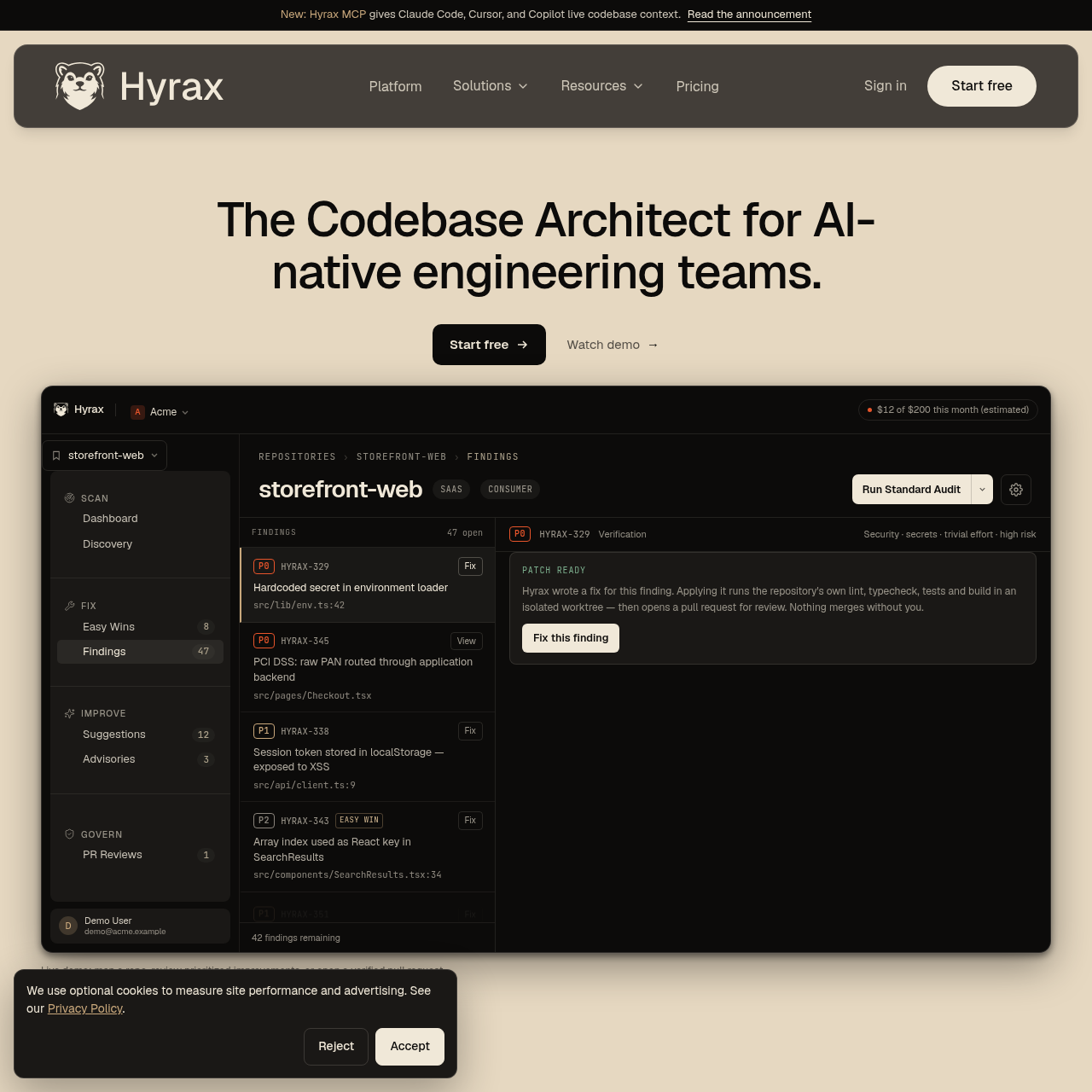
Hyrax AI product interface screenshot
Listed on AIToolly

What Is Hyrax AI? Product Overview

What the product does and how it is positioned

Hyrax AI functions as an automated codebase architect designed for engineering teams that write code alongside AI tools. Installed as a GitHub App, the system analyzes repository structures, dependencies, boundaries, and existing conventions, committing live context directly into repository files like HYRAX.md and the .hyrax/discovery folder. This shared map serves as a grounding baseline for both human engineers and external coding assistants.

Rather than applying broad, unvalidated changes across a codebase, Hyrax employs six domain agents covering security, correctness, maintainability, performance, architecture, and operations. Approved improvements undergo verification in an isolated worktree using the repository's native tests, type checks, and build steps. Hyrax halts before opening a pull request if any check fails, and never merges changes on its own.

What Can You Use Hyrax AI For?

Source-supported ways to use the product

Codebase Architecture Mapping

Engineering teams connect Hyrax via GitHub to automatically generate and maintain shared architectural maps, pattern catalogs, and environment variable documentation within the repository.

Automated Codebase Auditing and Maintenance

Teams run audits across security, maintainability, and operations to identify token storage flaws, outdated patterns, and configuration issues, turning prioritized findings into verified pull requests.

External AI Assistant Context Provisioning

Developers use the Hyrax MCP integration to feed live repository context and established conventions into AI coding tools like Cursor, Claude Code, and Copilot.

How to Use Hyrax AI

The documented workflow, where available

  1. 1

    Install the GitHub App

    Connect the repository using the Hyrax GitHub App to trigger the initial scan and generate HYRAX.md alongside discovery files.

  2. 2

    Review Prioritized Findings

    Inspect the issues, suggestions, and advisories produced across six engineering dimensions, selecting approved tasks to address.

  3. 3

    Run Verification Gate

    Hyrax executes changes in an isolated worktree, validating against local tests, linters, builds, and a re-scan of the issue.

  4. 4

    Review and Merge Pull Request

    A human engineer reviews the resulting GitHub pull request and diff before approving and merging it into the repository.

  5. 5

    Update Shared Context

    Each merged pull request triggers an update to the repository map, syncing recent changes into HYRAX.md and discovery files.

Automated Verification and Context Architecture

Hyrax structures repository governance around persistent repository artifacts and strict automated verification gates. When connected to a repository, the platform outputs HYRAX.md and companion documents in .hyrax/discovery that detail module boundaries, data flows, pattern occurrences, and required environment variables. Custom engineering notes placed between designated boundary markers are preserved during subsequent synchronization runs.

Before any proposed fix or improvement appears as a GitHub pull request, it must pass through an automated verification pipeline. Operating inside an isolated worktree, the system baselines the repository, applies the edit adhering to local conventions, and runs the test, typecheck, and build commands defined in the project configuration. The system also requires passing lint checks, staying under a diff size threshold, undergoing independent agent review, and completing a re-scan to verify the issue is resolved. If any check fails, the task aborts without opening a pull request.

  • Stores context in HYRAX.md, architecture.md, patterns.md, and env-vars.md.
  • Preserves manual team notes across automated syncs via explicit user notes markers.
  • Validates edits against repository-native commands such as test, typecheck, and build.
  • Restricts PR creation if diff size limits or independent agent reviews fail.

What to Test Before Choosing Hyrax AI

Checks to run with your own material and workflow

  • Verify that the GitHub App has appropriate access permissions to read repositories and create pull requests.
  • Check that package scripts for testing, typechecking, and building run cleanly in automated worktrees.
  • Confirm that user notes placed between the designated markers in HYRAX.md persist after a sync.
  • Review whether project dependencies and environment variables are properly documented in the .hyrax/discovery files.

Hyrax AI Sources and Last Checked

What was checked and when

Official source
https://hyrax.dev/
Last checked
Category
Code & IT

Hyrax AI Frequently Asked Questions

Answers based on the source-checked product record

Does Hyrax automatically merge pull requests into the codebase?

No. Hyrax never merges pull requests on its own; every generated pull request requires an engineer to review and approve the change.

What dimensions do the specialized Hyrax agents evaluate?

Six specialized agents evaluate repositories across security, correctness, maintainability, performance, architecture, and operations.

What happens if a test or build fails during the verification process?

If any required check fails during the verification gate, work halts immediately and Hyrax will not open a pull request.

Where does Hyrax process AI model inference and is customer code trained on?

All AI inference runs within the Hyrax AWS Bedrock account, and customer code is not used to train AI models.

How does Hyrax share codebase context with third-party coding tools?

Hyrax provides an MCP server that supplies live codebase context directly to tools such as Cursor, Copilot, and Claude Code.

Explore other recently added tools in the same category.