Google Vids 2.0
Google Vids: The AI-Powered Video Editing Suite for Creative Storytelling
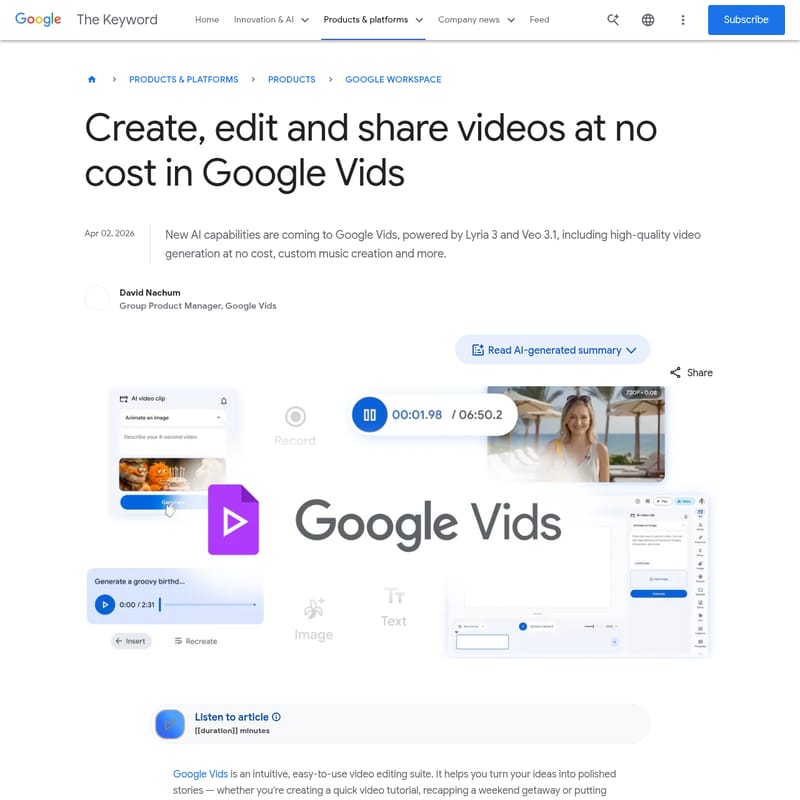
Google Vids is an intuitive, AI-driven video editing platform within Google Workspace that simplifies content creation. With features like high-quality video generation via Veo 3.1, custom music composition through Lyria 3, and directable AI avatars, it allows users to transform ideas into polished stories without professional editing skills. Whether you are creating tutorials, social media promos, or personal montages, Google Vids offers powerful tools at no cost, alongside premium options for power users.
2026-04-06
8800.0K
Google Vids 2.0 Product Information
Google Vids: Revolutionizing Video Creation with Advanced AI Capabilities
In the modern digital landscape, storytelling has become a visual-first medium. Google Vids emerges as a powerful, intuitive video editing suite designed to help users transform simple ideas into professional-grade stories. Part of the Google Workspace ecosystem, this platform leverages the latest advancements in artificial intelligence to democratize video production for everyone, from casual users to business professionals.
What's Google Vids?
Google Vids is an easy-to-use video editing suite that simplifies the process of creating, editing, and sharing high-quality video content. Integrated within the Google Workspace environment, it provides a seamless experience for turning prompts, photos, and concepts into polished narratives.
Whether you are building a quick tutorial, a weekend recap, or a promotional video, Google Vids serves as your creative partner. With the integration of Veo 3.1 and Lyria 3, the platform now offers sophisticated AI generation tools that allow you to produce visual and audio content directly within your browser, often at no cost.
Key Features of Google Vids
Google Vids is packed with cutting-edge features that redefine what a cloud-based video editor can do. Below are the primary capabilities that make this tool a standout in the market:
High-Quality Video Generation with Veo 3.1
Using the latest Veo 3.1 video generation model, Google Vids allows any user with a Google account to create video clips from a simple text prompt or photo. This high-quality generation is perfect for creating animated flyers, social media promos, or greeting cards. Personal accounts receive 10 generations per month at no cost.
Custom Music Creation with Lyria 3
Powered by Lyria 3 and Lyria 3 Pro, Google Vids enables users to compose original soundtracks. These soundtracks can range from 30 seconds to three minutes, tailored specifically to the mood of your project, such as a lighthearted birthday tune or an uplifting travel score.
Directable AI Avatars
Google Vids introduces AI avatars that provide a consistent face and voice for your content. Powered by Veo 3.1, these avatars are highly customizable:
- Direct Your Avatars: Move beyond static images by placing avatars in specific scenes where they interact with props or custom backdrops.
- Customize Appearance: Tweak outfits, backgrounds, and fine details to match the exact identity and mood required for your video.
Seamless Recording and Publishing
- Google Vids Screen Recorder: A dedicated Chrome extension that lets you record your screen and yourself from anywhere on the web, bringing studio features directly to your browser.
- Direct YouTube Export: Users can publish finished videos directly to YouTube from the Google Vids interface. Exports default to private for a final review before going public.
Use Cases for Google Vids
Google Vids is versatile enough to support a wide range of personal and professional projects:
- Educational Tutorials: Use AI avatars and screen recording to create engaging, step-by-step instructional content.
- Social Media Marketing: Generate high-quality video clips for side-hustle promotions or brand awareness using simple text prompts.
- Personal Milestones: Create heartfelt birthday montages or family vacation reels with custom music tailored to the occasion.
- Business Presentations: Develop professional-looking internal communications or project recaps without needing a dedicated video production team.
- Creative Mockups: Quickly visualize concepts for passion projects or school assignments using AI-generated visuals.
How to Use Google Vids
Getting started with Google Vids is designed to be as effortless as typing a document. Follow these steps to create your first video:
- Access the Platform: Navigate to vids.new to open a new project.
- Generate Content: Enter a prompt or upload a photo to use the Veo 3.1 model for generating high-quality clips.
- Add Audio: Use the music generation tool to create a track with the Lyria 3 model that fits your video’s vibe.
- Incorporate Avatars: If you need a narrator, select and customize an AI avatar to guide your viewers through the story.
- Record Assets: Utilize the Google Vids Screen Recorder Chrome extension to capture live screen data or webcam footage.
- Finalize and Share: Once your edit is complete, use the direct export feature to send your video to YouTube or share it within Google Workspace.
FAQ
Is Google Vids free to use? Yes, anyone with a Google account can generate up to 10 video clips per month at no cost. Higher limits and advanced features are available via Google AI Pro, Ultra, and Workspace AI Ultra subscriptions.
What AI models power Google Vids? The platform is powered by Google's latest models, including Veo 3.1 for video and avatar generation, and Lyria 3 for custom music composition.
Can I use my own footage? Absolutely. You can combine generated AI content with your own uploaded photos, videos, and screen recordings captured via the Chrome extension.
How many videos can power users generate? Google AI Ultra and Workspace AI Ultra accounts are eligible to generate up to 1,000 Veo videos per month.
Do I need to download software to use the screen recorder? No, the screen recorder is available as a Chrome extension, allowing you to capture content directly from your browser.