Trainn MCP favicon

Trainn MCP

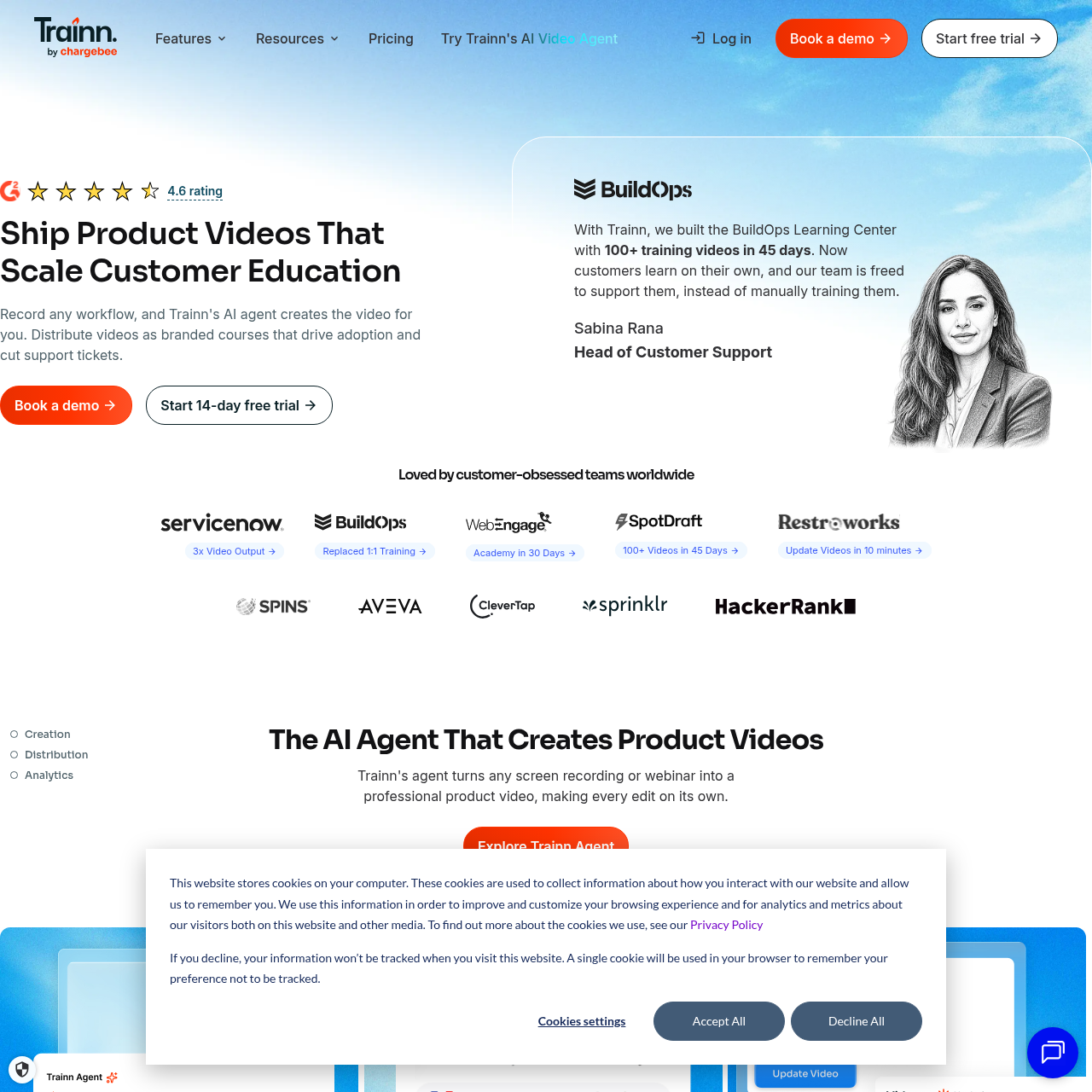
Trainn is an AI-powered platform that converts screen recordings and webinars into product videos, guides, and interactive walkthroughs with automated editing, voiceovers, distribution, and analytics.

VideoGenerates product videos, training…Performs automated video cuts and adds…Rewrites recorded speechDivides recordings into modular clips,…
Trainn MCP product interface screenshot
Estimated monthly visits
108K
Data period:
Listed on AIToolly

What Is Trainn MCP? Product Overview

What the product does and how it is positioned

Trainn converts screen recordings and webinars into customer education materials. Its AI agent analyzes recorded workflows to generate product demo videos, onboarding walkthroughs, and step-by-step documentation without requiring manual video editing.

The platform includes built-in distribution mechanisms such as embeddable in-app tutorials, searchable knowledge bases, and a no-code learning management system, accompanied by analytics to track viewer engagement across channels.

What Can You Use Trainn MCP For?

Source-supported ways to use the product

Customer Academy Deployment

The official customer story reports that BuildOps used Trainn to create a learning center containing over 100 training videos in 45 days, replacing manual training sessions.

Customer Education and Enablement

Customer success teams use Trainn to transform repetitive feature walkthroughs into self-serve training content, reducing reliance on 1:1 training sessions and manual onboarding calls.

How to Use Trainn MCP

The documented workflow, where available

  1. 1

    Workflow Recording

    Record a screen workflow or webinar with or without simultaneous narration.

  2. 2

    AI Editing and Voice Generation

    The agent edits the footage, applies visual effects, and generates or polishes the voiceover.

  3. 3

    Multi-Surface Distribution

    Distribute content via direct links, in-app embeds, a knowledge base, or a branded LMS academy.

  4. 4

    Impact Analytics

    Review learner engagement across knowledge base, LMS academy, and in-app channels in a centralized dashboard.

AI-Assisted Video and Documentation Pipeline

Trainn automates the production of instructional video and written documentation directly from screen captures. When users capture a software workflow or upload a webinar recording, the AI agent assesses the recorded actions, trims footage, and adds visual effects to produce finished demo and training videos.

The system simultaneously produces written step-by-step guides and interactive walkthroughs from the same recording. Maintenance is managed through modular clip structures, allowing creators to replace individual clips while the agent updates and synchronizes narration across the entire presentation.

  • Transforms screen recordings and webinars into videos, step-by-step guides, and interactive walkthroughs
  • Synthesizes voiceovers in over 100 languages and styles or rewrites spoken recordings for clarity
  • Splits recordings into clips to permit modular clip replacements without restarting the project

Multi-Surface Publishing and Engagement Tracking

The platform bundles publishing channels directly within its core offering, removing the need for separate hosting tools. Training assets can be integrated into web software via no-code in-app embeds, published to a searchable knowledge base, or organized into structured certification courses inside an academy LMS.

All hosted assets report viewing and completion metrics back to a single analytics dashboard. Updates made to source clips or documentation automatically propagate across all shared links and embedded locations without requiring manual file re-uploads.

  • Enables in-app contextual delivery without software engineering intervention
  • Includes a no-code learning management system for customer certification courses
  • Propagates content updates automatically to all active links and embedded destinations
  • Consolidates cross-channel engagement and completion metrics into one dashboard

What to Test Before Choosing Trainn MCP

Checks to run with your own material and workflow

  • Confirm whether organizational content workflows rely on screen recordings or webinars rather than text prompts or static images.
  • Verify that the platform's voice styles and automated narration align with target language requirements.
  • Review whether training requirements are addressed through on-demand videos and guides rather than live instructor-led training.
  • Check that embedding features satisfy customer education needs without requiring digital adoption checklist or survey tools.

Trainn MCP Sources and Last Checked

What was checked and when

Official source
https://trainn.co/
Last checked
Category
Video

Trainn MCP Frequently Asked Questions

Answers based on the source-checked product record

What is Trainn?

Trainn is an AI-powered platform that converts screen recordings and webinars into product demo videos, training videos, onboarding guides, and interactive walkthroughs, with delivery via an LMS, in-app embeds, or a knowledge hub.

How does Trainn differ from single-purpose video or guide creation tools?

Unlike single-purpose tools, Trainn produces videos, step-by-step guides, and interactive walkthroughs simultaneously from a single recording, pairing creation with built-in LMS and in-app distribution without requiring code.

Who is Trainn not built for?

Trainn is not designed for teams wanting text-to-video or image-to-video generation, organizations requiring digital adoption tools like checklists and NPS surveys, or companies whose primary training model is live instructor-led training.

How does the AI agent handle editing and voiceover creation?

The AI agent analyzes the context of recorded actions, automatically edits the footage for quality, adds visual effects, and synthesizes or refines narration, allowing teams to produce finished videos without manual timeline editing.

How are updates managed when a software interface changes?

Recordings are divided into clips, enabling users to swap out individual outdated clips while the AI rewrites and resyncs the narration; all changes automatically update across existing links and embedded tutorials.

Explore other recently added tools in the same category.