Google AI Edge Gallery
Google AI Edge Gallery: Experimental Generative AI Running Locally on iPhone and Mac
Google AI Edge Gallery is a cutting-edge utilities app designed for iPhone, Mac, and Vision Pro. It allows users to run powerful Generative AI models entirely offline. Experience real-time AI chat, image analysis, and audio transcription directly on your device without an internet connection. Featuring performance benchmarks and experimental tools like Prompt Lab and Tiny Garden, it offers a unique look into the future of on-device machine learning.
2026-03-02
597600.0K
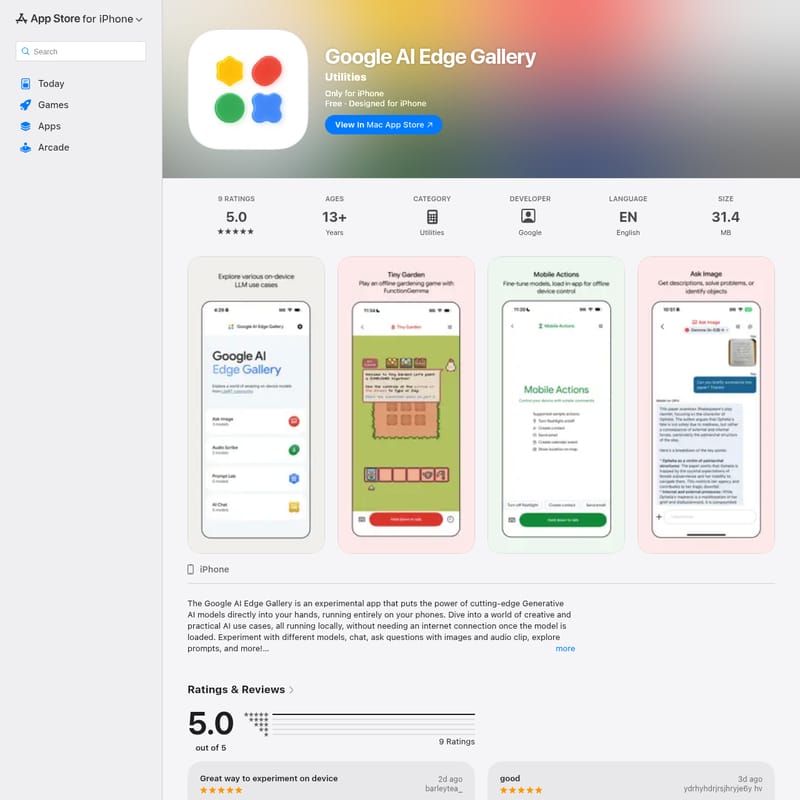
Google AI Edge Gallery Product Information
Google AI Edge Gallery: The Future of On-Device Generative AI
In the rapidly evolving landscape of artificial intelligence, the Google AI Edge Gallery emerges as a groundbreaking experimental application. Developed by Google LLC, this utility app is designed to bring the immense power of Generative AI models directly to your fingertips, running entirely on your local hardware. By leveraging the processing power of the iPhone, Mac, and Vision Pro, the Google AI Edge Gallery eliminates the need for constant cloud connectivity, offering a private, fast, and offline AI experience.
What's Google AI Edge Gallery?
Google AI Edge Gallery is an experimental platform that allows users to interact with advanced GenAI models locally on their mobile and desktop devices. Unlike traditional AI tools that require a data connection to process requests on remote servers, this app performs all computations on-device.
Whether you are using an iPhone (iOS 17.0 or later) or a Mac with an Apple M1 chip or later, the Google AI Edge Gallery provides a sandbox for testing the latest AI capabilities. From chatting with large language models (LLMs) to analyzing images and transcribing audio, the app serves as a comprehensive gallery for cutting-edge AI technology. It is a free utility that invites users to explore the potential of offline machine learning.
Core Features of Google AI Edge Gallery
The Google AI Edge Gallery is packed with features that showcase the versatility of on-device artificial intelligence. Below are the core functionalities included in the app:
- Run Locally, Fully Offline: The primary advantage of the Google AI Edge Gallery is its ability to operate without an internet connection once the models are downloaded. This ensures data privacy and allows for use in remote locations.
- Choose Your Model: Users can easily switch between different AI models sourced from Hugging Face. This feature allows developers and enthusiasts to compare performance and accuracy between various models like FunctionGemma.
- AI Chat: Engage in sophisticated multi-turn conversations with a local LLM. The Google AI Edge Gallery provides a seamless chat interface for natural language interaction.
- Ask Image: This multimodal feature allows you to upload images and ask specific questions. The Google AI Edge Gallery can describe scenes, identify objects, or help solve visual problems.
- Audio Scribe: A powerful tool for transcription and translation. You can record or upload audio clips, and the app will transcribe them into text or translate them into another language entirely offline.
- Prompt Lab: Designed for experimentation, the Prompt Lab lets you test single-turn LLM use cases. Use it to summarize long texts, rewrite paragraphs, or even generate code snippets.
- Tiny Garden: An experimental mini-game included in the Google AI Edge Gallery. It uses natural language processing to let users plant, water, and harvest virtual flowers through text commands.
- Mobile Actions: Explore how AI can interact with your hardware through offline device controls.
- Performance Insights: For those interested in the technical side, the app provides real-time benchmarks, including TTFT (Time to First Token), decode speed, and latency metrics.
Use Cases for Google AI Edge Gallery
The Google AI Edge Gallery is more than just a demo; it provides practical utility for various scenarios:
1. Privacy-Conscious Content Creation
Since the Google AI Edge Gallery runs locally, writers and developers can use the Prompt Lab to summarize sensitive documents or generate code without uploading data to a third-party server.
2. Real-Time Translation and Transcription
Travelers or students can use the Audio Scribe feature to transcribe lectures or translate conversations in real-time, even in areas with no cellular service.
3. Visual Problem Solving
By using the Ask Image feature, users can get instant descriptions of their surroundings or help identifying parts and objects, making the Google AI Edge Gallery a valuable tool for accessibility and education.
4. AI Development and Benchmarking
Developers can use the Performance Insights to see how different models from Hugging Face perform on specific hardware like the Apple M1 chip or the latest iPhone models.
FAQ
Q: Does the Google AI Edge Gallery require an internet connection? A: No. While you need a connection to download the initial models, all AI processing and interactions happen 100% offline on your device.
Q: Which devices are compatible with the app? A: The app is compatible with iPhone (iOS 17.0+), Mac (macOS 14.0+ with M1 chip or later), and Apple Vision Pro (visionOS 1.0+).
Q: Is my data shared with Google? A: The app focuses on local processing. However, according to the developer's privacy policy, some data like identifiers and usage diagnostics may be collected for analytics and app functionality.
Q: Can I use different AI models? A: Yes, the Google AI Edge Gallery allows you to select and experiment with various models from Hugging Face, such as FunctionGemma.
Q: What is the age rating for this app? A: The app is rated for ages 13+ due to infrequent profanity or crude humor that may be generated by AI models.