Glaze by Raycast
Glaze by Raycast: Create Custom AI-Powered Desktop Apps for macOS Tahoe
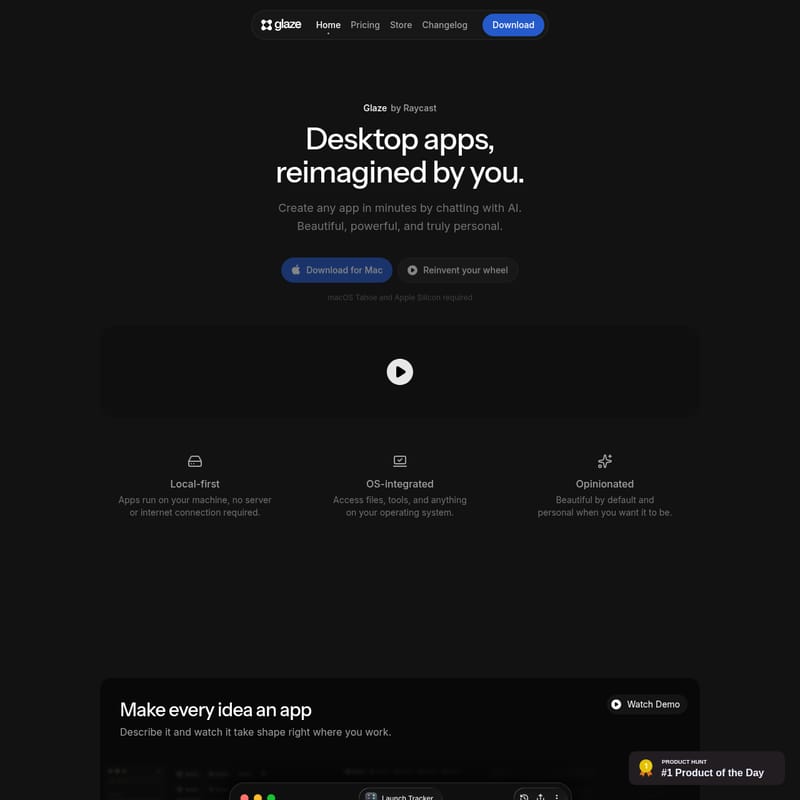
Glaze by Raycast is a revolutionary local-first platform that allows users to build powerful desktop apps using simple AI chat. Optimized for Apple Silicon and macOS Tahoe, Glaze enables the creation of OS-integrated, private, and beautiful software tools without requiring coding knowledge.
2026-07-05
37.0K
Glaze by Raycast Product Information
Glaze by Raycast: The Future of AI-Powered Desktop Apps
In the evolving landscape of software development, Glaze by Raycast emerges as a groundbreaking tool designed to reinvent how we interact with our computers. Imagine a world where you don't just use apps—you create them. Glaze is a platform that allows you to build any desktop app in minutes simply by chatting with AI. By bridging the gap between complex coding and creative ideas, Glaze empowers every user to develop beautiful, powerful, and truly personal software tailored to their specific needs.
What is Glaze?
Glaze is a desktop application builder developed by the team at Raycast. It is specifically designed to let users construct their own desktop applications just by describing what they want in plain language. Unlike traditional development environments, Glaze lives directly on your Mac, ensuring that the apps you build launch instantly and work offline.
Whether you need a specialized tool for your professional workflow or a simple utility for personal organization, Glaze provides the framework to turn those ideas into reality. It represents a shift toward "personal software," where the tools you use daily are exactly what you need them to be because you shaped them yourself. Currently, Glaze requires macOS Tahoe and Apple Silicon to function, providing a cutting-edge experience for modern Mac users.
Key Features of Glaze
Glaze is packed with features that prioritize performance, integration, and ease of use. Here are the core pillars that make Glaze a standout choice for app creation:
Local-First Architecture
One of the most significant advantages of Glaze is its local-first approach. All Glaze apps run directly on your machine. This means there is no requirement for a server or a constant internet connection. Your apps are fast, responsive, and always available, even when you are offline.
Deep OS Integration
Unlike web-based tools, Glaze is deeply integrated with your operating system. Glaze apps have the ability to access:
- Your local file system.
- Custom keyboard shortcuts.
- The macOS menu bar.
- Background processes.
- Local hardware and APIs.
This level of integration allows you to build tools that feel like native parts of your Mac environment.
AI-Powered Creation
At the heart of Glaze is an intuitive AI interface. You describe your desired app in plain English, and Glaze builds it for you. This "Opinionated" design philosophy means that Glaze apps are beautiful by default, following high-quality design standards while remaining fully personalizable when you want to make changes.
Privacy and Ownership
With Glaze, your data stays on your machine, not on someone else’s server. Furthermore, users maintain full ownership of the apps they build, including the code and the content. This makes Glaze an ideal choice for sensitive internal tools or private personal projects.
Effortless Publishing
Glaze makes it incredibly simple to share your creations. Whether you want to release an app publicly to the Glaze Store or share it privately with your team, the platform handles the distribution logistics.
Use Cases for Glaze
The flexibility of Glaze means that the possibilities are virtually limitless. If you can describe it, Glaze can build it. Here are some common ways to use Glaze:
Internal Software for Teams
Businesses can use Glaze to build bespoke internal tools centered around their specific processes. Instead of forcing a team to adapt to generic software, Glaze allows for the creation of software that fits the team's exact workflow. Through the Team plan, organizations can even maintain a private store for their internal Glaze apps.
Personal Productivity Utilities
Individuals can create specialized utilities that automate repetitive tasks. From custom calculators to unique data trackers, Glaze helps you build the exact utility you need to stay productive.
Workflow Automation
Because Glaze can hook into your local files and APIs, it is perfect for creating workflow automations. You can build a Glaze app that connects various services you already use, pulling in AI models or local data to streamline complex tasks.
Menu Bar and Background Apps
Sometimes the best app is one that stays out of your way. Glaze is excellent for building menu bar apps that provide quick access to information or background processes that handle tasks silently while you work.
How to Use Glaze
Getting started with Glaze is designed to be a seamless experience, even for those with no prior programming knowledge.
- Download and Install: First, download Glaze for Mac. Ensure your system meets the requirements (macOS Tahoe and Apple Silicon).
- Describe Your App: Open Glaze and start building by describing your idea in plain language. You might say, "Build a menu bar app that tracks my daily water intake and syncs with a local text file."
- Refine Through Conversation: Watch your app take shape in real-time. If a feature isn't exactly how you imagined it, simply talk to the AI to request changes. You can tweak the UI, add new functions, or adjust how it interacts with your OS.
- Advanced Customization: If you do know how to code, you can dive deeper into the code to shape things further, though this is entirely optional.
- Share and Deploy: Once you are satisfied, you can use the app locally, share it with a friend via an "Unlisted" link (Pro plan), or publish it to the Glaze Store for the wider community to discover.
FAQ
Q: What is Glaze? A: Glaze lets you build your own desktop apps just by describing what you want. They live on your Mac, launch instantly, and work offline, providing real software that fits your specific workflow.
Q: Do I need to know how to code? A: No. You describe what you want in plain language and Glaze builds it. If you do know how to code, you can use those skills to further refine your apps.
Q: How is Glaze different from Lovable, Replit, or v0? A: While those tools are designed for building browser-based applications, Glaze is built specifically for the desktop. This allows Glaze apps to access your file system, keyboard shortcuts, and background processes in a way browser tools cannot.
Q: What kind of apps can I build? A: You can build anything from internal team tools and personal utilities to menu bar apps and workflow automations. You can also browse the Glaze Store for inspiration.
Q: Do I own the apps I build? A: Yes! You own the app, its code, and all its content.
Q: What platforms does Glaze support? A: Glaze currently supports Mac and requires macOS Tahoe and Apple Silicon. Support for Windows and Linux is planned for the future.
Q: How do I share my apps? A: You can share apps with anyone who has Glaze installed and is signed in. You can publish to the public Glaze Store, share "Unlisted" apps on the Pro plan, or use a private team store on the Team plan.
Q: Can I integrate with other tools? A: Yes. Since Glaze apps run locally, they can connect to your APIs, local files, hardware, and any service with an API.