FocuSee 2.0
FocuSee: AI-Powered Screen Recorder for Automatically Polished Product Demos and Tutorials
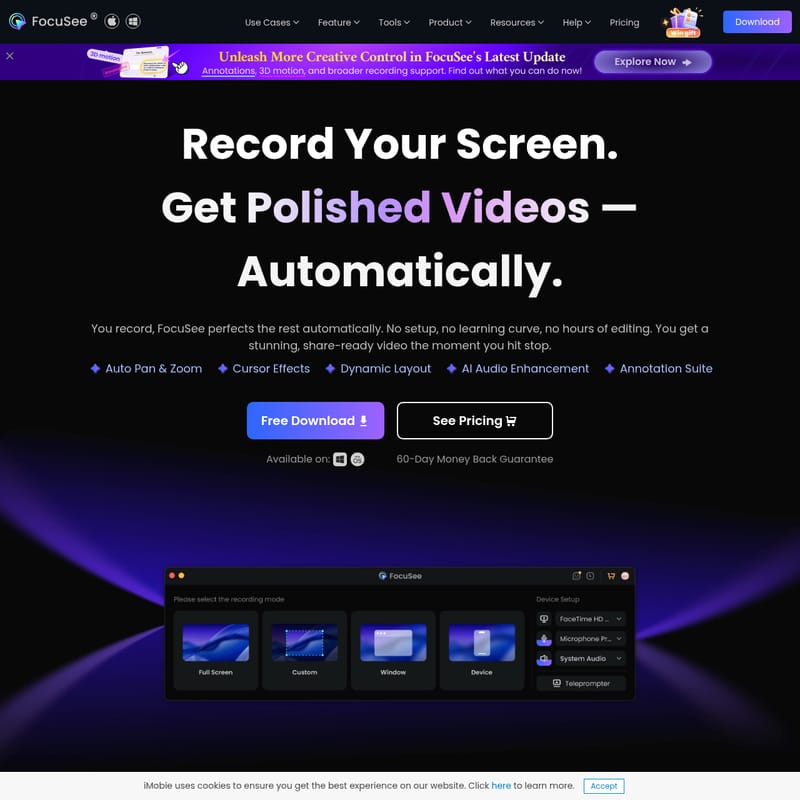
FocuSee is a revolutionary AI-powered screen recorder designed for Mac and Windows that eliminates the need for manual video editing. By leveraging advanced AI tracking, FocuSee automatically applies pan and zoom effects to follow cursor movements, highlights key clicks, and enhances audio by removing background noise and filler words. It features an AI virtual avatar, automatic subtitle generation in over 50 languages, and a built-in teleprompter to ensure professional delivery. Ideal for developers, educators, and marketing teams, FocuSee allows users to record once and export high-quality videos optimized for platforms like YouTube, TikTok, and Instagram. With tools for mobile device recording, privacy masking, and custom branding, it streamlines the production of product demos, online courses, and tutorial videos, delivering studio-quality results in minutes.
2026-04-25
1100.0K
FocuSee 2.0 Product Information
FocuSee: The Ultimate AI-Powered Screen Recorder for Professional Videos
Creating professional-grade screen recordings often requires hours of tedious post-production, manual zooming, and audio cleaning. FocuSee changes this paradigm by offering an AI-driven solution that automates the entire editing process. With the FocuSee screen recorder, you can record your screen and receive a polished, share-ready video the moment you hit stop. Whether you are an indie developer, an online instructor, or a marketing professional, FocuSee empowers you to produce cinematic content without any learning curve.
What's FocuSee?
FocuSee is an advanced AI-powered screen recorder available for both Mac and Windows. It is designed to bridge the gap between simple screen captures and high-end video production. Unlike traditional tools that provide a raw video file, FocuSee uses artificial intelligence to automatically apply pan and zoom effects, follow cursor movements, and highlight important actions.
By integrating features like AI audio enhancement, automatic subtitle generation, and dynamic layouts, FocuSee acts as a smart director. It is the ideal tool for anyone looking to create "polished videos automatically" without spending thousands on professional editors or wasting hours on manual software like Premiere Pro or Screen Studio.
Key Features of FocuSee
AI Visual Focus and Auto-Polishing
- Auto Pan & Zoom: The FocuSee AI tracks every click and mouse movement, automatically zooming in on key moments to guide audience attention.
- 3D Motion Effects: Add tilt and perspective to your recordings for a cinematic feel that follows your cursor.
- Intelligent Cursor: Customize your cursor with various styles, lively click animations, and sounds that appear and fade gracefully as needed.
- Annotation Suite: Enhance clarity by stacking text, shapes, arrows, and spotlights simultaneously during your recording.
AI-Powered Post-Production
- AI Virtual Avatar: For creators who are camera-shy, FocuSee generates digital personas to maintain interactivity without showing your real face.
- AI Subtitle Generation: Support for over 50 global languages with a 98% accuracy rate ensures your content is accessible to a worldwide audience.
- AI Background Removal: Blur or replace messy backgrounds in post-production to create a studio-quality environment without a green screen.
- AI Smart Cut: Automatically detect and remove awkward pauses and filler words like "um" and "ah" with one click.
Professional Audio Tools
- AI Voice Enhancement: Polishes your voice to sound crystal clear, removing breathing sounds and mouth noises.
- AI Noise Reduction: Eliminates background distractions like wind or electrical hums, keeping the focus on your message.
- Independent Tracks: Record microphone narration and system audio on separate tracks for total editing flexibility.
Workflow and Efficiency
- Built-In Teleprompter: Stay confident and fluent with on-screen script guidance to avoid retakes.
- Mobile Device Recording: Connect iOS or Android devices via USB to record mobile app tutorials directly on your computer.
- Multi-Platform Export: Record once and automatically resize videos for TikTok, YouTube, Instagram, Facebook, and Twitter.
- Privacy Masking: Quickly hide sensitive or personal information with built-in blur masks.
Use Cases for FocuSee
FocuSee is a versatile tool designed to fit a wide range of professional scenarios:
Product Demos
Indie developers and entrepreneurs can highlight a product's true value using FocuSee. The auto-zoom and spotlight features ensure that the best features are never missed by the audience, while visual customization makes every demo eye-catching.
Tutorial Videos
Designers and technical support teams can streamline their workflow. With automatic shortcut capture and dynamic camera layouts, FocuSee creates easy-to-follow guides that look professional even under tight deadlines.
Online Courses
Instructors can revolutionize their teaching. Use the built-in teleprompter to deliver lessons confidently and AI subtitles to make learning accessible. The high-quality audio ensures students stay focused from start to finish.
Marketing and Sales
Marketing teams can build a strong brand presence using custom watermarks, preset templates, and AI avatars. FocuSee allows you to craft promotional videos that reinforce your brand message without the cost of a production crew.
FAQ
Q: Is FocuSee available on both Mac and Windows? A: Yes, FocuSee is fully supported on both macOS and Windows platforms, offering a consistent experience across devices.
Q: How does the auto-polishing work in FocuSee? A: FocuSee uses AI to analyze your recording in real-time. It follows your mouse cursor to apply smooth zooms, pans, and 3D motion effects, and it automatically cuts out silences and filler words post-recording.
Q: Can I record my webcam and screen at the same time? A: Absolutely. FocuSee supports simultaneous recording of your screen and webcam, with various dynamic layouts like picture-in-picture and full-screen transitions.
Q: Does FocuSee offer a money-back guarantee? A: Yes, FocuSee comes with a 60-day money-back guarantee, allowing you to try the full suite of features risk-free.
Q: Can I import existing videos into FocuSee? A: Yes, in addition to direct recording, you can import local video footage from your computer to enhance it with FocuSee's AI effects and export tools.
Q: Is it possible to share videos directly online? A: FocuSee allows you to export videos via shareable links, complete with password protection and permission controls for secure sharing.