Drift
Drift: The AI-Powered Copilot for Robotics Simulations, ROS, and Gazebo Development
Drift is an innovative AI copilot designed to streamline robotics simulations. It allows engineers to build, test, and debug robot environments using natural language prompts. By integrating ROS, URDF generation, and simulator orchestration, Drift simplifies the creation of mobile robots, manipulators, and pick-and-place tasks, serving as a powerful toolkit for researchers and developers using Linux and Ubuntu.
2026-03-26
10.0K
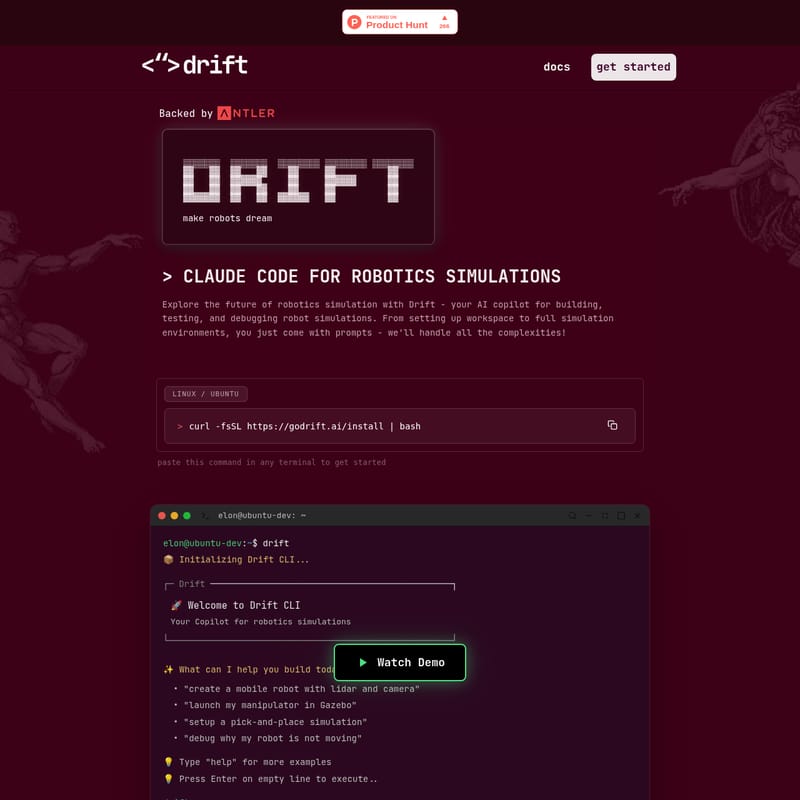
Drift Product Information
Drift: The Ultimate AI Copilot for Robotics Simulations
In the rapidly evolving world of automation, the bridge between a concept and a functional robot often lies in simulation. Drift emerges as the premier AI copilot for robotics simulations, designed specifically to help researchers, engineers, and developers build, test, and debug robot environments with unprecedented speed. By leveraging natural language processing, Drift transforms complex coding tasks into simple conversational prompts, allowing you to focus on innovation rather than configuration.
What’s Drift?
Drift is a comprehensive AI copilot for robotics simulations that acts as an intelligent layer between the developer and the simulation environment. Backed by industry experts and built for the modern robotics stack, Drift handles the complexities of workspace setup, environment configuration, and robot modeling.
Whether you are working with Linux or Ubuntu, Drift integrates seamlessly into your terminal, providing a powerful CLI (Command Line Interface) that understands the nuances of robotics engineering. From generating URDF files to managing ROS (Robot Operating System) nodes, Drift is the tool that makes "robots dream" by turning abstract ideas into simulated reality.
Key Features of Drift
Drift is packed with advanced capabilities that address the most common bottlenecks in robotics development. Here are the core features that make this AI copilot for robotics simulations indispensable:
1. Agent: Complete Simulation Toolkit
Drift provides everything required for a professional robotics workflow, including support for ROS, various simulators, plugins, and OS orchestration. It allows you to setup and run simulations on the fly without manual environment configuration.
2. AI: Natural Language Control
One of the most powerful aspects of Drift is its ability to understand Natural Language. You can describe your requirements in plain English, and the AI translates those prompts into:
- Simulation setups
- URDF files (Unified Robot Description Format)
- Launch configurations
- Executable actions
3. Build: Rapid Prototyping and Testing
With Drift, you can build any robot or world and launch it in simulation almost instantly. The tool allows you to wire up your control loop from a single prompt, significantly reducing the time spent on boilerplate code.
4. Debug: ROS & Simulator Aware Debugging
Debugging in robotics can be notoriously difficult. Drift actively tracks the states of both ROS and the simulator. It identifies the root cause of failures—such as why a robot isn't moving—and provides swift fixes to get your project back on track.
Use Cases for Drift
As a versatile AI copilot for robotics simulations, Drift supports a wide range of development scenarios:
- Mobile Robot Development: Quickly "create a mobile robot with lidar and camera" to test navigation algorithms.
- Manipulator Integration: Use commands like "launch my manipulator in Gazebo" to visualize arm movements and kinematics.
- Task Automation: "Setup a pick-and-place simulation" to refine industrial automation workflows.
- Error Resolution: Efficiently "debug why my robot is not moving" by letting the AI analyze the ROS state and simulation physics.
How to Use Drift
Getting started with the Drift AI copilot for robotics simulations is straightforward and designed for high-performance Linux/Ubuntu environments.
Installation
To install the Drift CLI, paste the following command into your terminal:
curl -fsSL https://godrift.ai/install | bash
Getting Started with the CLI
Once installed, simply type drift in your terminal to initialize the assistant. You will be greeted by the Drift CLI interface:
- Initialize: Type
driftand press Enter. - Prompt: Enter your request at the
drift>prompt (e.g., "create a mobile robot with lidar"). - Execute: Press Enter on an empty line to execute the command.
- Assistance: Type
helpat any time for more examples of what the AI can build for you.
Coming Soon: The Future of Drift
The team at Ramankind Inc. is continuously expanding the capabilities of this AI copilot for robotics simulations. Upcoming features include:
Worlds: Instant Templates
One-click access to realistic environments with pre-configured physics. Users will be able to choose from warehouses, outdoor settings, or custom environments to start testing in seconds.
Robots: Gallery of Models
A library of prebuilt, leading robot models. These models will be instantly customizable to exact specifications, covering everything from complex manipulators to agile mobile robots.
FAQ
Q: Which operating systems are supported by Drift? A: Currently, Drift is optimized for Linux and Ubuntu systems, which are the industry standards for robotics development.
Q: Does Drift work with ROS? A: Yes, Drift is fully ROS-aware. It can manage launch configurations, track ROS states, and help debug nodes within your simulation.
Q: How do I get in touch for custom solutions? A: Drift works closely with startups and robotics labs. You can reach the founders at [email protected] for customized offerings.
Q: Is there a community for Drift users? A: Yes, you can connect with other developers and the creators of Drift via Discord, X (Twitter), and LinkedIn.
Become a 100x robotics developer today with Drift, the premier AI copilot for robotics simulations. Build, test, and dream in code like never before.