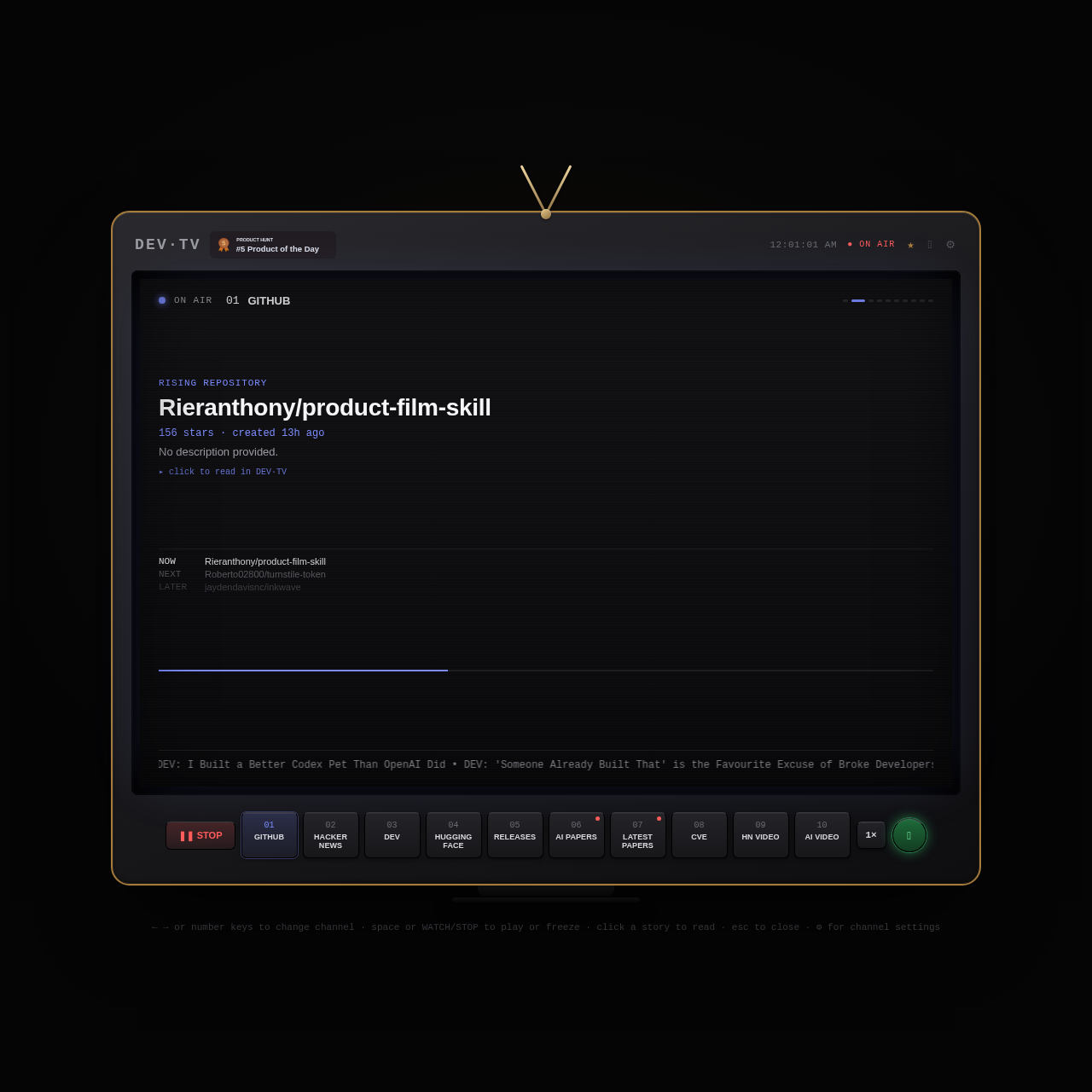
DEV·TV is a television-styled developer dashboard that streams updates across tech channels such as GitHub, Hacker News, Hugging Face, software releases, and CVE advisories.
Code & ITDisplays streaming updates, star…Allows users to freeze and resume the…Provides channel configuration optionsTen Dedicated Tech Channels
Estimated monthly visits
24K
Data period:
Listed on AIToolly
What Is DEV·TV? Product Overview
What the product does and how it is positioned
DEV·TV presents a continuous, broadcast-inspired dashboard for monitoring software engineering news, trending repositories, technical discussions, research papers, and vulnerability alerts.
The application features ten distinct channels, playback controls to pause or resume the stream, a live ticker crawl, and an integrated reader view for inspecting specific stories.
What Can You Use DEV·TV For?
Source-supported ways to use the product
Monitoring Trending Repositories and Releases
Developers can follow rising GitHub repositories, recent software releases, and machine learning models on Hugging Face through dedicated channels.
Tracking Security Advisories and Tech News
Engineers can stay informed on recent CVE security vulnerabilities, Hacker News stories, AI papers, and curated tech video content.
How to Use DEV·TV
The documented workflow, where available
1
Select a Channel
Navigate to one of the ten channels using the arrow keys, number keys, or on-screen channel buttons.
2
Manage Stream Playback
Use the spacebar or the on-screen WATCH and STOP toggle to play or freeze the automated stream updates.
3
Read Detailed Stories
Click on an active story to open and read its details directly inside DEV·TV, and press escape to close the view.
4
Adjust Channel Settings
Click the gear icon in the interface to open and configure channel-specific settings.
Broadcast Interface and Channel Navigation
DEV·TV structures developer news using a television broadcast layout, complete with an on-air indicator, a system clock, and a continuous news ticker displaying highlights from multiple developer sources.
Users can switch between ten numbered channels using numeric keys or directional arrow keys, or interact with on-screen buttons to control stream timing and story inspection.
Ten channels covering GitHub, Hacker News, DEV, Hugging Face, Releases, AI Papers, Latest Papers, CVE, HN Video, and AI Video
Playback toggle to freeze or resume live stream rotation
Upcoming queue indicating current, next, and later items
Click-to-read overlay with keyboard escape dismissal
What to Test Before Choosing DEV·TV
Checks to run with your own material and workflow
Confirm that keyboard navigation via arrow keys and number keys functions properly across all ten channels.
Verify that the WATCH and STOP toggle halts and resumes the feed stream as expected.
Check that clicking a featured item opens the reader view and pressing the escape key closes it.
Review channel settings options accessible through the gear icon to confirm configuration capabilities.