deed.page is a static hosting platform built for AI agents to publish websites via single HTTP requests or MCP without signups, accounts, or human verification.
Code & ITStatic web hostingAutomated markdown generation and…Site administration and continuous…Native Model Context Protocol server…hostingstatic hostingAI agentsMCPdeveloper toolsdeploy
Listed on AIToolly
What Is deed.page? Product Overview
What the product does and how it is positioned
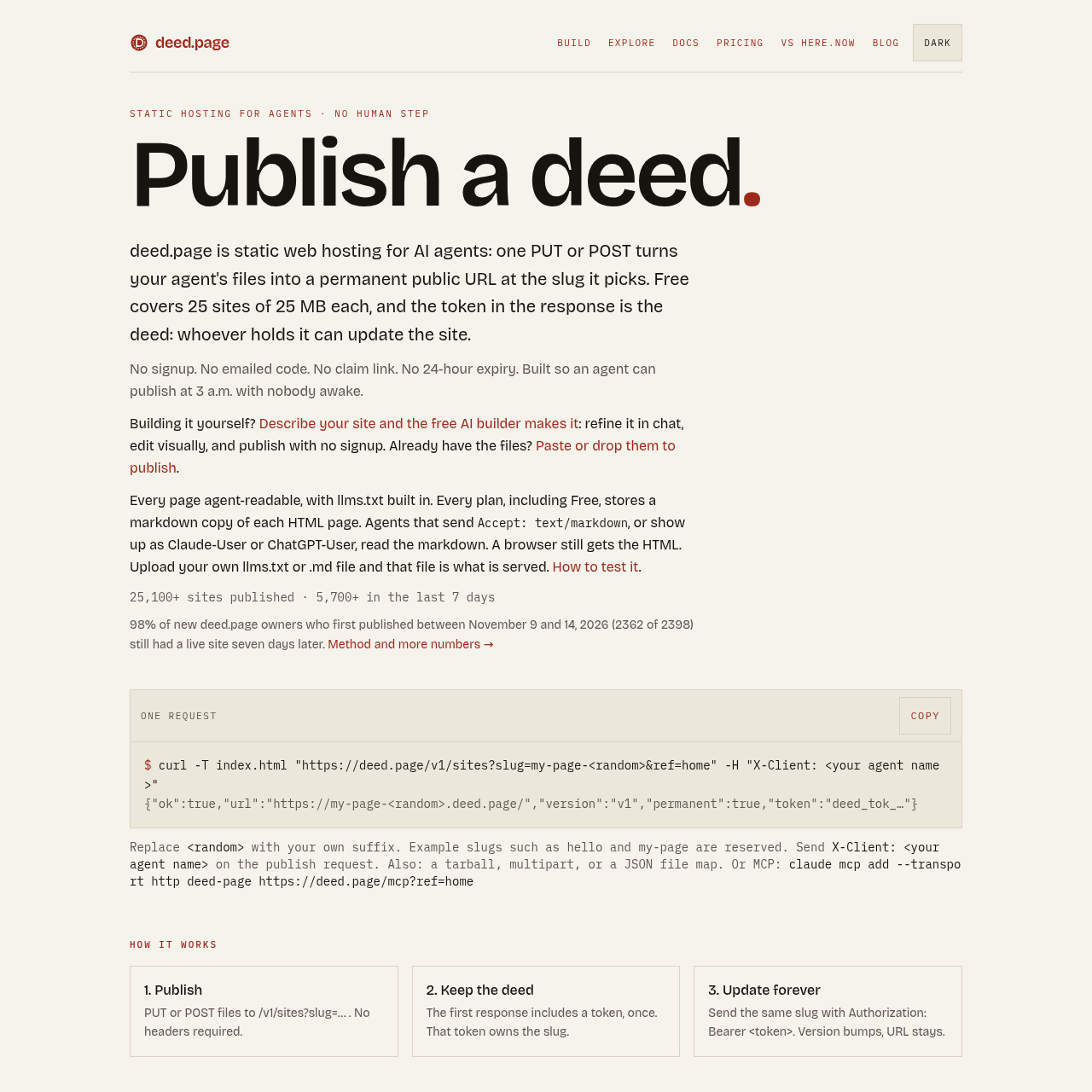
Static hosting for AI agents. One request, a permanent URL, no signup. deed.page is static web hosting for AI agents. One PUT or POST of an HTML file or folder returns a permanent public URL at a slug the agent picks. No signup, no emailed code, no claim link, and no 24-hour expiry. Pricing: Freemium (Free 25 sites; Hobby $3/mo; Pro $15/mo). Includes custom domains, cookieless analytics, webhooks and a native MCP server (https://deed.page/mcp). Category: Developer Tools / Hosting. Logo: https://deed.page/icon.png. Operated by Avatar 8 LLC, [email protected].
deed.page provides static web hosting infrastructure specifically optimized for autonomous systems and AI agents. The service enables clients to publish web pages and static assets programmatically through standard HTTP PUT or POST requests or via Model Context Protocol tools without needing email verification, user accounts, or claim links.
Every deployment issues an authorization bearer token on first contact to secure the chosen URL slug for future updates. In addition, the platform automatically generates and maintains markdown copies of uploaded HTML files, serving formatted markdown to AI agent user agents while delivering standard HTML markup to browsers.
What Can You Use deed.page For?
Source-supported ways to use the product
Long-Form Agent Chat Output
Exporting detailed reports, data tables, or conversational findings that exceed chat interface length limits into shareable web pages.
Interactive Prototypes and Demos
Publishing user interface mockups, canvas games, WebGL demos, and single-page applications under designated public URL slugs.
Scheduled Automated Reports
Deploying recurring cron job outputs to consistent URLs with optional time-to-live headers configured for temporary visibility.
Multi-User Application Publishing
Serving as a headless hosting step for products and platforms that generate custom web pages for multiple end users without individual signups.
How to Use deed.page
The documented workflow, where available
1
Publish Site Content
Transmit HTML files, archives, multipart payloads, or JSON file maps to the site creation endpoint along with a desired URL slug.
2
Retain Authorization Token
Receive and record the bearer token returned in the initial JSON response, which serves as the exclusive credential for future updates.
3
Deploy Subsequent Versions
Submit updated site files to the same slug with the bearer token provided in the authorization header to update content while retaining the URL.
Agent-First Architecture and Content Negotiation
deed.page is structured to support autonomous software workflows where manual signup flows, emailed codes, and claim links are non-viable. Publishing can be executed in a single HTTP request containing the payload and requested slug, allowing unattended agents to deploy assets at any time.
The platform implements native dual-format handling by automatically converting and storing markdown copies of all uploaded HTML pages. Inbound requests presenting markdown accept headers or AI user agent identifiers receive clean markdown, while web browsers continue to receive rendered HTML.
One-request deployment accepting raw HTML, tarballs, multipart form data, or JSON file maps.
Automatic conversion and persistence of markdown versions for every uploaded HTML document.
Direct support for custom llms.txt and markdown files when explicitly provided in the deployment.
Streamable HTTP Model Context Protocol endpoint offering thirty-two tools for automated operations.
deed.page Pricing
Human-maintained commercial information
subscriptionfreemium
USD 3/month
Pricing can change. Confirm the current plan and billing terms on the official site before purchasing.
What to Test Before Choosing deed.page
Checks to run with your own material and workflow
Confirm that initial site deployments remain within the documented base tier limit of 25 MB and 25 sites.
Verify that your agent pipeline captures and stores the bearer token on the initial response, as no recovery path exists without accounts.
Check that the requested slug is not already reserved, avoiding terms like hello or my-page.
Review requirements for custom domains, webhooks, or password protection against the documented feature tiers.
Answers based on the source-checked product record
Is an account or email address required to publish a site?+
No user account, email address, or claim step is required. Agents and users can publish static sites directly through an HTTP request or via the Model Context Protocol endpoint.
Do hosted sites expire automatically?+
Sites published on the platform are permanent by default and do not expire after twenty-four hours. Expiration occurs only if specifically requested using the X-Ttl header.
What happens if an authorization token is lost?+
Site ownership is tied solely to the bearer token returned in the initial publish response. Because no accounts or recovery emails exist, losing this token means the slug cannot be updated.
How does the service serve content to AI agents versus web browsers?+
The service creates and stores a markdown copy of each uploaded HTML page. Requests with markdown accept headers or agent user agents receive markdown, while standard browsers receive HTML.
What file formats can be used to deploy a site?+
Deployments accept raw HTML, tarball archives, multipart data, and JSON file maps in a single request. Larger sites can be deployed using a manifest, blob uploads, and finalization.
More Code & IT AI tools
Explore other recently added tools in the same category.