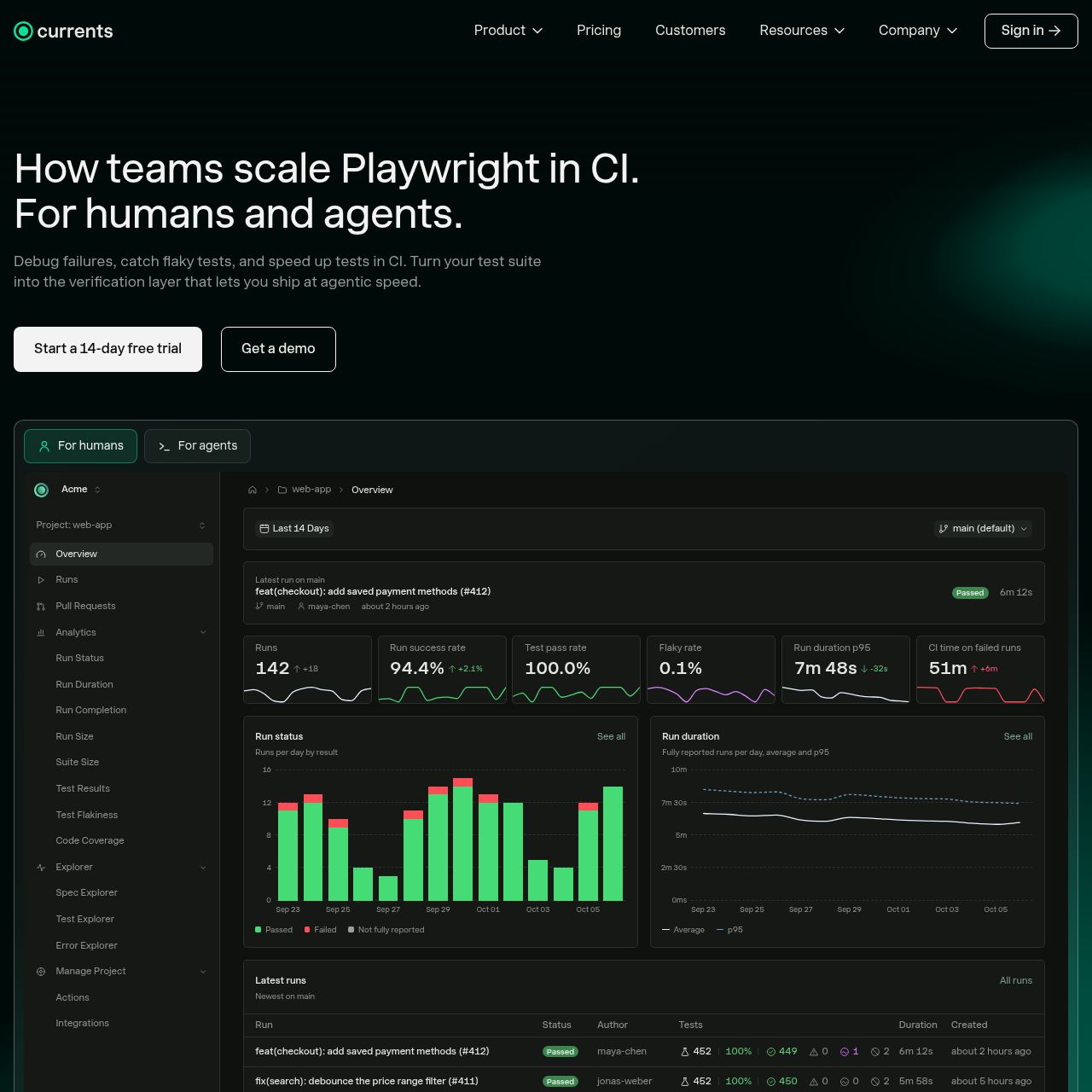
Currents reports Playwright results from a team's own CI, with failure evidence, flaky test tracking, and orchestration across CI machines.
Code & ITRank tests and spec files by failure…Rerun only failed tests in sharded or…Quarantine tests by rule so they…Create or link Jira and Linear issues…
Estimated monthly visits
18K
Data period:
Listed on AIToolly
What Is Currents? Product Overview
What the product does and how it is positioned
Currents combines a Playwright reporter, a test dashboard, and CI orchestration. The reporter sends results to the dashboard as tests run, where teams can review errors, traces, screenshots, and videos.
Teams can track failures, flakiness, and duration over time. Connected AI agents can read test history and failure details through the Currents MCP server.
What Can You Use Currents For?
Source-supported ways to use the product
Investigate a CI failure
A developer can review the failed attempt's error and Playwright trace together in the dashboard.
Prioritize flaky tests
A QA team can rank tests by flakiness and review their history across branches to decide which to investigate first.
Report during a Cypress migration
A team moving from Cypress to Playwright can report both frameworks' results side by side while migrating one suite at a time.
How to Use Currents
The documented workflow, where available
1
Install the reporter
The team installs the Currents reporter and adds the record key to each CI job it wants to report.
2
Run the test suite in CI
The team's CI executes the tests, and the reporter streams results to the Currents dashboard during the run.
3
Review the reported results
The team opens the run in the dashboard and reviews the errors and evidence attached to failed attempts.
Playwright CI orchestration
Currents uses historical spec durations to order a live queue. It tells each CI machine which spec file to run next, while execution stays in the team's CI environment.
Failure-first ordering prioritizes specs with higher historical failure rates.
Fail-fast settings can cancel the run across CI machines after the first failure or a configured threshold.
Failed-test reruns work with both sharded and orchestrated runs.
What to Test Before Choosing Currents
Checks to run with your own material and workflow
Confirm that the CI jobs can run the Currents reporter and be configured with a record key.
Check whether required pull request status checks fit the repository's merge rules.
Verify that the intended MCP client can connect through the documented browser sign-in.
Answers based on the source-checked product record
Does Currents execute the test suite?+
No. Tests run in the team's own CI. The reporter sends results to Currents, and orchestration can tell each CI machine which Playwright spec to run next.
Which test frameworks can Currents report on?+
Currents is built for Playwright and also reports results from Jest, Vitest, Cypress, the Node.js test runner, and frameworks that write JUnit XML.
How does Currents identify flaky tests?+
Currents flags tests that pass on retry and tracks their flakiness rates and history across branches.
How do AI agents access test results?+
Agents connect through the Currents MCP server using browser sign-in. A connected agent can read failure errors, steps, traces, and history.
Can Currents be deployed on-premises?+
Yes. Currents offers a cloud deployment, and enterprise customers can run Currents on-premises or use their own storage.
More Code & IT AI tools
Explore other recently added tools in the same category.