Busabase favicon

Busabase

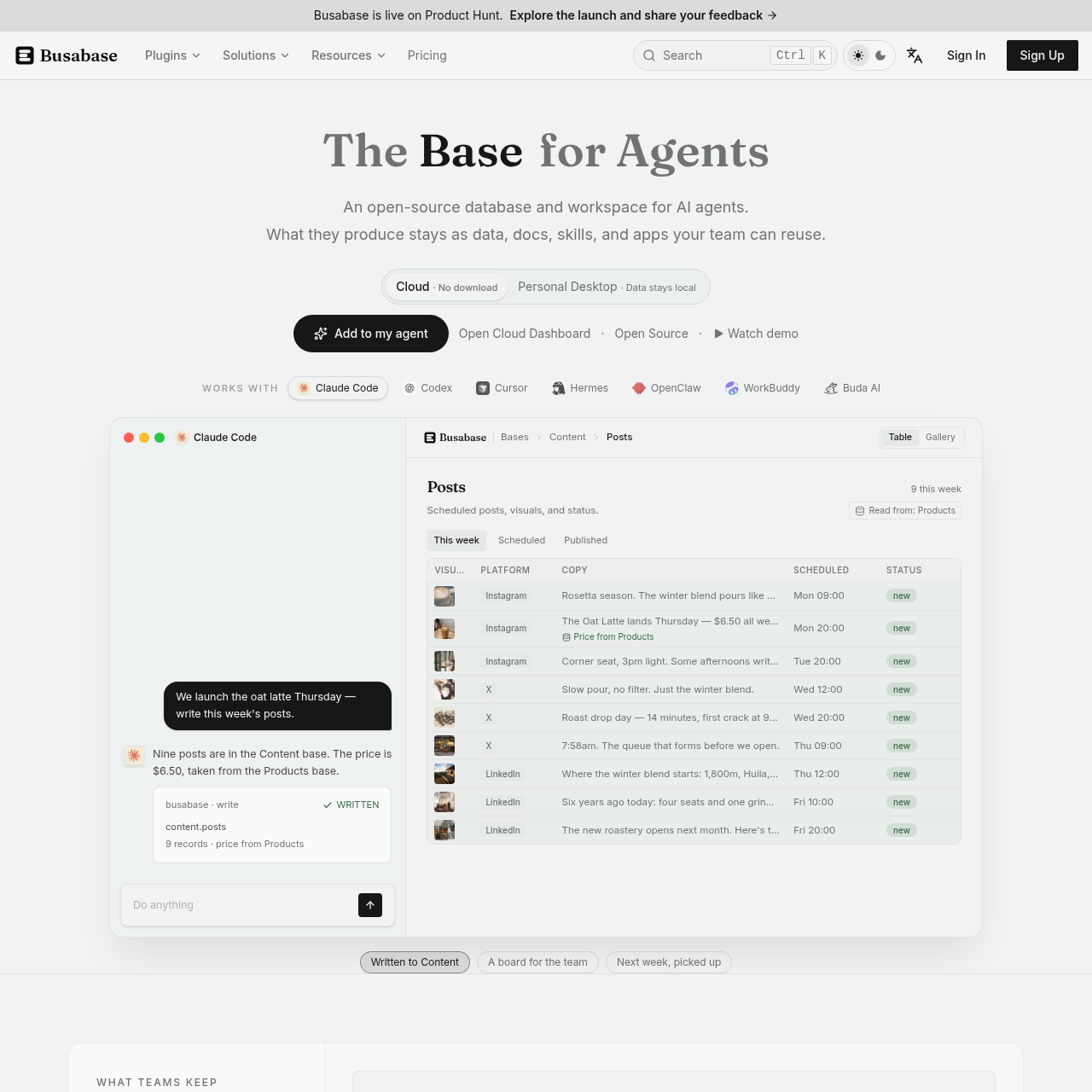
Busabase is an open-source database and workspace designed for AI agents and human teams, storing agent outputs as structured data, documentation, skills, and internal applications across local and cloud environments.

Code & ITConnect external agentsPersist outputs produced by AI agents…Run locally on individual workstations…Deploy within self-hosted private…
Busabase product interface screenshot
Listed on AIToolly

What Is Busabase? Product Overview

What the product does and how it is positioned

Busabase serves as a centralized database and collaboration workspace for AI agents and human team members. Instead of leaving agent outputs scattered across individual chat sessions, the platform organizes agent-generated results into structured data tables, documentation, operational skills, and lightweight internal applications.

The platform supports local-first desktop usage, Docker-based self-hosting within internal corporate networks, and managed cloud deployments. External agents connect through standard interfaces such as the Model Context Protocol, OpenAPI, command-line tooling, or dedicated agent skills to read and update shared data.

What Can You Use Busabase For?

Source-supported ways to use the product

Customer Support Handling

Agents reference product facts and question databases to draft replies, which human operators review and approve before delivery.

Content and Marketing Pipeline Management

Teams track briefs, marketing contacts, social post schedules, and assets across shared pipelines updated directly by connected agents.

Persistent Organizational Memory

Meeting summaries, decisions, and contextual background are captured in documentation tables so subsequent agent sessions do not reset to zero.

Operations and Inventory Management

Teams maintain supplier records, product specifications, stock data, and project statuses in shared relational tables accessed by agents.

How to Use Busabase

The documented workflow, where available

  1. 1

    Connect Agents

    Integrate coding assistants, automation systems, or custom agents using Model Context Protocol, Agent Skills, OpenAPI, or the command-line interface.

  2. 2

    Record and Review Writes

    Changes made by agents log the contributor identity and revision history, with the option to hold specific updates for human approval.

  3. 3

    Reuse Workspace Assets

    Subsequent agents, team members, or internal applications query the persisted tables, docs, and skills without restarting workflows from scratch.

Workspace Structure and Integration Architecture

Busabase structures agent activity into specialized functional modules including Data Base, Knowledge Base, Apps Base, Skills Base, and Playbooks. Data Base establishes tables with consistent field schemas, supporting multiple autonomous agents and human editors read and write identical data definitions without schema drift.

Integration with external AI tooling occurs through open standards including Model Context Protocol, OpenAPI, command-line interfaces, and specialized agent plugins. Changes committed through these endpoints record origin metadata and maintain historical audit trails, enabling oversight across automated operations.

  • Data Base provides tabular records with fixed column structures for cross-agent compatibility.
  • Knowledge Base maintains documented facts alongside verified source references.
  • Skills Base stores repeatable workflows so multiple agents can execute the same process.
  • Playbooks define operating guidelines that agents consult prior to starting tasks.

What to Test Before Choosing Busabase

Checks to run with your own material and workflow

  • Confirm agent compatibility requirements by verifying whether your tools support Model Context Protocol, OpenAPI, CLI, or supported agent plugins.
  • Verify whether your compliance policies require local desktop isolation, private Docker hosting, or cloud deployment.
  • Review the human approval configuration to verify how critical agent write actions are gated for team review.
  • Check data schema requirements to ensure table structures and knowledge formats align with planned agent tasks.

Busabase Sources and Last Checked

What was checked and when

Official source
https://busabase.com/
Last checked
Category
Code & IT

Busabase Frequently Asked Questions

Answers based on the source-checked product record

Is Busabase open source?

Busabase is open-source software provided under the MIT license, allowing teams to inspect code and run it in self-managed environments.

Where can Busabase be deployed?

Busabase can be used as a desktop application on a personal computer, self-hosted on company servers using Docker, or accessed via Busabase Cloud.

Which AI agents can connect to Busabase?

The platform works with agents such as Claude Code, Codex, Cursor, Hermes, OpenClaw, WorkBuddy, and custom agents via MCP, OpenAPI, CLI, or Agent Skills.

How does Busabase maintain accountability for agent edits?

Each write operation records who made the change along with a full edit history, and sensitive actions can be queued for human review before execution.

Does Busabase support offline and local data storage?

Busabase Desktop stores data locally in a directory on the user computer, operates without usage tracking, and continues to function without an internet connection.

Explore other recently added tools in the same category.