Bulkmark
Bulkmark: The Ultimate AI-Powered X/Twitter Bookmark Organizer and Search Tool
Bulkmark is a comprehensive AI tool designed to organize, tag, and summarize your X/Twitter bookmarks. Transform your bookmark graveyard into a searchable library with auto-syncing, email digests, and an AI chat interface.
2026-05-25
5.0K
Bulkmark Product Information
Bulkmark: Transform Your X/Twitter Bookmark Graveyard into a Smart Library
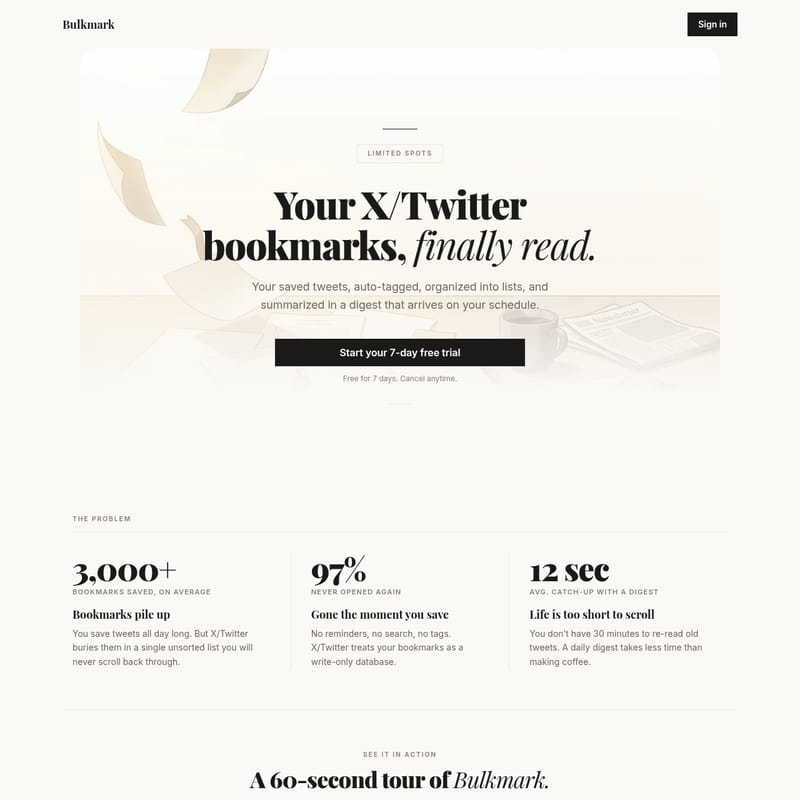
For many power users of X (formerly Twitter), the bookmark feature is where great ideas go to die. Statistics show that the average user has over 3,000 bookmarks saved, yet a staggering 97% of those bookmarks are never opened again. X treats your bookmarks as a "write-only database," burying them in a single, unsorted list that is nearly impossible to navigate.
Bulkmark is the professional solution to this problem. It is an AI-powered bookmark management platform that turns your chaotic collection of saved tweets into a tidy, organized library that you will actually revisit and use. By utilizing advanced AI to auto-tag, summarize, and search your saved content, Bulkmark ensures that the value you find on X is never lost.
What's Bulkmark?
Bulkmark is a specialized bookmark organizer designed specifically for the X/Twitter ecosystem. It functions as a bridge between your saved tweets and your daily workflow. Instead of scrolling endlessly through an unorganized feed, Bulkmark automatically syncs your bookmarks and categorizes them using artificial intelligence.
Whether you are saving threads about AI research, design inspiration, development tips, or business strategies, Bulkmark processes these tweets so you can find them in seconds. It is designed for "bookmark hoarders" who want to transition from simply saving content to actually reading and learning from it. With features like email digests and an interactive AI chat, Bulkmark changes the way you interact with saved information.
Features of Bulkmark
Bulkmark offers a suite of powerful features designed to make bookmark management effortless and productive.
Sync + Auto Tag
Bulkmark provides a seamless "set it and forget it" experience. Once you link your X account, the platform automatically syncs every bookmark. The AI then goes to work, tagging your bookmarks by topic—such as AI, Design, Dev, or Business—before you even open the app. This means your library is always organized without any manual effort.
Search + Filter
Finding a specific tweet is no longer a chore. Bulkmark provides full-text search across all your bookmarks. You can filter by specific tags or sort your saved tweets by date or engagement metrics. This allows you to locate that one specific thread on LLMs or design systems in seconds, rather than minutes of scrolling.
Create and Share Lists
Bulkmark allows you to drag and drop your bookmarks into themed collections. You can build lists like "AI Research," "Design Inspo," or "Startup Playbooks." These lists aren't just for you; you can share any list with a single link. Best of all, viewers do not need a Bulkmark account to see the curated content you’ve shared.
Email Digest
Bulkmark respects your time. Instead of requiring you to open another app, it delivers a topic-grouped email digest directly to your inbox on your own schedule (daily or weekly). This briefing distills dozens of saved tweets into a clean summary. According to user data, catching up with a digest takes an average of only 12 seconds, making it faster than making a cup of coffee.
Chat AI: Ask Your Bookmarks
Perhaps the most innovative feature is the Chat AI. You can ask questions directly to your own bookmark library. For example, if you ask, "What did @karpathy say about tokenization?", the AI will pull the instant answer from your saved tweets and provide links back to the original posts. It turns your bookmarks into a private, searchable knowledge base.
How to Use Bulkmark
Getting started with Bulkmark is designed to be a quick, 60-second process:
- Sign In and Connect: Link your X/Twitter account once to the Bulkmark platform.
- Automatic Sync: Bulkmark will automatically begin syncing your existing bookmarks and any new ones you save.
- AI Organization: Sit back as the AI categorizes your tweets into topics like Tech, Design, and Business.
- Set Your Digest: Choose your schedule for the daily or weekly email briefing.
- Search and Chat: Use the dashboard to search for specific keywords or use the Chat AI to ask questions about the content you have saved.
Use Case
Bulkmark is an essential tool for various professionals and researchers:
- AI Researchers: Automatically group tweets about tokenization, LLMs, and context protocols. Use the Chat AI to quickly recall specific technical insights from industry leaders.
- Developers: Organize dev-related threads and code snippets into shareable lists to help teams stay updated on new protocols or tools.
- Designers: Create "Design Inspo" lists from curated threads and share them with clients or colleagues using a simple link.
- Business Owners: Stay on top of startup playbooks and business trends without getting lost in the noise of the X timeline.
Pricing
Bulkmark offers a tiered pricing structure to reward early adopters. Every plan includes every feature, including auto-sync, AI sorting, weekly digests, shareable lists, and the Chat AI interface.
- Founders Tier: $59/year ($4.92/mo) — 40% discount (Limited spots available).
- Early Bird Tier: $69/year ($5.75/mo) — 30% discount.
- Early Access Tier: $79/year ($6.58/mo) — 20% discount.
- Standard Price: $99/year ($8.25/mo).
Note: Your price stays the same as long as you are subscribed. All tiers come with a 7-day free trial that you can cancel anytime.
FAQ
How do you access my bookmarks? Do I have to give you my X/Twitter password? You link your X account once through a secure connection. You do not need to provide your password directly to Bulkmark; the app uses standard connection protocols to sync your bookmarks automatically.
Is there a free trial? Yes, Bulkmark offers a 7-day free trial. You can explore all the features for a full week and cancel at any time if it doesn't fit your needs.
How often do bookmarks sync? Bookmarks sync automatically on their own, or you can trigger a sync on demand to ensure your library is up to date.
What does the AI auto-tagging actually do? The AI reads the content of your saved tweets and assigns them to relevant categories like AI, Design, Dev, and Business. This makes filtering and searching much more efficient than X's default list.
What does the email digest look like? The email digest is a clean, topic-grouped briefing. It includes highlights and summaries of your bookmarks, grouped by category (e.g., Tech), allowing you to catch up on 30+ tweets in seconds.
What happens to my data if I cancel? Bulkmark is built for your convenience, and while specific data retention policies follow the terms of service, the goal is to provide a tidy library as long as you are using the service.
"You already saved the best parts of X/Twitter. Time to actually read them. Your bookmark graveyard becomes a morning briefing."