Archify
Archify: Architecture Intelligence for Understanding Modern Web Applications and Software Systems
Archify is a powerful, open-source browser extension that provides architecture intelligence for modern web applications. By operating 100% locally, it allows developers to instantly see the components, APIs, and behaviors behind any web page without any data leaving the browser. Archify bridges the gap between writing code and understanding it, tracing five distinct layers—interface, component, API, storage, and route—to streamline development, debugging, and competitive analysis. With support for over 100 fingerprints, including React, Next.js, and Stripe, Archify turns complex manual investigation into a simple hover-and-reveal process, ensuring developers spend less time digging through DevTools and more time building.
2026-07-05
--K
Archify Product Information
Archify: The Ultimate Architecture Intelligence Tool for Modern Web Development
In the current landscape of web development, applications have become increasingly complex. While AI has made writing code significantly cheaper and faster, the bottleneck has shifted. Today, the most difficult part of a developer's job is not necessarily writing code, but understanding the intricate systems and architectures they didn't build themselves. Enter Archify, the premier architecture intelligence tool designed to help you understand software directly within your browser.
What is Archify?
Archify is a free, open-source browser extension that provides deep insights into the components, APIs, and behaviors of any web page. It operates with a 100% local philosophy, meaning no account is required and absolutely nothing leaves your browser. Archify is built to bridge the gap between a user interface and the underlying system architecture, allowing developers to see the "how" and "why" behind a page's functionality without manual digging.
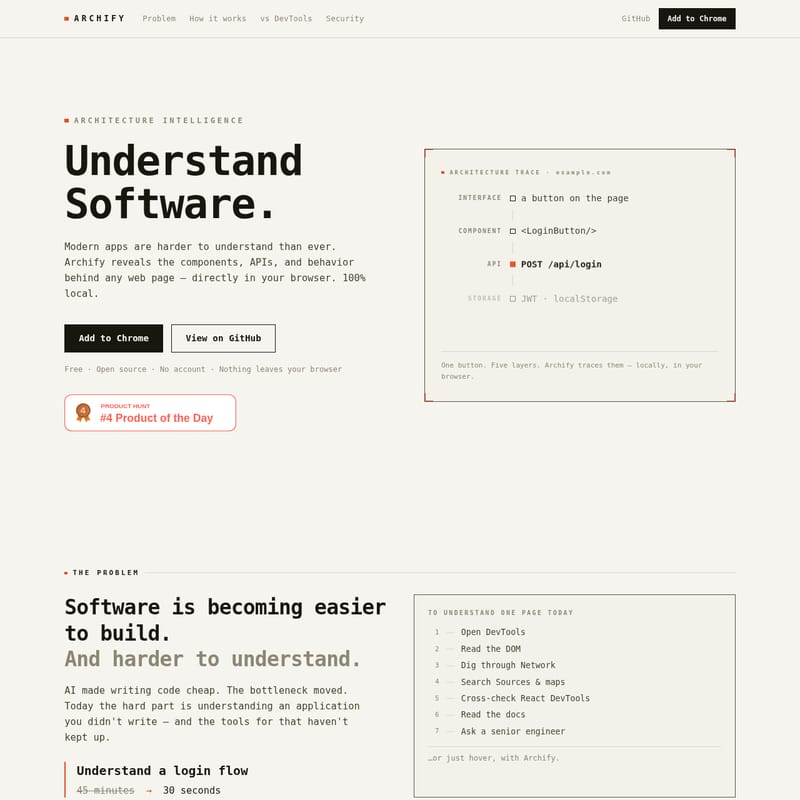
When you use Archify, you are not just looking at code; you are viewing a multi-layered trace of the application. It provides a comprehensive view across five critical layers:
- Interface: Identify specific buttons or elements on the page.
- Component: See the actual framework component, such as
<LoginButton/>. - API: Identify the network calls triggered, like
POST /api/login. - Storage: View storage mechanisms like JWT in
localStorage. - Route: Track the application route, such as
/dashboard.
The Problem: Why Understanding Code is the New Bottleneck
Software is becoming easier to build but harder to understand. According to a field study by Xia et al. in the IEEE Transactions on Software Engineering, approximately 58% of developer time is spent on understanding code rather than writing it. This issue is compounded by the rise of AI-generated code. The Stack Overflow Developer Survey 2025 revealed that 66% of developers believe AI-generated code is "almost right, but not quite," while 59% have admitted to shipping AI-generated code they didn't fully understand.
Currently, to understand a single page, a developer must:
- Open DevTools
- Read the DOM
- Dig through the Network tab
- Search Sources and source maps
- Cross-check React DevTools
- Read external documentation
- Ask a senior engineer for help
Archify streamlines this 45-minute process into just 30 seconds. By meeting the developer where the work happens—the browser—Archify provides immediate clarity.
Core Features of Archify
Archify is packed with features designed to provide a "whole-page profile" through over 100 fingerprints with zero guesses. Every reading provided by the tool carries a confidence score, ensuring you know exactly how reliable the data is.
1. Framework & Runtime Detection
Archify detects a vast array of frameworks and runtimes, including:
- React, Next.js, Vue, Nuxt, Angular, Svelte, SvelteKit, Astro, Remix, SolidJS, Preact, Qwik, Gatsby, htmx, Alpine.js, Lit, Blazor, and Flutter Web.
2. UI Libraries & Styling
Instantly identify the styling tools and libraries used to build the interface, such as:
- MUI, Ant Design, Chakra UI, Radix UI, Mantine, Tailwind CSS, Bootstrap, Vuetify, Headless UI, Ionic, Carbon, and Fluent UI.
3. Analytics & Pixels
Understand the tracking infrastructure of any site, including:
- Google Analytics, Meta Pixel, TikTok Pixel, Segment, Mixpanel, PostHog, Hotjar, and Plausible.
4. Commerce & Payments
Identify the transaction engines powering the web:
- Stripe, PayPal, Braintree, Shopify, WooCommerce, Magento, and BigCommerce.
5. Security & Script Monitoring
One of the most powerful features of Archify is its ability to surface security risks. It reveals every third-party script and outbound call. Most importantly, it identifies which scripts are listening to your form and payment fields—the kind of client-side exposure that traditional network firewalls often miss.
How to Use Archify
Using Archify is simple and requires no complex setup or configuration. Follow these three steps to reveal the architecture of any page:
- Hover any element: Move your cursor over any element on the page, such as a button, card, or form field.
- Archify reads runtime signals: The tool automatically collects framework internals, network calls, the DOM, and form-field listeners locally in your browser.
- The system is revealed: Archify displays the component, the library, the APIs it fires, and the listeners on your form fields. Each piece of information comes with a confidence score. If the system is unsure, it will show as "unknown" rather than fabricating data.
Use Cases: Who is Archify For?
Archify is an essential tool for various roles within a technical organization:
- Frontend Engineers: Perfect for developers who can see where a bug shows up but can't see where it starts. It allows you to trace a symptom back to its specific component and the API behind it in seconds.
- QA Engineers: Enhance your bug reports by attaching technical context, such as the specific component name, the network request, and the status code associated with a failure.
- Technical Founders: Ideal for competitive analysis. Quickly read a competitor's stack, hosting provider, and general architecture from the outside.
Archify vs. Other Tools
While there are many developer tools available, Archify provides a unique perspective by showing the system rather than just fragments of the implementation:
"Chrome DevTools shows implementation. Wappalyzer shows technologies. React DevTools shows components. Archify shows the system."
It is not meant to replace Chrome DevTools; rather, they sit side-by-side. DevTools helps with the granular implementation, while Archify provides the high-level architectural intelligence needed to understand the application as a whole.
FAQ
Is Archify free? Yes. Archify is completely free and open source under the Apache-2.0 license. There are no accounts, no paywalls, and no trial periods.
Does my data leave the browser? No. All analysis runs locally on your machine. There are no external servers, no telemetry, and no analytics. Your page contents are never stored or transmitted, and the analysis is destroyed once you navigate away from the tab.
Which frameworks does it detect? Archify detects React, Next.js, Vue, Angular, Svelte, and many more. Please note that exact component names are usually only available on development builds; on minified production code, Archify shows the component type and a confidence score.
Does it work on any site?
It works on any standard web page you choose to inspect. However, it does not run on browser-internal pages (like chrome://) or the extension store due to browser security policies.
Is it a DevTools replacement? No. They are complementary. While DevTools shows you how something is implemented, Archify shows you the architecture—the component, the API, and the data flow.
For those who need continuous monitoring across every deploy, the creators of Archify also offer Glasswatch for ongoing client-side surveillance.