Alloy
AIToolly product video
See Alloy in motion
Alloy: The AI Prototyping Platform for Building and Modifying Real Products with Codebase Integration
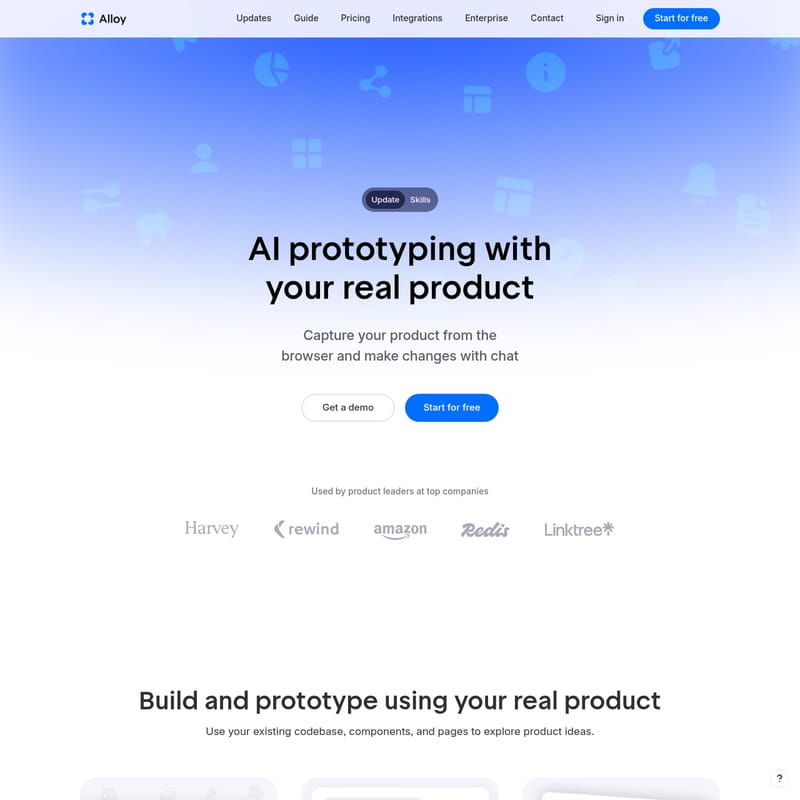
Alloy is a cutting-edge AI prototyping platform that empowers product leaders and developers to build using their real products. By connecting your codebase or using a browser extension, Alloy enables seamless AI prototyping with your actual components and design systems. It allows users to capture pages, make changes via chat, and generate production-ready code that can be pushed directly to GitHub. With cloud-based sessions and 20+ integrations, Alloy simplifies team collaboration and accelerates the product development lifecycle while maintaining high security standards.
2026-07-10
58.0K
Alloy Product Information
Alloy: The Ultimate AI Prototyping Platform for Real-World Product Development
In the fast-paced world of software development, bridging the gap between a conceptual design and a functional product is often a significant hurdle. Alloy emerges as a revolutionary solution, offering AI prototyping with your real product. Unlike traditional tools that rely on static mockups or screenshots, Alloy leverages your existing codebase, components, and pages to help you explore and implement product ideas instantly. By using Alloy, product leaders at top companies can transform the way they build, iterate, and share their vision.
What's Alloy?
Alloy is an advanced AI prototyping platform designed to streamline the product development process. It is the easiest way to make changes to your product by allowing you to prompt, share, and push production-ready code directly. At its core, Alloy understands that the best way to build a product is to work within the actual environment where it lives.
Whether you are looking to add a new feature or refine an existing interface, Alloy allows you to start from your real product. It functions by either capturing your product directly from the browser via an extension or by connecting deeply with your codebase. This ensures that every prototype you create is not just a visual representation but is built on the foundation of your actual design system and component library.
Key Features of Alloy
Alloy is packed with features that cater to the needs of modern product teams, from initial ideation to the final push to production.
AI Prototyping Using Your Real Product
One of the standout features of Alloy is the ability to build and prototype using your actual codebase. By connecting your codebase, you can use your real components and pages to explore new ideas. This ensures that any change you make feels native to your application.
Browser Capture and Codebase Integration
Users have two primary ways to bring their product into Alloy:
- Browser Extension: Capture pages instantly from your browser to start visual prototyping without any setup.
- Codebase Connection: Connect your actual codebase to allow Alloy to run your entire app, providing the power to write and export production-ready code.
Chat-Based Iteration
With Alloy, making changes is as simple as sending a message. You can capture your product from the browser and make changes with chat. For example, a user might prompt Alloy to "add a bulk select & move feature for the items on the home page," and Alloy will generate the necessary code changes instantly.
Live Sandbox Preview
Alloy runs your app in a secure sandbox environment. This allows you to view changes live in the browser as you provide prompts. You can see how your new ideas blend in perfectly with your existing theme and layout, such as an Airbnb app using an Airbnb Design System.
Production-Ready Code Generation
Every session in Alloy can be more than just a visual demo. The platform generates production-ready code that can be:
- Exported for manual use.
- Accessed via MCP.
- Converted directly into a Pull Request in GitHub.
Collaborative Cloud Sessions
Every Alloy session lives in the cloud, making it incredibly easy to share with your team or customers. You can invite teammates via email or share a public link to get instant feedback. This eliminates the need for others to run a local developer environment.
Enterprise-Ready Security
Alloy views security as an engineering standard rather than just a checklist. Every part of the platform is designed to keep your data secure, ensuring it is Enterprise Ready and built to scale for large organizations.
How to Use Alloy
Setting up Alloy is designed to be frictionless, catering to both quick visual edits and deep technical changes.
Step 1: Capture or Connect
To begin, you can either add the browser extension or connect your codebase.
- The browser extension requires no setup and is perfect for instant visual prototyping.
- For more advanced features, connecting your codebase requires admin permissions and approximately 15 minutes of setup time. This allows Alloy to understand your full component library.
Step 2: Prompt Ideas
Once your product is captured, use the chat interface to prompt new ideas. Whether it's adding a "Shipments MVP" or modifying a "Notifications panel," Alloy processes your requests to match your existing design standards.
Step 3: Preview and Refine
Watch your changes happen in real-time within the sandbox. You can logs changes and preview the live version of your app as it evolves through your prompts.
Step 4: Share and Collaborate
Click the "Share" button to invite your team. You can provide full access to anyone at your company or create a public link. This allows stakeholders to see exactly what you’ve built in minutes.
Step 5: Push to Production
Once you are satisfied with the prototype, you can convert your session into a GitHub Pull Request or export the code to integrate it into your development workflow.
Use Case Scenarios
Rapid Feature Exploration
A product leader wants to test a new "bulk order processing" feature for a logistics dashboard. Instead of waiting for a design mockup, they use Alloy to capture the existing "Freight Shipments" page and prompt the AI to add the feature. Within 5 minutes, they have a functional prototype to show the team.
Cross-Team Feedback
A developer wants to share a new UI component with a designer. They start a session in Alloy, apply the changes, and send a link. The designer reviews the live session in the cloud without needing to clone a repository or set up a local environment.
Seamless Design System Adoption
When building new pages, Alloy uses the existing Airbnb Design System (or your specific system) to ensure that every new button, list, or menu looks exactly like something a professional designer made.
FAQ
How do I use my existing product in Alloy? You can either connect your codebase or add the browser extension. Connecting your codebase allows Alloy to run your entire app and write production-ready code, while the extension is best for instant visual prototyping.
How is Alloy different from Claude Code? Unlike Claude Code, Alloy allows anyone in your company to start a session from the cloud without a local developer environment. Sessions can be started from Slack, run in parallel, shared instantly, and pushed to GitHub without complex setup.
How is Alloy different from other app builder tools? Most app builders require you to paste screenshots, often leading to off-brand results. Alloy starts from your real product and understands your component library and design system. Everything built in Alloy automatically matches your brand.
Is there any setup required? The browser extension requires no setup for instant use. Connecting your codebase for full power takes about 15 minutes and requires admin permissions.
Can I import from Figma? Currently, you cannot import from Figma, but you can export your Alloy prototype to Figma at any time by clicking the Figma button in your prototype.
Does Alloy generate code that I can use? Yes. Every session can be exported, accessed via MCP, or converted into a Pull Request in GitHub.