WordPress 7.0
WordPress 7.0: A Comprehensive Guide to the Next Generation of Content Management and Web Design
WordPress 7.0 marks a significant leap forward in web design and performance. This major release introduces advanced navigation overlay customization, a centralized AI Foundations hub for external services, and visual revisions with a timeline slider. With a universal font library, a modernized admin interface, and the ability to treat patterns as single blocks, WordPress 7.0 empowers both developers and creators to build faster, more accessible, and highly responsive websites with unprecedented control.
2026-05-24
7600.0K
WordPress 7.0 Product Information
WordPress 7.0: The Future of Web Design and Site Management
WordPress 7.0 has arrived as a transformative milestone for the world's most popular content management system. This release is designed to hand more control to creators and developers while ensuring that the underlying technology is more robust, accessible, and performant than ever before. From the introduction of AI Foundations to a completely reimagined Navigation Overlay system, WordPress 7.0 simplifies complex workflows and opens new creative possibilities.
What's WordPress 7.0?
WordPress 7.0 is the latest major version of the WordPress core software, representing the collective effort of over 750 contributors. It is a comprehensive update that focuses on site-building flexibility, performance optimization, and the integration of modern technologies. WordPress 7.0 introduces a refined user experience through a quieter, more modern admin interface and advanced tools that allow users to manage everything from typography to artificial intelligence connections in one centralized location. Whether you are building a simple blog or a complex enterprise site, WordPress 7.0 provides the tools to build exactly what you want.
Key Features of WordPress 7.0
Advanced Navigation Overlay Design
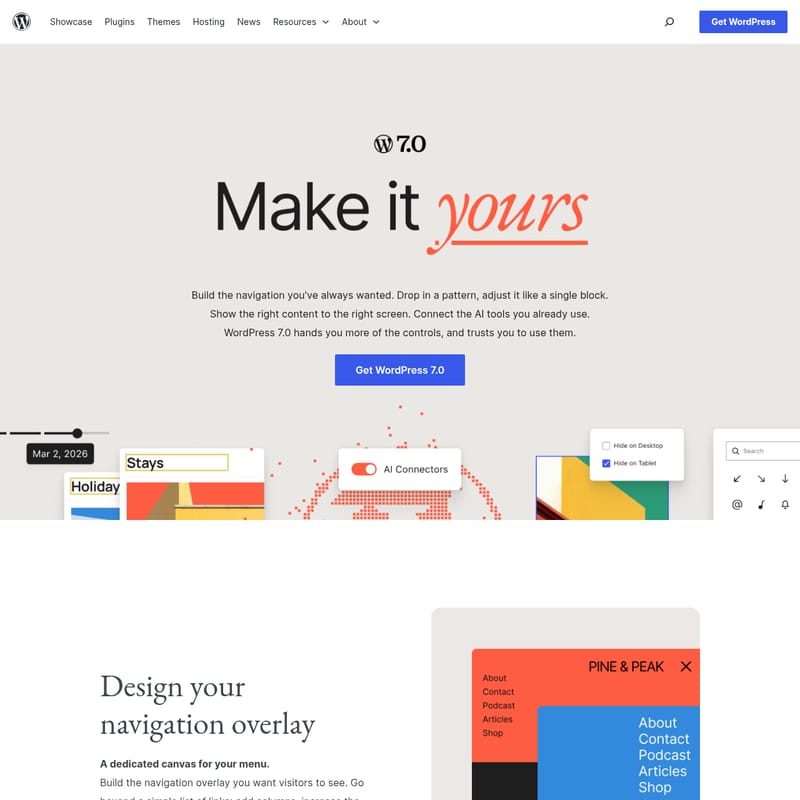
One of the standout features of WordPress 7.0 is the ability to design your navigation overlay on a dedicated canvas. This goes far beyond a traditional list of links. Users can now:
- Add columns and adjust font sizes within the menu.
- Align elements to match the site's unique design language.
- Start from pre-built templates or create a custom navigation overlay from scratch.
- Ensure the right content is shown on the right screen size.
AI Foundations and Centralized Connections
WordPress 7.0 introduces the Connectors screen, a single hub for managing external service integrations. This foundational shift allows users to:
- Opt-in and connect preferred AI providers to their website.
- Use the optional AI plugin to generate titles, excerpts, images, and alt text directly in the editor.
- Benefit from a standardized connection management system that any plugin can tap into, streamlining the developer experience.
Visual Revisions and Document History
Managing changes is easier in WordPress 7.0 with the introduction of Visual Revisions. This feature includes a timeline slider that allows users to:
- Scrub through every version of a page or post.
- See exactly what changed via visual markers on a block-by-block basis.
- Restore previous versions with a single click.
A Simpler Way to Build with Patterns
In WordPress 7.0, patterns now behave like single blocks. This means you no longer have to navigate through deep layers of nested blocks to make simple edits.
- Swap text and images instantly within the pattern.
- Adjust styles directly from the inspector.
- Use the "edit pattern" function for advanced customization when needed.
Universal Font Library
The highly anticipated Font Library is now available for all themes in WordPress 7.0, including classic themes. You can browse, install, and manage your website's typography directly from the editor, ensuring brand consistency regardless of the theme architecture.
Modern Admin Experience
The WordPress admin dashboard has received a significant facelift. WordPress 7.0 features a fresh default color scheme, updated buttons, and inputs. Navigating between pages is now smoother, with a fade transition replacing the abrupt jumps of previous versions, providing a more professional and modern feel.
Performance and Accessibility
Performance Upgrades
WordPress 7.0 significantly improves image loading prioritization. By preventing hidden images in navigation overlays or interactive blocks from slowing down the page, it ensures that critical resources load first. Additionally:
- On-demand block stylesheet loading is more reliable in classic themes.
- New script module dependencies reduce render-blocking, leading to faster perceived load times.
Accessibility Standards
WordPress 7.0 continues to polish the user experience to meet high accessibility standards. Key improvements include:
- Enhanced media management and usability for voice control users.
- Better color contrast in the new admin color scheme.
- New blocks designed with accessibility at the forefront, improving editor navigation and interaction.
How to Use WordPress 7.0
To make the most of WordPress 7.0, follow these simple steps to leverage its new site-building capabilities:
- Connecting AI Tools: Navigate to the new Connectors screen in the admin dashboard. Select your preferred AI provider to enable the centralized AI foundation. Once connected, use the editor to generate content such as titles and alt text automatically.
- Designing Navigation: Enter the navigation editor to access the dedicated overlay canvas. Use the block tools to add columns or icons to your menu and preview how it appears on different screen sizes.
- Implementing Patterns: Browse the pattern library and drop a pattern onto your page. Notice that it behaves as a single unit. Use the inspector on the right to swap images or text quickly.
- Managing Fonts: Open the Font Library within the editor (available for all themes) to upload custom fonts or browse available options to refresh your site’s typography.
- Reviewing Changes: Use the Visual Revisions slider to check your work. If you make a mistake, simply slide back to a previous version and hit restore.
Use Case Scenarios
- Enterprise Websites: Large-scale organizations can use the centralized Connectors screen to manage various external API integrations and AI tools across a massive content team.
- Mobile-First Design: With the ability to choose which blocks appear at specific screen sizes, developers can build cleaner mobile layouts without compromising the desktop experience.
- Creative Portfolios: The new Icon block and advanced navigation overlay options allow designers to create highly stylized, interactive menus that showcase their brand personality.
- Content Heavy Blogs: The Visual Revisions feature is perfect for editorial teams that need to track changes across multiple contributors and maintain a clear history of document edits.
FAQ
Q: Is the Font Library available for classic themes in WordPress 7.0? A: Yes, the Font Library, which was previously limited to block themes, is now functional across all WordPress themes in version 7.0.
Q: How does WordPress 7.0 improve site performance? A: It optimizes image loading by prioritizing critical resources and reducing render-blocking through improved script module dependencies.
Q: What is the benefit of the new Icon block? A: The Icon block allows you to add and style icons from a built-in library anywhere on your page without needing third-party plugins.
Q: Can I still edit individual blocks within a pattern? A: While patterns behave as single blocks for easy editing, you can still access all advanced tools by clicking the "edit pattern" button.
Q: Does WordPress 7.0 include new accessibility features? A: Yes, it includes improvements for voice control, media management, and enhanced color contrast in the admin dashboard.