AI Image to Video art
AIToolly product video
See AI Image to Video art in motion
AI Image to Video: Transform Still Photos into Cinematic AI-Generated Videos with Natural Motion
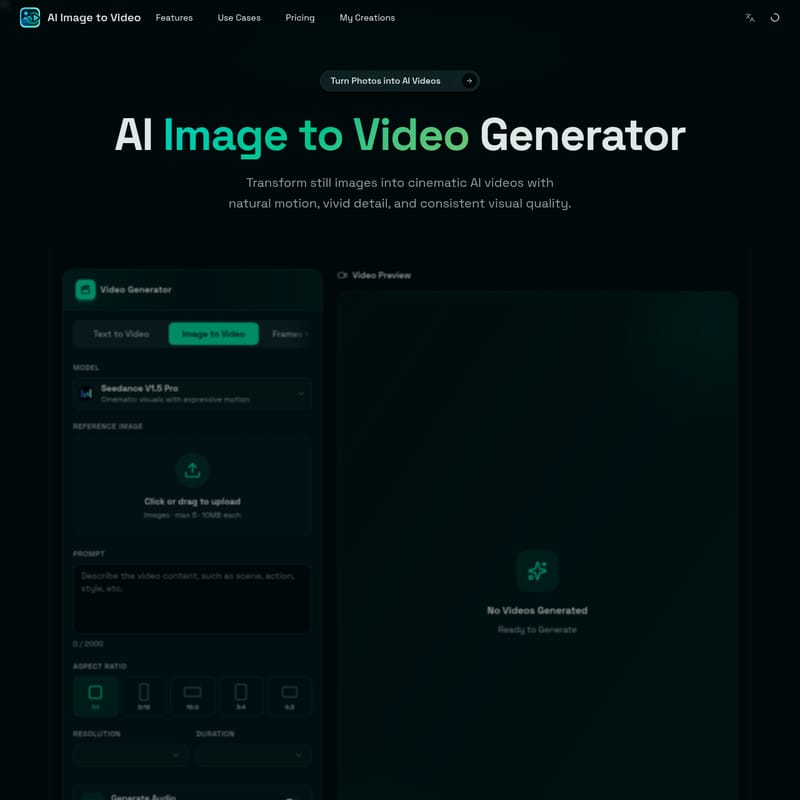
AI Image to Video is a powerful online tool that turns static images into dynamic, cinematic AI videos using the Seedance V1.5 Pro model. Ideal for social media, product ads, and creative storytelling.
2026-05-15
--K
AI Image to Video art Product Information
AI Image to Video: The Ultimate AI Image to Video Generator for Cinematic Motion
In the modern digital landscape, the ability to grab attention quickly is paramount. AI Image to Video is a cutting-edge online tool designed to transform your still images into cinematic AI videos with natural motion, vivid detail, and consistent visual quality. Powered by the advanced Seedance V1.5 Pro model, this AI Image to Video generator allows creators to breathe life into static photos, artwork, and product shots without the need for complex video editing software or expensive production teams.
Whether you are a marketer looking for high-impact product reveals, a social media influencer needing fresh content for TikTok and Reels, or an artist wanting to see your characters move, AI Image to Video provides a fast, simple, and free workflow to achieve professional results.
What is AI Image to Video?
AI Image to Video is a specialized image to video AI platform that enables users to convert photos, portraits, anime artwork, pet pictures, and creative scenes into short, high-quality AI-generated videos. Unlike traditional video creation that requires footage, this tool starts with a single image. By utilizing Seedance V1.5 Pro, it generates cinematic visuals with expressive motion and natural camera movements.
This technology is built for creators who want to move from a still concept to a shareable video clip in minutes. The platform supports a variety of visual styles, including portraits, product photography, landscapes, and illustrations. With AI Image to Video, you can control the motion of your subject and the camera using simple natural language prompts, ensuring your final video aligns perfectly with your creative vision.
Key Features of AI Image to Video
AI Image to Video focuses on the essential features that modern creators need to produce high-quality, engaging content directly in their browsers.
Still Image Animation
Transform any static image into a moving AI video. This feature adds subject motion, environmental movement, and camera depth to your photos, creating a sense of realism and stronger visual storytelling.
Cinematic Camera Control
Make a static image feel like a professional video shot. The image to video AI allows you to apply specific camera movements such as:
- Push-in movement and slow zoom
- Orbit camera and parallax depth
- Slow pan and handheld energy
- Close-up transitions
Natural Motion Prompts
You don't need to be a technical expert to guide the AI. Use simple text prompts to describe the movement you want, such as "hair movement," "flying particles," "moving background," or "cinematic lighting."
Subject Consistency
One of the biggest challenges in AI video generation is keeping the subject recognizable. AI Image to Video excels at animating people, pets, and products while maintaining the visual identity of the original uploaded image.
Fast Online Generation
Generate image to video AI clips without installing heavy software or managing local GPU resources. The entire process happens online, providing a fast workflow for creating social clips, ad concepts, and story videos.
Seedance V1.5 Pro Model Integration
The platform utilizes the Seedance V1.5 Pro model, specifically optimized for cinematic visuals and expressive motion. It supports various aspect ratios (1:1, 9:16, 16:9, 3:4, 4:3) and generates 4-second clips at 480P resolution.
Best Use Cases for Image to Video AI
The versatility of the AI Image to Video generator makes it suitable for a wide range of professional and personal projects.
Social Media Clips
Create eye-catching videos for TikTok, Instagram Reels, YouTube Shorts, and X posts. Turn your daily photos or fan edits into dynamic content that stands out in crowded feeds.
Product Photo to Video
E-commerce owners and marketers can turn product photos into short promotional videos. Use camera movements like product rotation or close-up motion to highlight features for ads, stores, and landing pages.
Portrait and Selfie Animation
Bring portraits and avatars to life. Add subtle motions like blinking, hair moving in the wind, or gentle facial expressions to profile photos and character images while keeping the subject clear.
Anime and Fantasy Artwork
Anime Image to Video allows artists to animate manga-style images, game assets, and illustrations. Bring characters to life with wind motion, moving clouds, and dramatic camera energy.
Ad and Promo Videos
Generate quick promotional clips from campaign images, posters, and brand visuals. This is an efficient way to create ad variations without a full production workflow.
How to Create an AI Video from an Image
Creating a video with the AI Image to Video generator is a straightforward four-step process:
- Upload an Image: Start by clicking or dragging your reference image into the tool. You can upload up to 5 images (max 10MB each). This could be a photo, portrait, anime art, or product shot.
- Write a Motion Prompt: In the prompt box (up to 2000 characters), describe the movement you desire. For example, "a cinematic slow pan across a mountain landscape" or "subtle hair movement and soft lighting for a portrait."
- Configure Settings: Choose your preferred aspect ratio (e.g., 9:16 for TikTok or 16:9 for YouTube) and decide if you want the model to Generate Audio to match the video. Generating a video typically costs 8 credits.
- Generate and Download: Click the generate button. Once the AI processes your request, you can preview the video, download it, and share it across your favorite platforms.
Popular AI Image to Video Ideas
If you're looking for inspiration, try these popular photo to video AI concepts:
- Cinematic Product Reveal: Use a product photo with a slow push-in and floating particles for a premium ad feel.
- Anime Character Scene: Add moving clouds and expressive character energy to your favorite illustrations.
- Pet Memory Video: Turn a pet photo into a warm video with soft camera movement and emotional lighting.
- Travel Photo Pan: Animate a landscape photo with a smooth camera pan to showcase the scale of the environment.
- Food Close-Up: Use a food picture to create a video with steam effects and appetizing close-up detail.
Frequently Asked Questions
What is AI Image to Video? It is a free online image to video AI generator that transforms still images into short, cinematic AI videos based on user-provided motion prompts.
Is AI Image to Video free to use? Yes, it is free to start. Depending on your needs for quality, speed, or length, there may be paid options available.
Can I make an AI video from just one image? Absolutely. One image is all you need to start the animation process. The AI uses that image as the visual foundation for the entire video.
How does the motion prompt work? The motion prompt is a text description that tells the AI how to move the camera or the subjects within the frame. You can describe zooms, pans, or specific actions like "smiling" or "waves crashing."
Can I use this for my business? Yes, AI Image to Video is highly effective for creating product videos, social media ads, and marketing content for e-commerce stores and landing pages.
What is the difference between Text to Video and Image to Video? Text to Video creates visuals from scratch based on a description. Image to Video AI uses your uploaded image as the base, which ensures the subject, composition, and style remain consistent with your original photo.
What file sizes are supported? You can upload images up to 10MB each, with a maximum of 5 images per session for the reference tool.