TapVid
Sponsored product video
See TapVid in motion
TapVid: The Professional AI Explainer Video and Motion Graphics Generator for Content Creators
TapVid is an advanced AI video creation platform that transforms prompts, documents, and scripts into high-quality motion graphics and explainer videos. It simplifies professional production by automating visuals, voiceovers, and editing, making it an ideal solution for marketers, educators, and businesses seeking efficient video workflows.
2026-07-24
2.0K
TapVid Product Information
TapVid: The Ultimate AI Explainer Video and Motion Graphics Generator
In the modern digital landscape, video content is the most effective way to communicate complex ideas. However, traditional video production often requires expensive agencies, complex software, and weeks of back-and-forth editing. TapVid changes this paradigm by offering a powerful AI explainer video generator that turns your ideas into professional motion videos in minutes. Whether you are starting with a simple prompt, a detailed PDF, or a web link, TapVid provides the tools to create structured, engaging motion videos with photorealistic visuals and clear explanations.
What’s TapVid?
TapVid is an innovative AI-powered platform designed to revolutionize how motion videos are created. At its core, it is a text to video AI solution that allows users to create high-quality content without any prior design or editing experience. The platform specializes in converting source materials—such as ideas, scripts, and documents—into comprehensive videos that include motion graphics, voiceovers, and intelligent transitions.
Unlike traditional video tools that require manual timeline management, TapVid leverages artificial intelligence to handle the heavy lifting. It is built for teams who need to "ship" content quickly, allowing them to transform a product document or a creative script into a post-ready video in as little as ten minutes. By bridging the gap between raw text and visual storytelling, TapVid serves as an essential tool for anyone looking to scale their video production.
Key Features of TapVid
TapVid is packed with features designed to maximize efficiency while maintaining high production values. Here are the core functionalities that make it a leading AI motion graphics generator:
AI Explainer Video Generator
Explain anything in a minute. This feature allows you to turn a simple prompt, a PDF document, or a URL into a fully realized explainer video. The AI analyzes the content, structures the narrative, and applies motion graphics to ensure the explanation is clear and visually stimulating.
Motion Graphics and Visual Styles
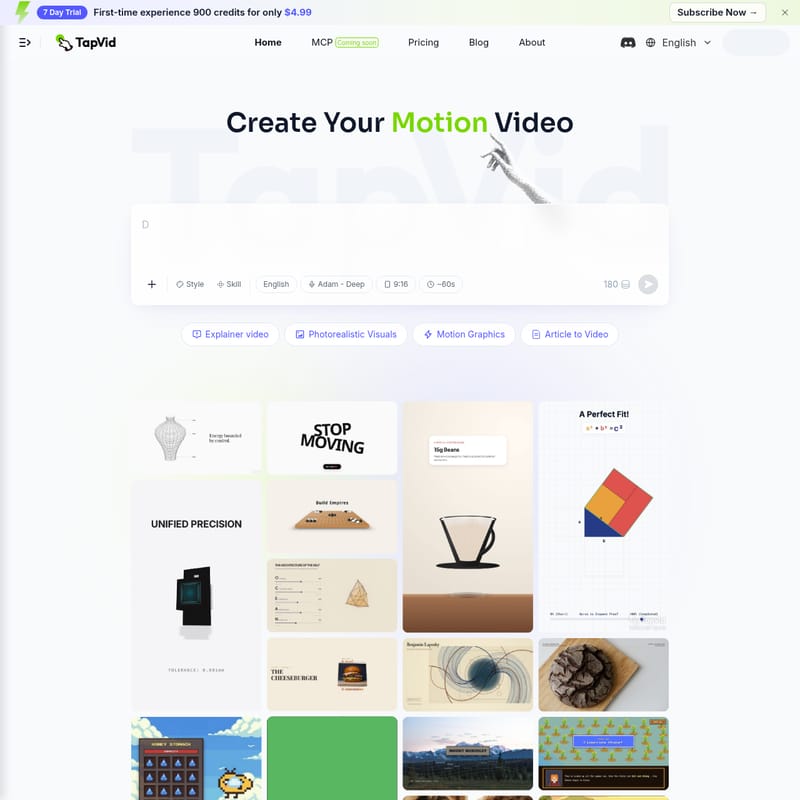
TapVid offers a wide variety of visual styles to suit any project. From Photorealistic Visuals and 3D Motion Graphics to Pixel Art and Kinetic Typography, the platform ensures your video doesn't have that "obvious template look." You can create everything from medical animations to geometric proofs with ease.
Intelligent Edit and One Shot Creation
The "One Shot" feature enables the creation of a complete video from a single input. However, the Intelligent Edit functionality ensures you aren't locked into the first result. You can tweak scripts, adjust visuals, and refine the output to match your brand's specific voice and style.
High-Quality Exports
All videos produced with TapVid are available for 1080p Export. Depending on your subscription plan, you can create clips ranging from 60 seconds to 5-minute films, all of which are watermark-free for professional use.
Article to Video and Document Conversion
One of the most powerful features of TapVid is its ability to ingest existing content. You can use the following formats to start your video project:
- PDF to Video
- PPT to Video
- Article to Video
- URL to Video
- Script to Video
- Google Slides to Video
How to Use TapVid
Creating a professional video with TapVid is a streamlined process that eliminates the need for a production crew. Follow these steps to generate your first motion video:
- Input Your Content: Start by providing a prompt, uploading a PDF, or pasting a link to an article or website. This serves as the foundation for your video.
- Select Your Style: Choose from various styles such as Motion Graphics, Photorealistic, or specialized themes like Pixel Art.
- Choose a Voice: Select a voiceover profile (e.g., "Adam - Deep") to match the tone of your content.
- Generate the Draft: The AI will process your input to create a structured video with visuals, voice, and motion.
- Refine with Intelligent Edit: If you need to make changes, use the edit tools to drop in a new script or adjust the motion elements.
- Export and Share: Once satisfied, export your video in high definition (1080p) to use on social media, landing pages, or presentations.
Use Cases for TapVid
TapVid is versatile enough to support a wide range of industries and content types:
For Marketing and SaaS
- SaaS Explainer Videos: Show off your software's features with clean motion graphics.
- Product Launch Video Maker: Generate excitement for new products with professional visuals.
- AI Ad Video Generator: Create high-conversion ads for social media platforms.
For Education and Training
- Educational Videos: Turn course slides into engaging videos to improve student completion rates.
- Tutorial Videos: Provide step-by-step guides for complex tasks like "How to Play Go" or "Home Pour-Over Coffee."
- Medical Animations: Use 3D medical animation for clinical guides, such as wisdom tooth extraction explanations.
For Content Creators and Storytellers
- Documentary Video Maker: Create historical or scientific deep dives, such as the "Great Serengeti Migration" or "The First Three Minutes of the Universe."
- Infographic Video Maker: Visualize data through Animated Chart Makers and Kinetic Typography.
Pricing and Plans
TapVid offers flexible pricing to accommodate everyone from individual creators to large creative studios.
- 7-Day Trial: For only $4.99, new users get 900 credits (approximately 6 videos) to experience the full power of the platform.
- Basic Plan: $15.2/mo after trial. Includes 900 credits per month, 1080p exports, and clips up to 3 minutes.
- Pro Plan: $31.2/mo. Includes 2,000 credits, priority rendering, and early access to new features. This is the most popular choice for content managers.
- Max Plan: $99/mo. Includes 6,000 credits (approx. 42 videos), priority support, and a faster render queue.
- Ultra Plan: $199/mo. Includes 14,000 credits (100+ videos) and unlocks 5-minute films with expedited expert support.
Note: 3 credits are equivalent to 1 second of video.
Frequently Asked Questions (FAQ)
Is there a free AI explainer video generator? Yes. TapVid is an AI explainer video generator that allows you to turn a prompt, PDF, or link into a finished video. You can start with the trial and upgrade as your needs grow.
Can AI turn a PDF into a video? Absolutely. TapVid supports converting PDFs, Word documents, and even PowerPoint slides directly into structured motion videos.
What makes TapVid different from other AI video generators? Unlike simple template-based tools, TapVid focuses on high-quality motion graphics and intelligent editing. It provides a "non-obvious template look" that feels like it was made by a professional agency.
Does TapVid support voiceovers and subtitles? Yes, TapVid automatically generates voiceovers and clear explanations, including subtitles, to ensure your message is understood by everyone.
What kinds of videos can I make with TapVid? You can create everything from SaaS explainers and product demos to educational tutorials, social media ads, and complex scientific documentaries.