Capptivo
Capptivo: Screen Recorder with Auto Zoom
Capptivo is a screen recorder with auto zoom for professional demos. Create videos with cursor tracking, on-screen drawing, and multi-format export options.
2026-08-04
--K
Capptivo Product Information
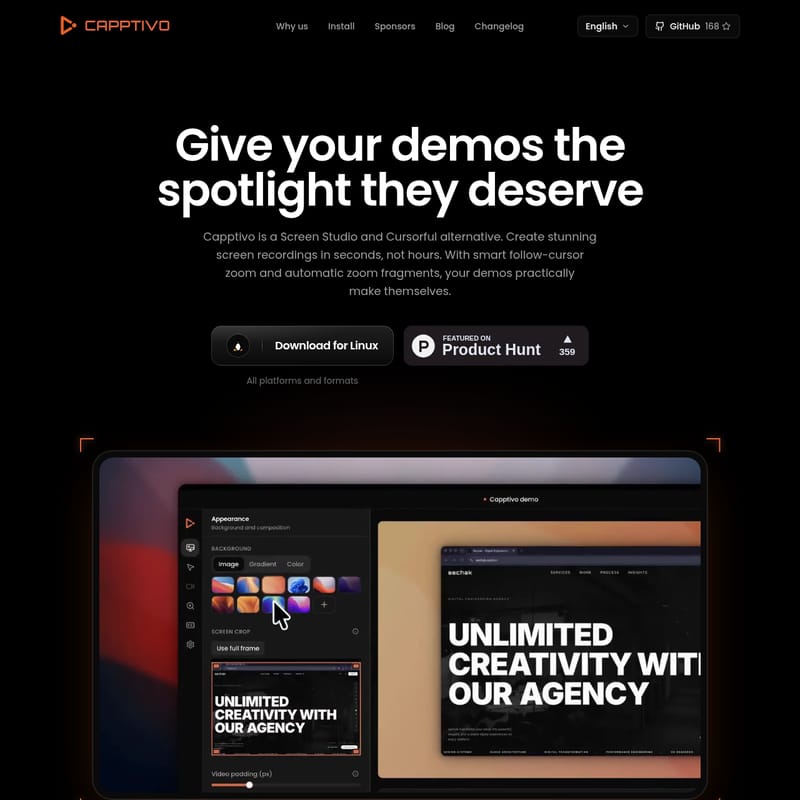
Capptivo is a screen recorder with auto zoom used for the creation of software demonstrations. The application is a native desktop screen recording software that functions as an alternative to Screen Studio and Cursorful, providing a workflow that integrates motion tracking with a timeline-based editor.
Smart Zoom and Motion Tracking
The software utilizes smart follow-cursor zoom and automatic zoom fragments to manage screen focus during recording. Pans and zooms follow the cursor so the important part of the screen stays in view. These automatic zoom fragments are generated based on where cursor interaction occurs within the captured interface.
Cursor Customization and Path Looping
This cursor tracking tool includes macOS Tahoe-style cursors with smooth movement. Idle cursors hide automatically when the pointer is not in motion. For those creating social and demo videos, the software allows for looping the cursor path so that recordings restart cleanly.
On-Screen Drawing Tools
Capptivo includes built-in on-screen drawing tools, such as a pen, a highlighter, and simple shapes. These tools are used to explain steps, walk through a flow, or point to specific elements. Markings are saved in the recording on top of the captured screen content. Users can also customize the background by choosing a preset or uploading an image.
Multi-Format Export and Platform Support
As a demo video creator, Capptivo is available as a native application for macOS, Windows, and Linux. The software supports widescreen, square, and vertical exports. A single edit can be used to generate multiple outputs formatted for the aspect ratio requirements of different platforms.
Timeline Editing and Zoom Management
The screen recording editor features a timeline for adjusting zoom points. Users can drag zooms on the timeline, and the software fills in the motion between these points. This provides a method for managing the focal points established by the auto zoom features after the recording is complete.
Capptivo faq
Which platforms are supported by the Capptivo desktop app?
Capptivo provides native applications for macOS, Windows, and Linux. The software operates as a local tool for recording and editing video footage.
How do the drawing and highlighting tools work?
The software includes a pen, highlighter, and simple shapes that can be used on the screen during a recording session. These drawings are captured as part of the video and appear on top of the interface in the final export.
What export options are available for different video formats?
The application supports widescreen, square, and vertical exports. This allows a recording to be output in various aspect ratios suitable for different distribution channels.