MorphLogo
Sponsored product video
See MorphLogo in motion
MorphLogo: A professional AI logo animation maker for brands to create cinematic video intros and social clips.
MorphLogo is a specialized AI brand studio and logo animation maker that transforms static logos into high-quality motion graphics. Unlike other tools, it keeps your original logo intact without redrawing it. Users can choose from over 15 cinematic styles—such as Liquid Morph, 3D Orbit, and Neon Pulse—or use AI prompts to customize motion, lighting, and camera angles. Supporting 4K exports, multiple aspect ratios (1:1, 16:9, 9:16), and formats like MP4, WebM, and GIF, MorphLogo is designed for creators and teams looking to produce brand-ready animations in roughly 60 seconds without needing complex design skills.
2026-08-02
--K
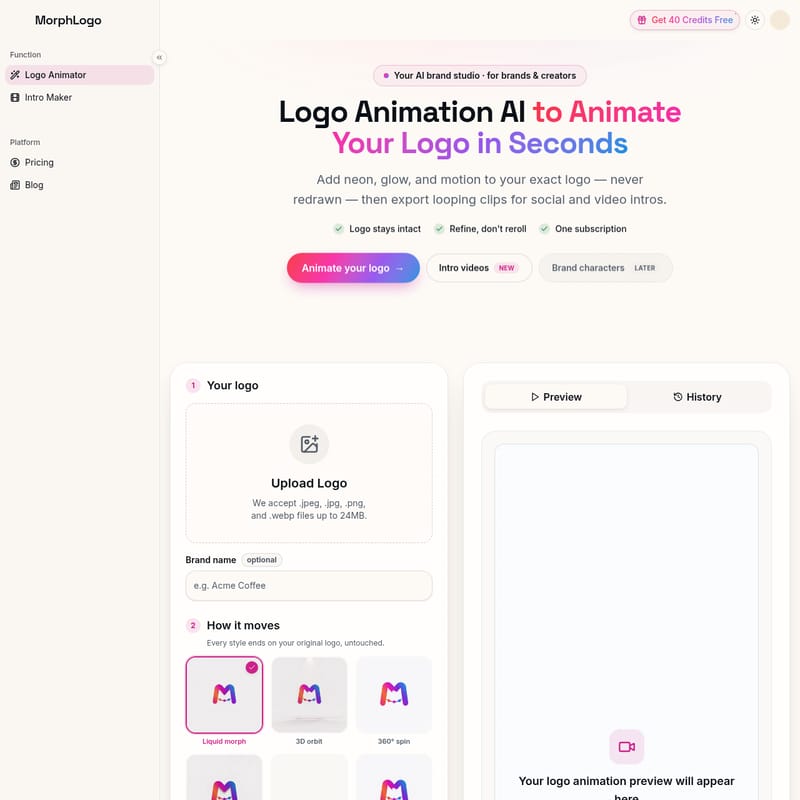
MorphLogo Product Information
MorphLogo: The Ultimate AI Logo Animation Maker for Brands and Creators
In the competitive digital landscape, a static brand mark is often not enough to capture attention. MorphLogo emerges as a premier AI logo animation maker designed to bridge the gap between static graphic design and professional motion graphics. As an all-in-one AI brand studio, MorphLogo allows brands and creators to animate your logo in seconds, providing a seamless way to create high-end video intros and social media content without the steep learning curve of traditional software.
What's MorphLogo?
MorphLogo is a sophisticated logo animation AI that specializes in transforming static image files into dynamic, looping video clips. It is built for brands that demand consistency and creators who need speed. The platform's core philosophy is "Refine, don't reroll," ensuring that your original logo design remains completely intact. Unlike generic AI image generators that might redraw or hallucinate your brand's shapes and colors, MorphLogo uses your actual file as the foundation, adding motion, neon effects, and cinematic glows to your exact mark.
Whether you are looking for an intro maker or a tool to spice up your social media presence, MorphLogo provides the power of a professional studio in a browser-based interface. With a focus on high-fidelity output and brand integrity, it has become a go-to logo animator for teams worldwide.
Features of the MorphLogo AI Logo Animation Maker
MorphLogo is packed with advanced features that cater to professional designers and business owners alike. This AI logo animation maker prioritizes quality, speed, and versatility.
Authentic Logo Preservation
One of the standout features of this logo animation AI is that your logo is never redrawn. Your uploaded file serves as the actual first and last frame of the animation. This ensures that the shape, colors, and proportions of your brand remain 100% accurate throughout the motion sequence.
Lightning-Fast Rendering
Traditional motion graphics can take hours or even days to render. MorphLogo acts as a fast logo animation maker, moving from a static upload to a polished, high-definition animation in roughly 60 seconds. There are no timelines to manage and no keyframing required.
Professional 4K Exports
Quality is never compromised. Users can render their animated logo in SD, HD, 1080p, or even 4K resolution. This ensures that the output remains crisp at any size, making it suitable for everything from mobile hero headers to massive big-screen displays.
Versatile Export Options
MorphLogo supports various formats and aspect ratios to fit every digital channel. You can download your creations as:
- Formats: MP4, WebM, or animated GIF.
- Aspect Ratios: 16:9 (Widescreen), 1:1 (Square), and 9:16 (Vertical/Reels).
Prompt-Driven AI Motion
Beyond pre-set styles, MorphLogo offers prompt-driven animation. You can describe the specific motion, lighting, and camera angles you want using natural language. Advanced video models then translate your description into brand-ready motion graphics.
Integrated Sound Effects
To complete the cinematic experience, this logo animator allows you to add generated sound effects that automatically match the motion of your logo, providing a full sensory brand experience.
Stunning Cinematic Motion Styles
The MorphLogo AI logo animation maker provides a diverse library of curated motion styles. Each style is designed to end on your original, untouched logo. Popular styles include:
- Liquid Morph & Liquid Chrome: Fluid, organic transitions with a metallic or aqueous feel.
- 3D Orbit & 360° Spin: Dynamic spatial movements that give your logo depth.
- Neon Pulse & Hologram: Futuristic lighting effects perfect for tech and gaming brands.
- Energy Shockwave & Particle Assembly: High-impact reveals using physics-based effects.
- Gold Shimmer & Soft Float: Elegant, high-end movements for luxury brands.
- Glitch Burst & Glass Shatter: Gritty, modern reveals for high-energy content.
- Ink Bloom & Sketch Reveal: Artistic transitions that mimic traditional media.
How to Use MorphLogo to Animate Your Logo
You don't need After Effects or professional design skills to get started. MorphLogo simplifies the process into three easy steps:
Step 1: Upload Your Logo
Begin by dropping your brand file into the platform. MorphLogo accepts .jpeg, .jpg, .png, and .webp files up to 24MB. For the cleanest motion and best results, transparent backgrounds (PNG or WebP) are recommended.
Step 2: Pick a Style and Prompt
Select one of the many cinematic motion styles or describe your vision in the prompt box. Here, you can also adjust video settings such as aspect ratio (1:1, 16:9, 9:16), duration (typically 4s), and quality levels.
Step 3: Export Your Animation
Preview your animation to ensure it meets your brand standards. Once satisfied, export and download your animated logo as an MP4, WebM, or GIF. Your file is now ready for use across all your marketing channels.
Use Cases for Your Animated Logo
An animated logo created with MorphLogo can be utilized across a wide variety of platforms to enhance brand recognition:
- Video Intros: Create professional openings for brand videos and presentations.
- Social Media: Enhance Reels, TikToks, and YouTube Shorts with vertical 9:16 animations.
- Websites: Use WebM or GIF formats for high-quality hero headers and website loaders.
- Digital Ads: Capture more clicks with motion-based advertisements on Facebook, Instagram, and LinkedIn.
- Campaigns: Quickly spin up multiple versions of a logo for different seasonal or marketing campaigns.
"The best AI logo animation tool I've used — a polished intro in one afternoon." — Kenji Sato, Startup Founder
"Our animated logo looks premium on every channel, especially 9:16 Reels." — Lily Nguyen, Social Media Manager
FAQ: Everything You Need to Know
Is there a free logo animation AI? MorphLogo offers 40 credits free upon sign-up, allowing you to test the features and start animating your logo without an initial cost.
How long does a render take? A typical render with this logo animation maker takes approximately 60 seconds to go from a static file to a finished animation.
What files can I upload? You can upload JPEG, JPG, PNG, and WebP files. Files can be up to 24MB in size.
Will MorphLogo redesign or redraw my logo? No. Unlike generic AI tools, MorphLogo keeps your logo intact. It uses your actual file for the first and last frames, ensuring your brand identity is never altered.
What resolutions are supported? MorphLogo supports various resolutions including SD, HD, 1080p, and 4K exports for maximum clarity.
Do I need design or After Effects skills? Not at all. MorphLogo is designed to be user-friendly, requiring no design or technical video editing skills. The AI handles the complex motion work for you.
Where can I use my animated logo? You can use your exports for websites, social media, video intros, marketing ads, and anywhere else that supports MP4, WebM, or GIF files.