Spellar 3.0
Spellar: The Ultimate Private AI Meeting Companion for Native Mac, iPhone, and iPad Recording
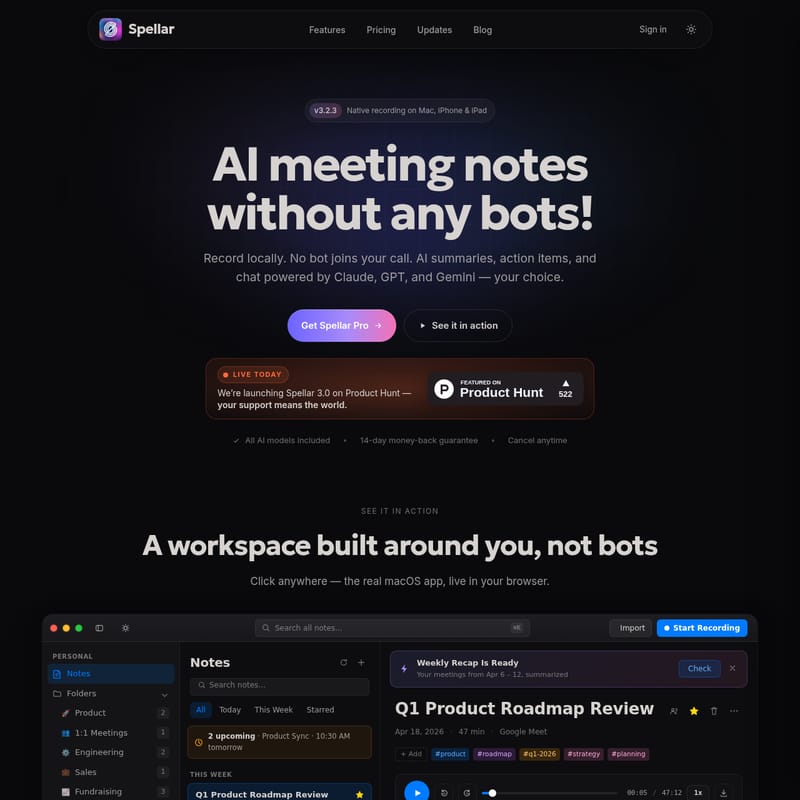
Spellar is a privacy-first AI meeting companion designed for Mac, iPhone, and iPad. It records meetings locally without intrusive bots, using premium AI models like GPT, Claude, and Gemini to generate summaries and action items. With 20+ native integrations and automated recaps, Spellar streamlines your workflow while keeping your data secure.
2026-05-16
12.0K
Spellar 3.0 Product Information
Spellar: Your Private AI Meeting Companion for Effortless Notes
In today's fast-paced digital workspace, meetings are the backbone of collaboration, yet they often result in a mountain of manual note-taking and missed action items. Spellar emerges as a revolutionary solution, acting as your private meeting companion that does the heavy lifting for you. Built natively for Mac, iPhone, and iPad, Spellar is designed for professionals who demand high-quality AI meeting notes without compromising on privacy or efficiency.
What is Spellar?
Spellar is a sophisticated, privacy-first workspace built around your meeting needs. Unlike traditional recording tools that require an intrusive bot to join your Zoom, Google Meet, or Microsoft Teams calls, Spellar operates natively on your device. It records audio locally, ensuring that no uninvited "recording bots" disrupt the flow of your conversations.
With Spellar v3.2.3, the platform has evolved into a comprehensive AI meeting notes engine. It leverages the world's most powerful AI models—including Claude, GPT, Gemini, and Perplexity—to transform raw audio into structured summaries, precise action items, and searchable insights. Whether you are conducting a high-stakes investor update or a routine engineering standup, Spellar ensures you can stay present in the conversation while it handles the documentation.
Key Features of Spellar
1. Privacy-First, No-Bot Recording
The standout feature of Spellar is its commitment to privacy. By recording locally on your Mac, iPhone, or iPad, Spellar eliminates the need for cloud-based bots to join your meetings. You have complete control over where every byte of your data goes. Server-side AI transcription is strictly opt-in, and you can even bring your own AI API keys to keep your data entirely within your own ecosystem.
2. Choice of Premium AI Models
Spellar recognizes that different tasks require different "brains." You can switch between leading AI models depending on your needs:
- GPT-4: Best for reasoning and structured output.
- Claude: Ideal for nuanced writing and creative summaries.
- Gemini: Perfect for long-context meetings and fast processing.
- Perplexity: Great for performing live web research while you talk.
3. 30+ Smart Templates
Don't waste time formatting your notes. Spellar comes with over 30 built-in templates tailored for various meeting types, including:
- Sales Discovery: Captures pain points, budget, and stakeholders.
- 1:1 Meetings: Focuses on performance and personal growth.
- Sprint Retrospectives: Organizes what went well and what needs improvement.
- Standups: Keeps track of daily wins and blockers.
- Custom Templates: Create your own using natural language prompts.
4. AI Chat: Chat with Your Meetings
Imagine having a personal assistant who remembers everything said in every meeting. Spellar's AI Chat allows you to pull decisions, commitments, and specific quotes from any individual meeting or across your entire meeting history. Every answer is cited and linked back to the exact moment in the transcript, providing a reliable source of truth.
5. 20+ Native Integrations
Spellar fits perfectly into your existing tech stack. It pushes your summaries and action items directly to the tools where work happens, including Notion, Linear, Slack, Jira, Salesforce, HubSpot, Asana, and Zapier. With two-way sync, you can even pull tasks back from Linear or Jira to keep your workspace updated in real-time.
6. Automated Recaps
Stay ahead of your schedule with automated weekly and monthly project digests. Spellar analyzes every meeting you've attended and generates a comprehensive recap of wins, blockers, and commitments. These recaps are delivered to your inbox, making it easy to share progress with your manager or team.
How to Use Spellar
Getting started with Spellar is simple and designed to fit into your natural workflow in three easy steps:
- Record Locally: Use a single shortcut to start recording on your device. Spellar captures audio from Zoom, Meet, Teams, or even live audio in the room. You decide what gets stored and for how long.
- Select Your AI: Choose the best model for the job—Claude, GPT, or Gemini. You can set preferences per meeting or per template to ensure the output matches your requirements.
- Sync and Share: Once the meeting ends, your notes land exactly where they belong. Whether it's an action item in Linear or a summary in Slack, Spellar handles the distribution with zero copy-pasting required.
Use Cases for Spellar
Product Management
Use Spellar to manage Q1 roadmap reviews and design syncs. Track decisions regarding product bets, such as mobile app versions or data residency requirements, and ensure engineering handoffs are documented with clear milestones.
Sales and Customer Success
During sales discovery calls, Spellar captures essential details like budget, timeline, and stakeholder concerns. It automatically identifies next steps, such as sending a security one-pager, ensuring no lead falls through the cracks.
Engineering Teams
Streamline sprint retrospectives and architecture reviews. Spellar helps teams document technical decisions and track open actions, allowing developers to focus on coding rather than administrative tasks.
Leadership and Fundraising
Keep board prep and investor updates organized. Spellar provides a searchable archive of high-level commitments, making it easy to track progress toward Series A funding or other strategic goals.
Frequently Asked Questions (FAQ)
Q: Does a bot join my meeting? No. Spellar uses native recording on your Mac, iPhone, or iPad. No recording bots ever join your calls, maintaining a professional and private environment.
Q: Which AI models are included with Spellar Pro? Spellar Pro includes access to GPT, Claude, Gemini, and Perplexity. You can switch between them at any time without needing separate subscriptions.
Q: How does the privacy model work? Audio is captured on-device. Server-side transcription is an opt-in feature, and you can configure your data retention settings from "1 hour" to "always." For maximum privacy, you can also bring your own AI API keys.
Q: Can I search across multiple meetings? Yes. The AI Chat and global search functionality allow you to query your entire meeting history to find specific decisions or commitments made across different dates and folders.
Q: What is the pricing for Spellar? Spellar Pro starts from $11.99/mo. This includes access to all AI models and works across all your devices. There is also a 14-day money-back guarantee.
Q: What happens if I am not satisfied? Spellar offers a 14-day money-back guarantee and you can cancel your subscription at any time through your account settings.