
Skillkit
SkillKit: The Open Source Package Manager for AI Agent Skills
SkillKit is a universal bridge and package manager for AI agent skills, supporting 32 agents including Claude, Cursor, and Copilot. It features auto-translation, persistent memory, and a marketplace of 15,000+ skills.
2026-02-09
--K
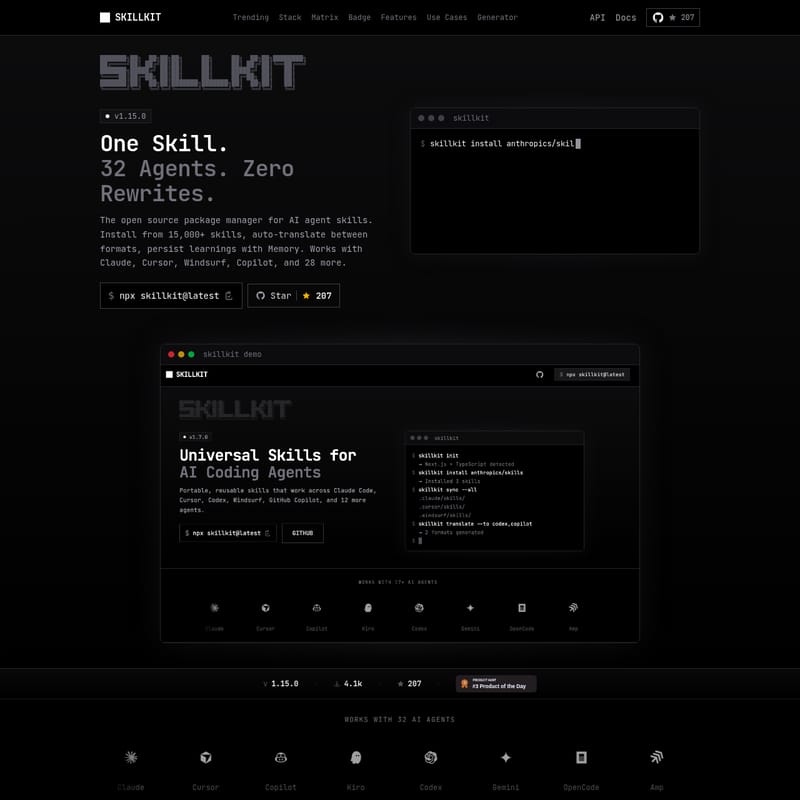
Skillkit Product Information
SkillKit: The Open Source Package Manager for AI Agent Skills
SkillKit is the definitive open-source package manager designed specifically for AI agent skills. In an era where AI agents are becoming central to the development workflow, SkillKit acts as a universal bridge, allowing developers to install, manage, and translate skills across 32 different AI agents. Whether you are using Claude, Cursor, Windsurf, or GitHub Copilot, SkillKit ensures that your AI agents have the capabilities they need without requiring manual rewrites for every platform.
With a library of over 15,000 skills and a robust CLI tool, SkillKit simplifies the process of empowering AI agents. It operates on the principle of "One Skill. 32 Agents. Zero Rewrites," making it the "npm for agent skills."
What's SkillKit?
SkillKit (v1.15.0) is a comprehensive infrastructure for intelligent, distributed AI agent orchestration. It provides a standardized way to handle AI agent capabilities, moving beyond simple installations to offer advanced features like auto-translation, session memory, and a mesh network for inter-agent messaging.
At its core, SkillKit solves the fragmentation problem in the AI agent ecosystem. Instead of writing separate instructions for every tool, SkillKit allows you to define skills once and deploy them everywhere. It integrates seamlessly with popular IDEs and AI platforms, including Gemini, OpenHands, Vercel, and CommandCode, ensuring a consistent experience across your entire tech stack.
Features
Universal Agent Support
SkillKit supports an impressive array of 32 AI agents. This includes industry leaders like Claude, Cursor, Copilot, and Gemini, as well as specialized tools like Roo, Cline, Trae, and Windsurf. The SkillKit compatibility matrix ensures that your skills work across various categories including frontend, backend, security, and DevOps.
Auto-Translation and Primer
One of the standout features of SkillKit is the ability to auto-translate skill formats. You can write a skill for one agent and convert it for another with a single click. Additionally, the Primer tool analyzes your codebase to auto-generate optimized agent instructions for all supported agents.
Persistent Session Memory
Unlike standard setups where agent learning is lost between sessions, SkillKit provides persistent memory. This allows your AI agents to retain learnings across different projects and sessions, significantly improving productivity.
Security and Testing
SkillKit includes a built-in security scanner to detect prompt injections, exposed secrets, and malicious patterns. It also features a testing framework with assertions to validate that your skills perform as expected before they are deployed in a production environment.
Core Capabilities Summary:
- 15,000+ Skills: Access a massive marketplace of community and official skills.
- Skill Tree: A hierarchical taxonomy with 12 categories for easy discovery.
- Team Sync: A Git-based
.skillsmanifest ensures team-wide consistency. - AI Generation: Create new skills from natural language using the
skillkit generatecommand. - API Access: Includes REST, MCP (Model Context Protocol), and Python clients for runtime discovery.
Use Case
Multi-Agent Development
If you develop skills for Claude Code but your team prefers Cursor or Windsurf, SkillKit eliminates the pain of manual conversion. Use the translation feature to deploy your skills across all platforms instantly.
Team Onboarding
Team leads can use the .skills manifest to define a standardized skill stack. New developers can simply run a command to sync their local environment with the team's best practices, ensuring everyone is using the same AI agent capabilities.
Project Initialization
For new projects, the SkillKit Primer can scan your codebase and recommend the best skills to install from the marketplace, such as TypeScript Best Practices or Next.js App Router templates.
Enterprise Orchestration
Architects can leverage the Mesh Network feature to run AI agents across multiple machines with encrypted P2P communication and inter-agent messaging, creating a distributed network of intelligent agents.
How to Use SkillKit
Installation
You can launch the interactive TUI or install skills directly via the terminal using npx:
$ npx skillkit@latest
Installing Skills
To install a specific skill, such as the official Anthropic skills, use the following command:
$ skillkit install anthropics/sk
Generating Skills
To create a new skill using AI and natural language context:
$ skillkit generate --agents claude,cursor
Managing Your Stack
You can compose a perfect skill stack and install multiple skills at once:
$ npx skillkit@latest install expo/skills anthropics/skills davila7/claude-code-templates
FAQ
Q: Which AI agents are supported by SkillKit? A: SkillKit currently supports 32 agents, including Claude, Cursor, Copilot, Gemini, Windsurf, Cline, Roo, and many more.
Q: How does the translation feature work?
A: SkillKit automatically converts skill formats between different agents. You can use the command skillkit translate --to cursor to adapt your existing skills for a new agent platform.
Q: Can I use SkillKit for team collaboration?
A: Yes. By using a .skills manifest and the skillkit team share command, you can synchronize AI agent capabilities across your entire organization via Git.
Q: Is there a way to verify the safety of third-party skills? A: Absolutely. SkillKit includes an auto-scan security feature that checks for prompt injections and malicious patterns upon installation.
Q: Where do the skills come from? A: Skills are aggregated from official sources like Anthropic, Vercel, and Stripe, as well as a large community of open-source contributors.







