
Superset
Superset: The Parallel Code Editor and Orchestrator for AI Agents and CLI Coding Tools
Superset is a revolutionary code editor built for the AI era, designed to orchestrate swarms of AI agents in parallel. It allows developers to run multiple agents like Claude Code and Codex simultaneously across isolated Git worktrees, preventing merge conflicts and boosting productivity 10x. With universal compatibility, Superset works with any CLI-based agent and integrates seamlessly with popular IDEs like VS Code and Cursor. It features built-in port forwarding, an integrated terminal, and a visual interface for reviewing changes, making it an essential tool for modern builders who want to code faster without switching costs.
2026-03-01
192.0K
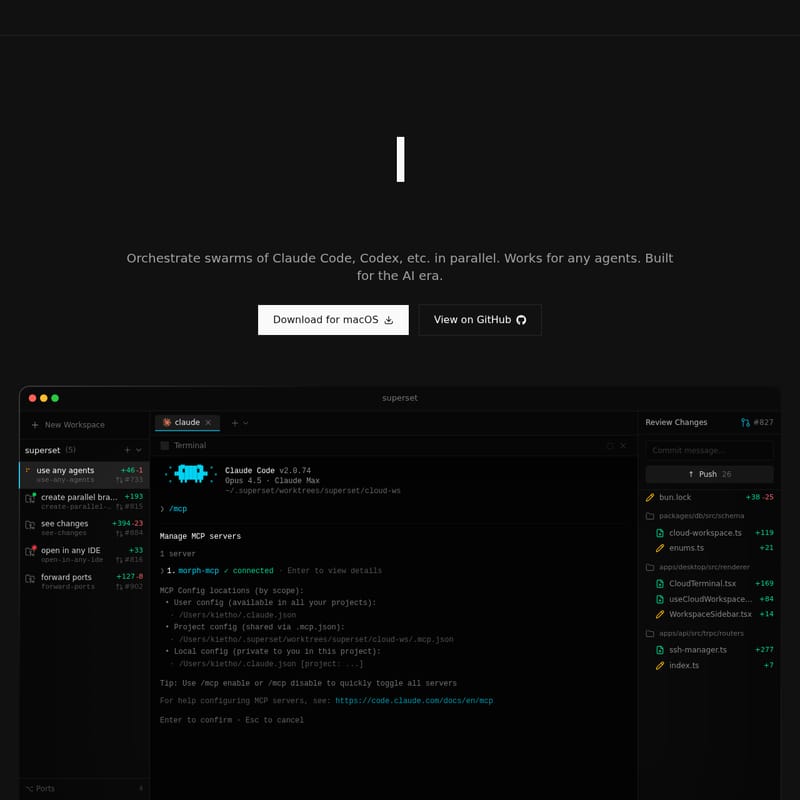
Superset Product Information
Superset: The Premier Code Editor for AI Agents
In the rapidly evolving landscape of software development, the way we interact with code is shifting from manual input to AI-driven orchestration. Superset emerges as the definitive code editor for AI agents, specifically built for the AI era. It allows developers to orchestrate swarms of agents, such as Claude Code, Codex, and many others, in parallel.
By providing a sophisticated environment where multiple AI coding agents can work on different tasks simultaneously, Superset eliminates the bottlenecks of traditional sequential development. Whether you are fixing bugs, refactoring legacy code, or building new features, Superset ensures that your AI agents operate efficiently and independently.
What's Superset?
Superset is an agent-agnostic development platform and code editor designed to enhance the capabilities of CLI-based AI tools. Unlike traditional editors, Superset is optimized for parallel execution, allowing you to launch dozens of agents at once. It functions as a central command center where you can manage various AI models—including Claude, Codex, Gemini, and Cursor—within a unified interface.
At its core, Superset is built to solve the "switching cost" problem. It integrates with your existing tools while providing a superior user experience (UX) for managing AI workflows. By using isolated Git worktrees, Superset ensures that every agent has its own independent environment, allowing for a seamless transition between automated AI coding and manual review in your favorite IDE.
Features of Superset
Superset is packed with features designed to maximize developer velocity and simplify the management of AI agents.
Parallel Execution
Run dozens of agents at once. Launch multiple AI coding agents across different tasks simultaneously. You can have one agent analyzing tab usage while another fixes PR comments, all happening in the background.
Universal Compatibility
Superset works with any CLI agent. It is completely agent-agnostic, meaning you can use Claude Code, OpenCode, Cursor, or any other terminal-based coding tool without friction.
Isolated Worktrees
One of the most powerful aspects of Superset is its use of Git worktrees. Each agent runs in its own isolated environment. This means:
- No merge conflicts while agents are working.
- No stepping on other agents' changes.
- Independent environments for code reviews and merges.
Open in Any IDE
Superset doesn't lock you into a single ecosystem. With one click, you can jump into your favorite editor. It supports:
- VS Code
- Cursor
- Xcode
- JetBrains IDEs
- Sublime Text
Integrated Terminal and MCP Management
Superset includes a powerful Cloud Terminal and built-in management for MCP (Model Context Protocol) servers. You can easily toggle servers, manage user/project configurations, and view connected details directly within the editor.
Real-time Port Forwarding
Superset handles port forwarding automatically, allowing you to see changes in real-time as your agents work on web applications or APIs.
Use Case
Superset is the ideal tool for various development scenarios where speed and parallelization are critical:
- Solo Developers: Act as a project manager for a fleet of AI agents. Assign a bug fix to one agent and a feature request to another, then review and merge their work when they are finished.
- Rapid Prototyping: Use multiple agents to experiment with different frameworks or library configurations (e.g., PyTorch MNIST experiments) in parallel branches without cluttering your main branch.
- Large Scale Refactoring: Deploy agents to update schemas across multiple packages simultaneously. Use the "See Changes" feature to compare side-by-side or inline diffs before committing.
- CI/CD Optimization: Use Superset to manage complex PR reviews. An agent can fetch comments, suggest fixes, and stage changes while you focus on high-level architecture.
How to Use Superset
Getting started with Superset is straightforward, designed to fit into your existing CLI workflow:
- Launch a New Workspace: Use the command
superset newto set up a new parallel environment. This automatically creates a worktree from the main branch, installs dependencies, and configures the environment. - Orchestrate Agents: Open a new terminal within Superset and call your preferred agent (e.g.,
/mcpto manage servers or simply runclaudeoropencode). - Manage Branches: Create parallel branches for different tasks. Superset will track "In Progress" tasks and move them to "Ready for Review" once the agent completes the work.
- Review and Commit: Use the built-in Git interface to review changes (e.g.,
+119additions incloud-workspace.ts). You can approve, comment, or push changes directly to your repository. - External IDE Integration: If you need to perform manual edits, select "Open in Cursor" or "Open in VS Code" to instantly access the specific worktree in your preferred editor.
FAQ
Q: I already use an IDE like Cursor, is this for me? A: Yes! Superset is designed to complement tools like Cursor. It provides the parallelization and infrastructure (like worktrees and agent orchestration) that standard IDEs don't focus on, allowing you to use Cursor agents more effectively.
Q: Which AI coding agents are supported? A: Superset is agent-agnostic. It supports Claude Code, OpenCode, Codex, Gemini, Cursor Agent, and any other CLI-based coding tool.
Q: How does the parallel agent system work? A: Superset uses Git worktrees to create isolated environments for each agent. This allows multiple agents to work on the same codebase in parallel without interfering with each other's files or causing merge conflicts.
Q: Is Superset free to use? A: [Information regarding pricing was not provided in the source content.]
Q: Can I use my own API keys? A: Yes, Superset allows you to manage your own configurations and MCP servers, ensuring you have control over the agents and models you utilize.







